When a MP3/MPEG-4 disc is inserted into the unit, the menu screen appears
automatically. You can use the menu screen to select your desired folders
and songs or the system plays the songs in the order they were burned
onto the disc.
1. Press the ▲ or ▼ button to choose a folder from the folder list.
2. Press “OK” to select the highlighted folder. The songs available under the
folder will be listed.
3. Use ▲ or ▼ button to choose a song from the list. Press “OK” to select
and begin playback of the highlighted song.
4. Use the button to move to the next song. Press the button to move to
the beginning of the previous song.
5. Press the ▲ button to select the current folder and press “OK” to confirm.
Then you can back to the folder list.
D. Playback of MPEG-4 content:
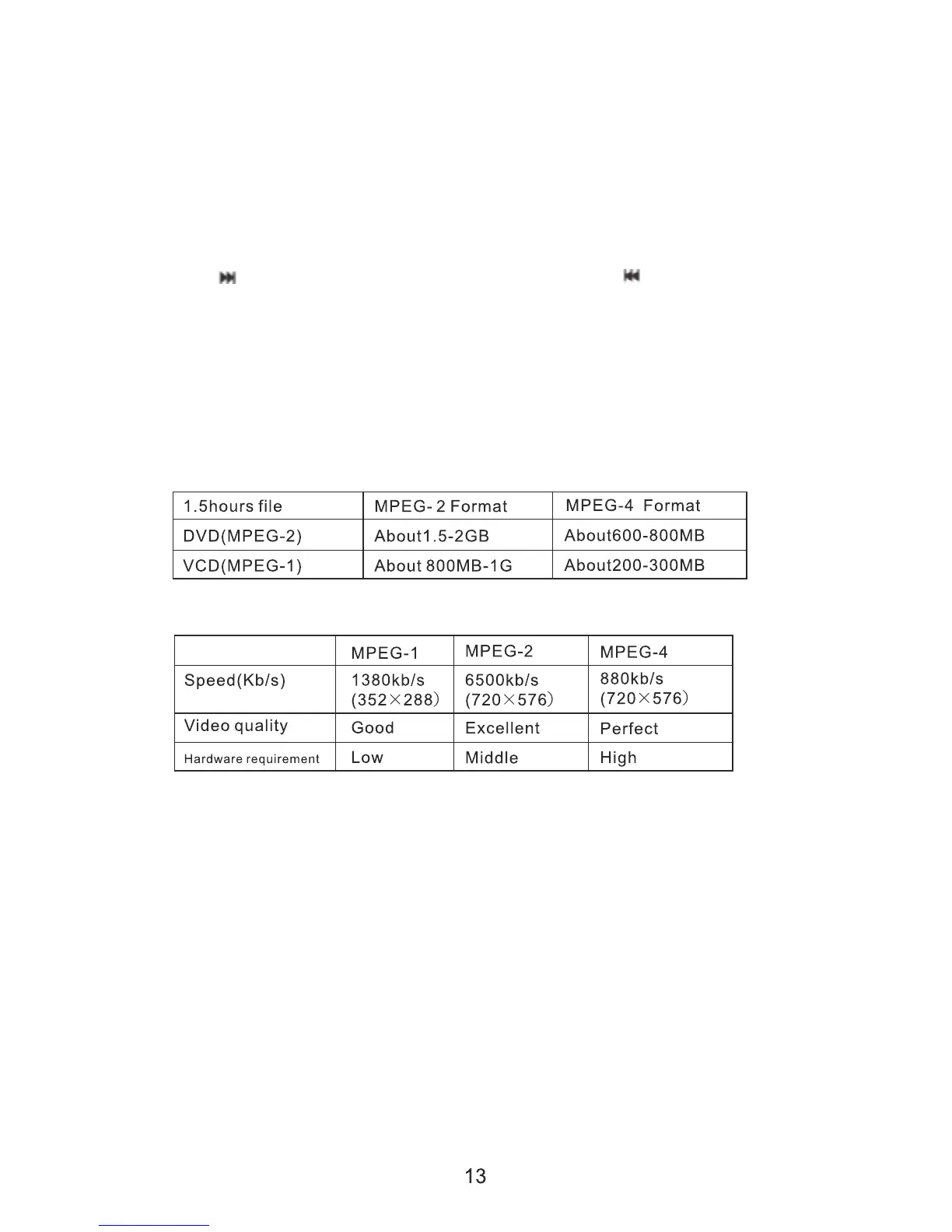
1. The MPEG-4 codec is capable of holding high quality video and sound in
a highly compressed file format. File types such as AVI are typically able
to hold more data in a smaller file:
2. Comparing MPEG-1, MPEG-2 and MPEG-4:
However depending on how the file was encoded, compatibility may still
be and issue with certain types of AVI or MP4 type files.
E. Play USB and SD/MMC Card:
1.Insert the USB device in, Press[Source] button ont the Remoto control
and it will display MODE menu, Press▲/▼ button to choose the media,
press ENTER button to play.


 To Next Page