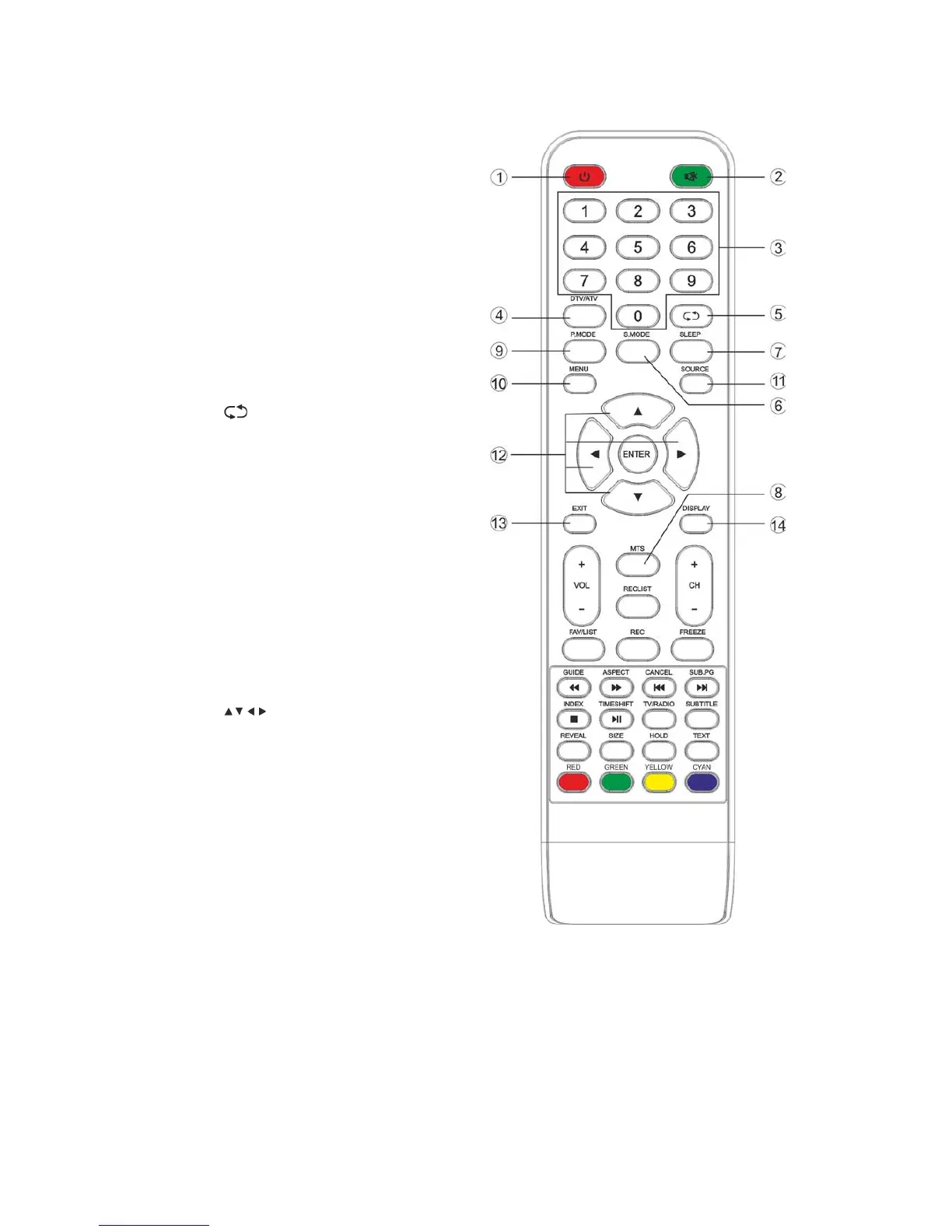
3. Remote Control
1. POWER: Sets your TV to power on or
standby mode.
2. MUTE: Press to mute the sound. Press
again or press VOL+ to unmute.
3. 0-9: Press 0~9 to select a TV channel
directly while watching TV. The channel
will change after 2 seconds. Applicable for
entering page number in teletext mode
and so on.
4. DTV/ATV: Switch between analog and
digital TV.
5.
: Return to the previous viewed
program.
6. S.MODE: Press to cycle through the
different sound settings.
7. SLEEP: Select the amount of time before
TV turns itself off automatically.
8. MTS: Press to search the NICAM mode.
9. P.MODE: Press to cycle through the
different picture settings.
10. MENU: Allows you to navigate to the
on-screen menus.
11. SOURCE: Opens the main menu, press to
list the sources.
12.
ENTER: Allows you to navigate
the on-screen menu and adjust the
system settings to your preferences.
13. EXIT: Exits from the menu or sub-menu
and cancels the function in process (if
applicable).
14. DISPLAY: Press to display the source and
channel's info.
Battery Installation:
Remove the battery compartment lid on the
rear of the remote control by sliding the lid
down, then off. Put two AAA batteries inside
the battery compartment with their + and –
ends aligned as indicated. Do not mix old and
new batteries or different types of batteries.
Slide the lid until you hear it click into place.



 To Next Page