What is “MIDI”
The initials MIDI are an abbreviation for "Musical Instrument Digital Interface" and represent a standard for the transmis-
sion of data via cable between a musical instrument (usually a keyboard) and a Personal Computer (or another musical
instrument).
The General MIDI System (General Midi)
This keyboard adopts the MIDI General System (General Midi): a standard that allows to receive or send MIDI data
(to a personal computer or to another keyboard) without having problems of compatibility deriving from the different
brands of the product. The general MIDI system specifies factors like the numeration of sounds, the available MIDI
channels etc.
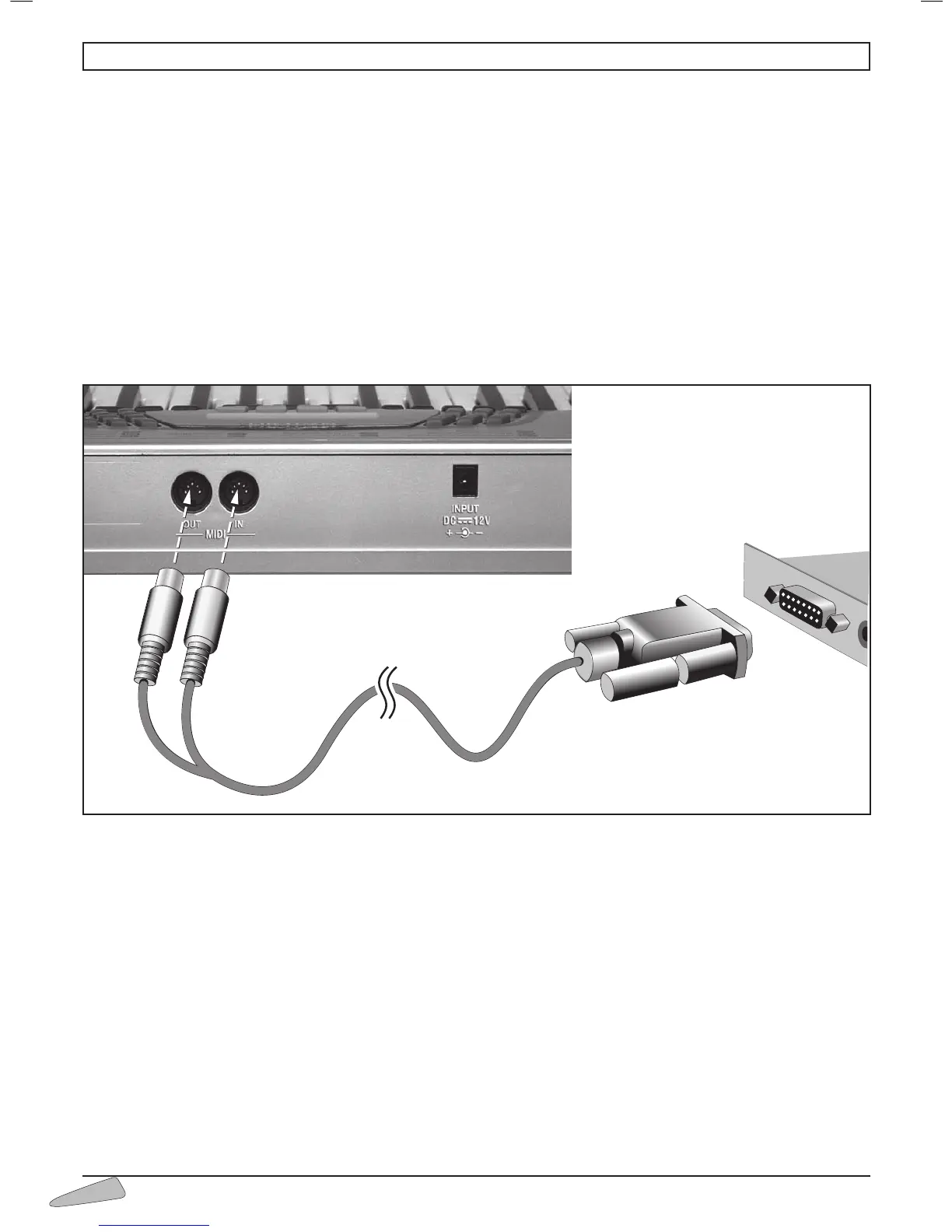
The keyboard is provided with MIDI IN and OUT sockets which enable the user to connect it to a Personal Computer
using a cable (not supplied). This can be connected as indicated in the figure: Connect the IN and OUT plugs to the key-
board and the connector to the JOYSTICK socket (games socket) of the Personal Computer.
SYSTEM REQUIREMENTS
Personal Computer with Windows 95/98 operative system, Windows 2000/Millennium, Windows XP equipped
with a GAMES portal. It is indicated also as the JOYSTICK portal.
PROCEDURE
Connect the cable to the MIDI IN and MIDI OUT portals of the keyboar. Follow the instructions on the connec-
tors.
Connect the connector to the JOYSTICK portal (as in the diagram shown below). This operation can be carried out even
with the computer switched on.
11. CONNECTION TO A PERSONAL COMPUTER



 To Next Page