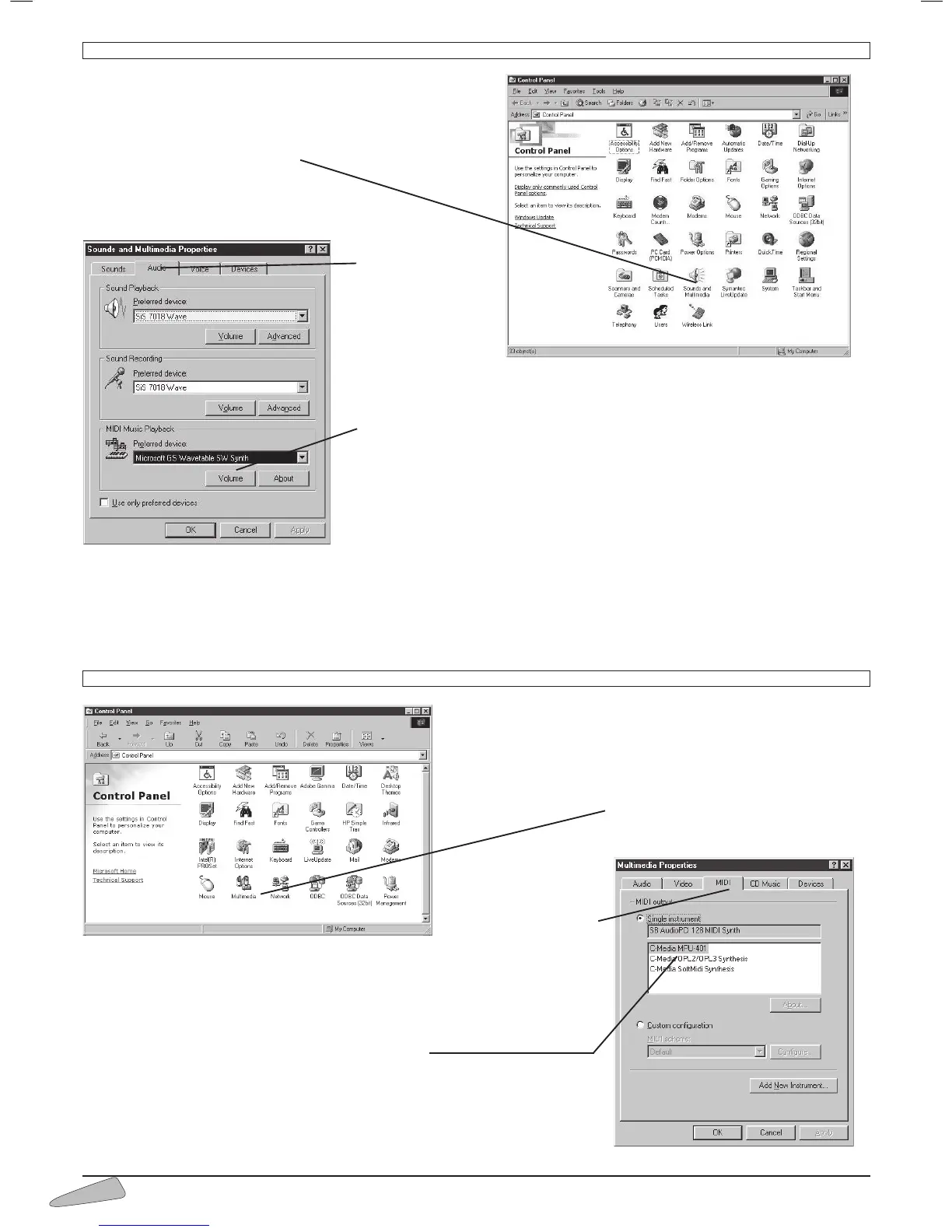
CONFIGURATION OF THE COMPUTER - Windows 2000 / Millennium
To open the control panel, select:
- START then LAYOUT
- and finally CONTROL PANEL.
- Double click on Multimedia
This window will open:
Chose the
AUDIO file.
It is necessary to
select a peripheral
that corresponds
with the MIDI
Music Reproduction MENU, which guides the MIDI data to the outside. The
name of this peripheral varies according to the Audio file present in the
computer; the most commonly found is MPU-401.
NOTE: If it is not possible to recognise the peripheral, try in turn all of those
present (normally there are not more than two or three), until the correct one
is found. Click on OK
Now the computer is configured to use the external MIDI interface and every
MIDI file will be reproduced on the keyboard.
N.B.: even if the procedure is very simple, it can become difficult in the presen-
ce of particular computer configurations. In this case it is advisable to contact a computer technician who will easily be
able to resolve the problem. (Continues on page 19 par. “System function test”).
CONFIGURATION OF THE COMPUTER - Windows 95 / 98
To open the control panel, select:
- START
- then LAYOUT
- and finally CONTROL PANEL.
Double click on Multimedia
This window will open:
Chose the MIDI
file
It is necessary to select a peripheral that corresponds with the MIDI Music
Reproduction MENU, which guides the MIDI data to the outside.
The name of this peripheral varies according to the Audio file present in the
computer; the most commonly found is MPU-401
NOTE: If it is not possible to recognise the peripheral, try in turn all of those
present (normally there are not more than two or three), until the correct one
is found.
Click on OK



 To Next Page