• 3mm Allen Key
• Focus Firmware version 6.8 or greater
• SCENE 2021.0 or later
Always power OFF both units when installing or removing the PanoCam. Click the link below to download the
PanoCam Quickstart installation guide.
PanoCam Quickstart Guide
Note: The PanoCam should always be removed from the Focus Scanner before shipping or storage in its transport
case.
Caution: The PanoCam is not IP (Ingress Protection) rated and is not recommended for wet environments.
PanoCam Setup and Calibration
Setup
1. Power ON both the PanoCam and the Focus scanner.
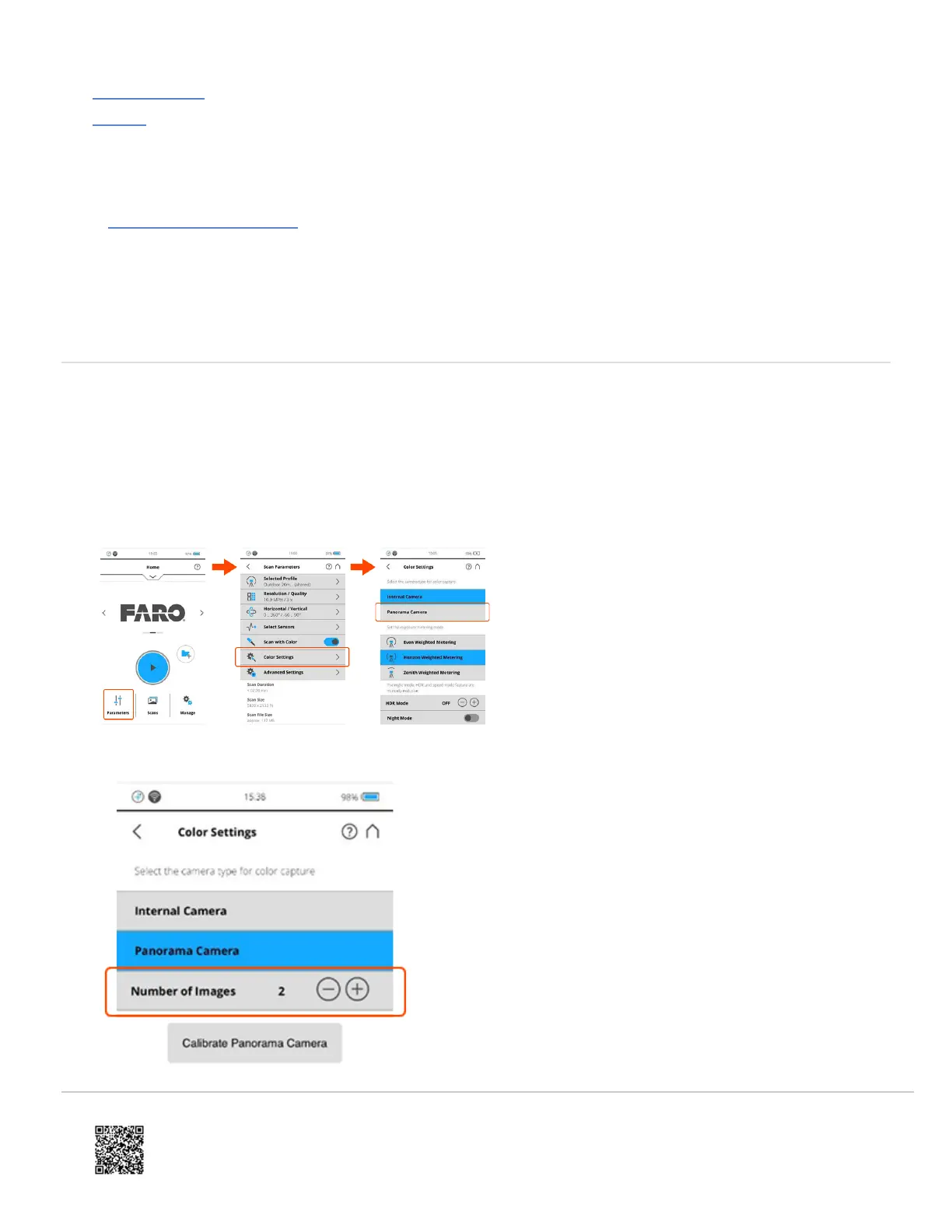
2. From the Focus home screen, tap Parameters > Color Settings and then tap Panorama Camera.
3. Set the Number of Images to a value of "2". Higher values can be used but will increase scanning/processing
times and files sizes.
https://knowledge.faro.com/Hardware/3D_Scanners/Focus/PanoCam_Installation_and_Setup_for_the_Focus_S_Series
Updated: Wed, 27 Oct 2021 07:49:01 GMT
2



 To Next Page