Fastcorp, LLC
DIVI Setup and Users Guide
Page 29 of 62
Rev 6
C. EDIT SELECTION-
Allows you to change the price, edit bin location or add multiple chained bins to a single
selection.
D. CREATE SELECTION –
Create new selections, with the ability to chain multiple bins to a single selection.
NOTE:
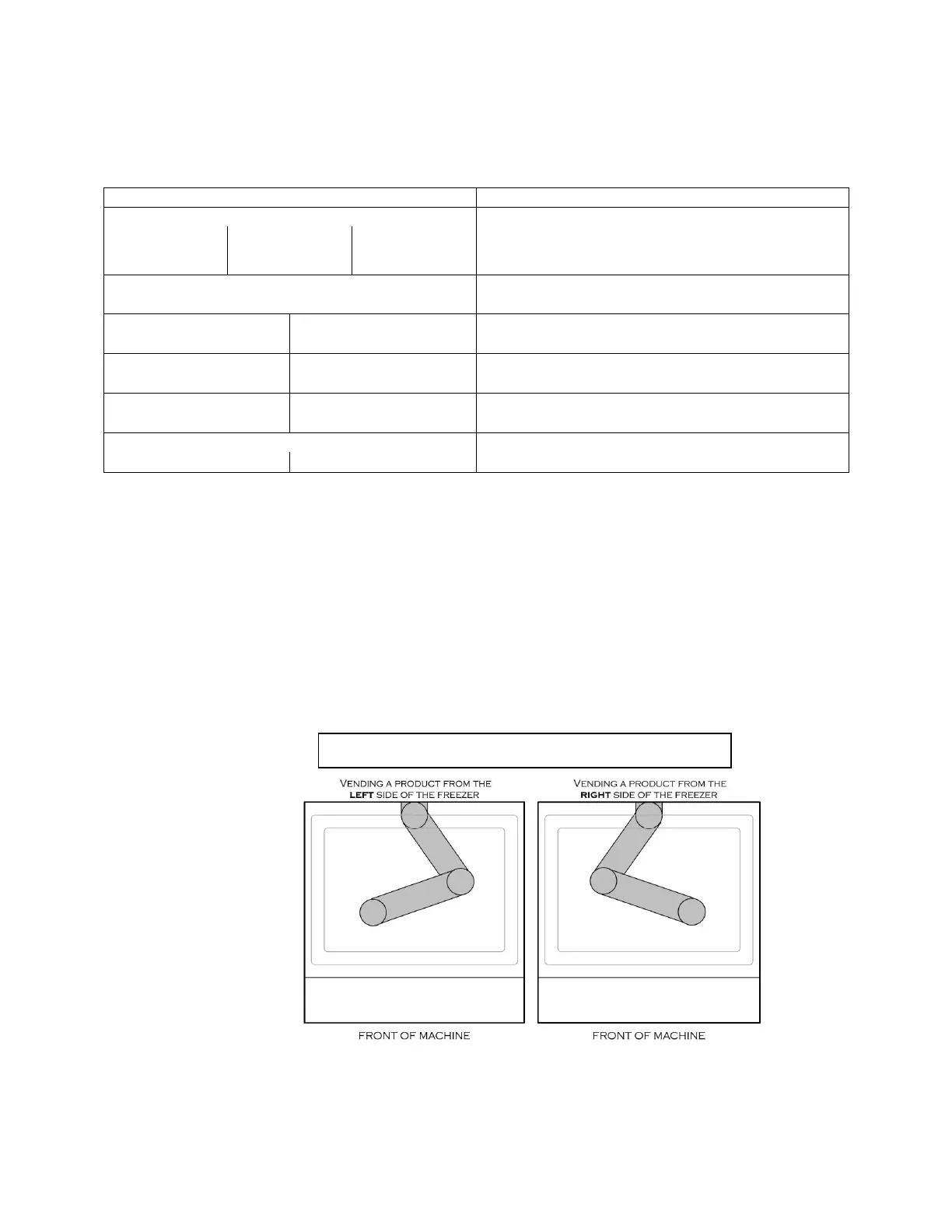
WHEN POSITIONING THE ROBOT OVER A BIN, THE ELBOW SHOULD POINT TO THE OPPOSITE SIDE OF
THE FREEZER FROM THE BIN. EXAMPLE- IF THE BIN IS LOCATED ON THE LEFT SIDE OF THE FREEZER THE
ROBOT ELBOW SHOULD POINT TO THE RIGHT SIDE AND VICE VERSA.
*** BINS NEAR THE CENTER OF THE FREEZER SHOULD BE PROGRAMMED WITH THE ELBOW POINTING TO
THE RIGHT SIDE***
a) Press the #=Yes key. The robot will go to the delivery
point and the freezer lid will open.
b) Enter selection number to be edited.
c) Type over the price and press the “#” key.
d) Adjust the position of the robot over the bin. Press
“#” key to save the bin location.
e) Select Tall or Short by pressing the *key. Press # to
accept.
f) Press the #=Yes key to add additional (chained) bins
or press * to exit menu.
Robot Arm Positions – Programming. Figure 10



 To Next Page