(Average) will appear on the display. parameters, each of which is identified by 2
To see the time of the Fastest Attack from the digits: the left one identifies the number of the
exercise you've just completed, press T4; to exercise (from 1 to 9) while the right digit
see the record average time for the last 100 shows the number of the parameter (from 1 to
exercises of the currently selected exercise, 5). For example, parameter 7.4 refers to
press T5. parameter 4 of exercise number 7.
The list of parameters for the 9 exercises can
3.5 Valid hit area be seen on Table 1 on page 7.
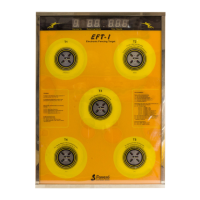
The area where the target recognizes that it
has been hit varies depending on the force of The following describes the 5 parameters for
the impact: the area in the center requires less each exercise, identified as x.1 to x.5, where
force, while the farther away you go from the "x" refers to the number of the exercise (from
center, the more force is required. That is why 1 to 9).
the targets are delineated with several
concentric circles. x.1 - Number of Attacks [from 3 to 99]
This system forces fencers to use greater The parameter x.1 defines the number of
accuracy for actions with a slow approach, attacks per exercise "x", where "x" indicates
and allows more tolerance for quick actions. which of the 9 exercises it refers to.
The number of attacks can be modified from 3
to 99. Section 4.2 explains the keys used to
change the value, to pass to another
parameter, or to end programming.
4.1 Accessing and exiting programming
mode. x.2 - Attack Type [from 1 to 7]
To ensure that non-authorized users cannot For the definition of "attack", see section 3.3.
easily change the programmable parameters, There are 7 types of attacks that are
to access the programming mode you must: described in Table 3 on page 7. The keys
1. Press repetitively T1+T4 or T1+T5 to select used to change the value, to pass to another
exercise number 8. parameter, or to end programming are shown
2. Keep pressed T3+T5 for 2 seconds: the in section 4.2.
letter "P" will appear on the display, indicating
that the machine is in programming mode. x.3 - Attack Time Limit [from 0.1 seconds
The green display shows 1.1 to indicate the to 9.9 seconds]
first parameter of the first exercise while the Decide on the amount of time within which the
red digits on the right show the respective attack must be completed: after this time limit,
value. any target that has not been hit will be turned
To exit programming mode, press T3. off and disabled. If the attack is not completed
within the time limit, the attack response time
4.2 Using the keys in programming mode. will be the same as the time limit. It is
When in programming mode, use the keys T2 therefore recommended that the time limit be
(next) and T1 (previous) to select the desired set at a value with a high enough margin over
parameter, which appears on the green the amount of time needed to correctly
display. Use T5 (+) and T4 (-) to change the perform the attack so that if the target is not
value, displayed on the right. hit, there will be an appropriate time penalty.
To change the numbers more rapidly, simply Do not apply too great a penalty, though,
keep any of these 4 keys pressed. To exit otherwise a single mistake will make the
from programming mode, press T3. average time for the entire exercise too high.
The keys used to change the value, to pass to
another parameter, or to end programming are
4.3 PARAMETERS FOR EACH EXERCISE shown in section 4.2.
There are 5 programmable parameters for x.4 - Pause Time after an attack [from 0.1
each of the 9 exercises, making a total of 45 seconds to 9.9 seconds]
4.0 PROGRAMMING
ENGLISH
5
ENGLISH


 To Next Page
 Loading...