This is the time given to the fencer to get back indicates that its micro switch is working
into position and get ready for the next attack. properly.
The keys used to change the value, to pass to To end the test, press T1+T2.
another parameter, or to end programming are
shown in section 4.2.
x.5 - Maximum Random Delay after the The guarantee is for 2 years from the date
pause time [from 0.0 seconds to 9.9 appearing on the purchase document and
seconds]. includes free repairs for defects in materials
This determines how long a delay there will be and workmanship. This guarantee does not
before the target lights up; since the fencer will include parts subject to mechanical wear and
be unable to predict it, this feature helps to tear or shipping costs.
develop fast reflexes. For example, if the
value is set to 2.8 seconds, the first target in
each attack can light up at any time between
zero and 2.8 seconds after the pause time. If
the Maximum Random Delay is set to zero, Power supply:
the target will always light up immediately after 12 VAC ±15%, 50-60 Hz, 300mA max
the pause time. The keys used to change the 12 VDC (10.5÷16V), 300mA max
value, to pass to another parameter, or to end Operating conditions: 0 .. +50 °C; RH < 95%
programming are shown in section 4.2. Storage conditions: -15 .. +70 °C; RH < 95%
Dimensions and weight: 63x46x5cm, 7.4kg
4.4 SHARED PARAMETERS
Shared parameters are ones that apply to all
the exercises. They start with the number zero
and are the last parameters to be
programmed so they appear after the ones for
Exercise 9. To access the programming mode,
see section 4.1. To get quickly to the first
shared parameter (0.1) keep T2 pressed.
The basic parameters are:
0.1 - Sound [on, OFF]
Select: "on" to activate the sound or "OFF" to
toggle it off. The keys used to change the
value, to pass to another parameter, or to end
programming are shown in section 4.2.
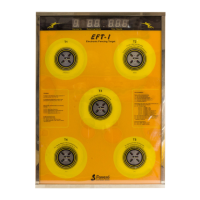
0.2 - Number of Targets [5 or 7]
Defines the number of targets that are
operated. Using T4 or T5, select 5 or 7.
Set the value to 7 only if the optional item with
an additional 2 targets is being used to
simulate the epee hits to the feet and legs.
To exit from the programming mode, press T3.
Keep T2+T4 pressed for 2 seconds. All the
target lights and all the digit segments should
light up. Pressing on each target, the
corresponding light should go off; this
6.0 GUARANTEE
7.0 TECHNICAL DATA
5.0 TEST
ENGLISH
6


 To Next Page
 Loading...