Document Number:
MAN – FDDOCAPSULE
Revision Date:
12/09/2016
Page 10 of 37
© 2016 FDS Avionics Corp.
All Rights Reserved.
TECHNICAL SUPPORT
470-239-7421 or FDSAvionics.com
Connecting to the Default Wireless Network
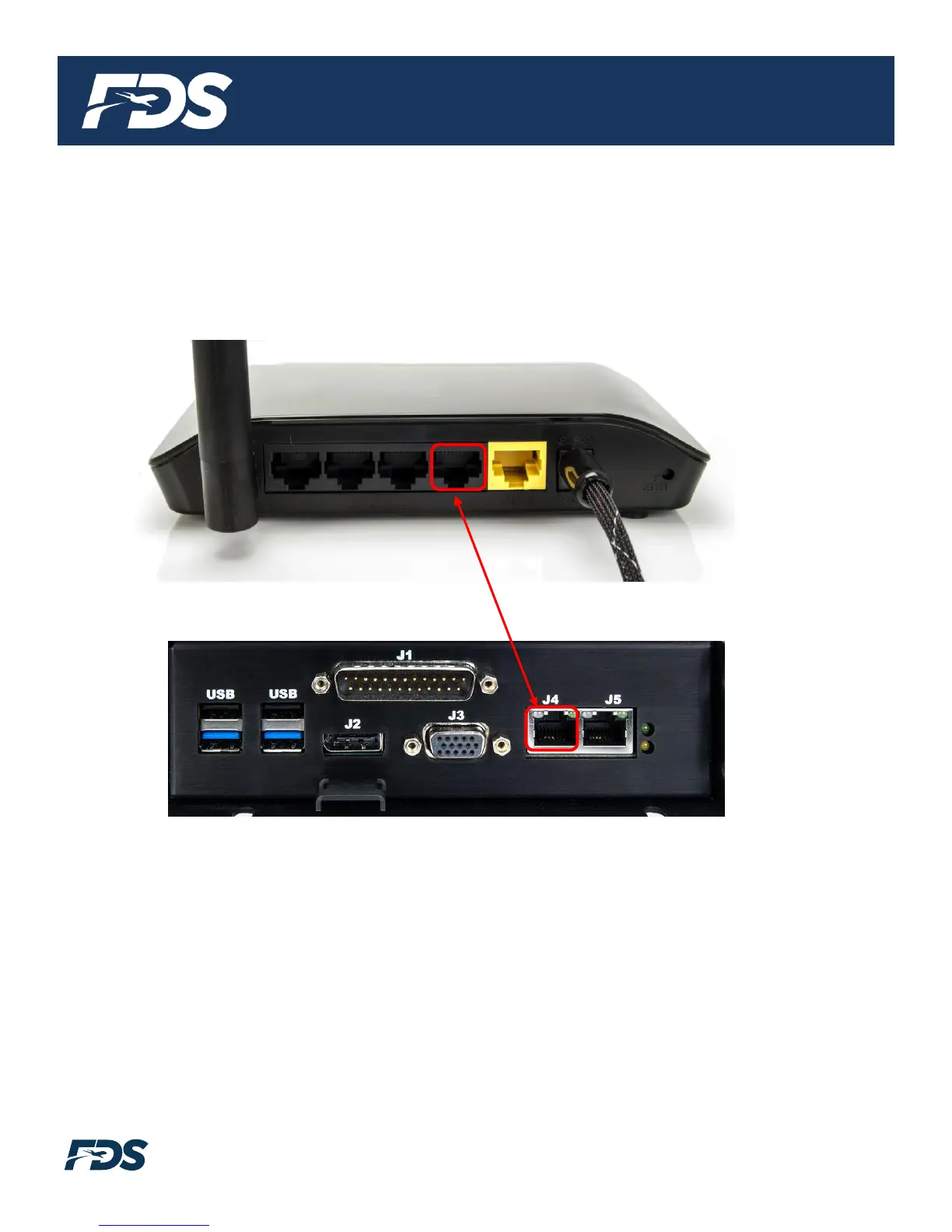
Connect both the Ethernet and power cables to the Wi-Fi router. Connect the other end of the
Ethernet cable to J4 on the rear of the unit. Finally, connect the USB side of the Wi-Fi router
test harness to an available USB port on the rear of the unit.
Cable included in Shipkit
The procedure required to connect to the supplied wireless router will vary slightly depending
on the type of PED in use. This is the same procedure used to connect to any other wireless
network such as those in a hotel or at a coffee shop.
SSID (wireless network name): DO-WIFI
Password: 12345678
In general, the steps are outlined below:
1. Click the settings button on the device.
2. Turn on Wi-Fi if it is not already on.
3. Click on Wi-Fi or network menu. A list of available wireless networks should now populate.
4. Select the Wi-Fi network called “DO-WIFI”. Type in the Password “12345678”.


 To Next Page