R301 CARD READER FIRMWARE UPDATE TOOL
4.1 Introduction of Update tool
Firmware update tool using to upgrade R301 Card Reader firmware, it is for maintain in future. R301
Card Reader apply dual encrypted mechanism. The firmware will have encrypted by UID (User ID), only
the right UID firmware can be update by right reader. We will explain UID function later. To using
update tool, please check R301 Card Reader SDK.
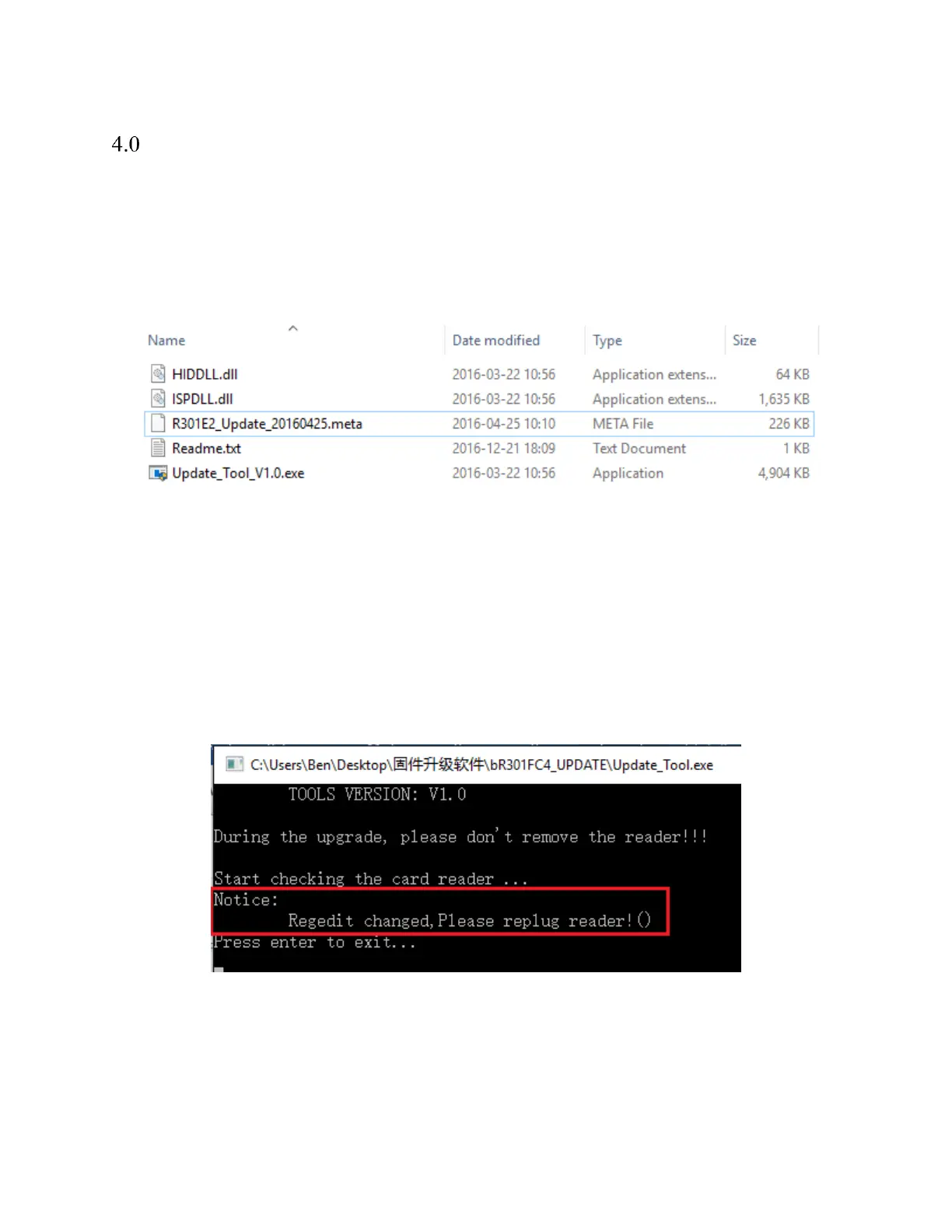
*The related files of update application
Update_Tool_V1.0.exe is execute file
*. meta file is firmware BIN file, please don’t rename this file
4.2 The operation of Update tool
The update tool is easy, convenient and safe too. We will introduce how to using this tool to update your
reader.
Step #1: Insert reader to PC and double click “Update_Tool.exe” by administrator. If you are first
running this tool, the tool will inform to re-plug reader.


 To Next Page