9
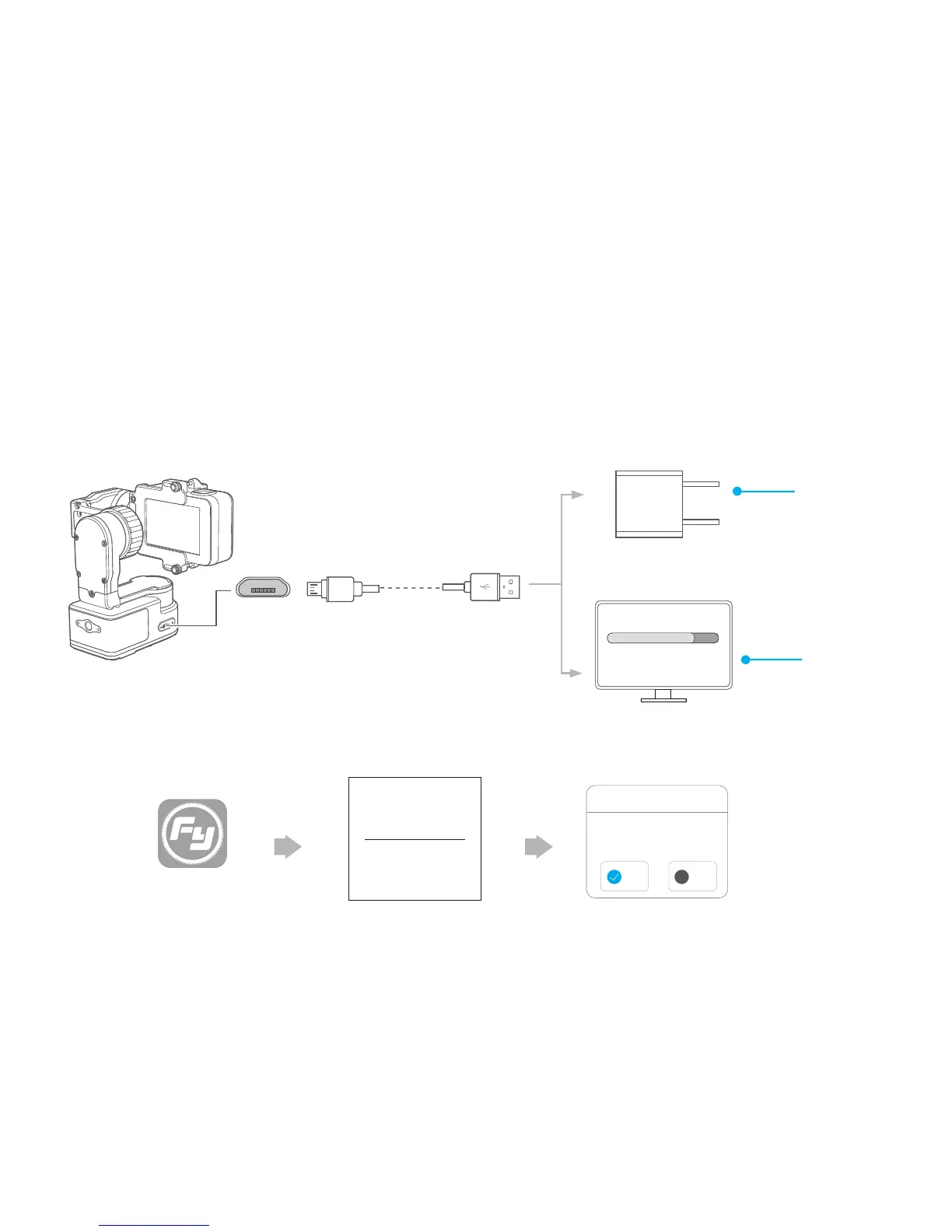
USB cable
PC
Upgrade........
Please visit the official website www.feiyu-tech.com to download the relevant software for upgrading,
including USB driver,firmware upgrade software and product firmware, and install the relevant software,
decompress the firmware files .
Feiyu ON
Option 1: connect the gimbal with PC via micro USB cable, and then upgrade the firmware.
Option 2: connect the gimbal with smartphone via bluetooth, and then upgrade the firmware.
(1)
(2)
Charge with micro USB cable.
*Please make sure
the battery is fully
charged before you
use the gimbal for
the first time.
Firmware Upgrade
(equipped by user)
5V
Firmware
Upgrade
Charging
The current used version 1.7.2,
new firmware is available,
do you want to upgrade?
Later Download
and install it.
new firmware is available,
do you want to upgrade?
×
Firmware upgrade
Yes
No














 To Next Page