EasyManua.ls Logo

Fender Bubbler Chorus - User Manual

Fender Bubbler Chorus
8 pages
Print Icon
To Next Page IconTo Next Page
Loading...
BUBBLER CHORUS
Question and Answer IconNeed help?

Do you have a question about the Fender Bubbler Chorus and is the answer not in the manual?

Summary

Fender Bubbler Chorus Control Layout

User Interface Elements

Details on footswitches, knobs, LEDs, and indicators for operation.

Input, Output, and Power Connections

Information on connecting instruments, amplifiers, and the power supply.

Introduction to the Bubbler Chorus

Detailed Control Descriptions

Rate and Depth Controls

Explanation of Rate 1, Rate 2, Depth 1, and Depth 2 for modulation speed and intensity.

Level, Sensitivity, and Wave Type

Details on Level, Sensitivity controls, and Wave Type switch functionality.

LED Indicators

Description of LEDs indicating speed status and rate timing.

Component Functions Explained

Indicators and Kill Switch

Explanation of Sensitivity LED, Jewel Indicator, and LED Kill Switch.

Footswitches and Connectivity

Details on Bypass, Slow/Fast footswitches, and audio jacks.

Power Connector

Specifies the connection for the DC power adapter.

Important Safety Instructions and Specifications

Safety Precautions

Warnings regarding damage, fire, shock hazard, and hearing.

FCC Compliance

Information on device compliance with FCC rules.

Technical Specifications

Details on impedances, power supply, dimensions, and weight.

Summary

Fender Bubbler Chorus Control Layout

User Interface Elements

Details on footswitches, knobs, LEDs, and indicators for operation.

Input, Output, and Power Connections

Information on connecting instruments, amplifiers, and the power supply.

Introduction to the Bubbler Chorus

Detailed Control Descriptions

Rate and Depth Controls

Explanation of Rate 1, Rate 2, Depth 1, and Depth 2 for modulation speed and intensity.

Level, Sensitivity, and Wave Type

Details on Level, Sensitivity controls, and Wave Type switch functionality.

LED Indicators

Description of LEDs indicating speed status and rate timing.

Component Functions Explained

Indicators and Kill Switch

Explanation of Sensitivity LED, Jewel Indicator, and LED Kill Switch.

Footswitches and Connectivity

Details on Bypass, Slow/Fast footswitches, and audio jacks.

Power Connector

Specifies the connection for the DC power adapter.

Important Safety Instructions and Specifications

Safety Precautions

Warnings regarding damage, fire, shock hazard, and hearing.

FCC Compliance

Information on device compliance with FCC rules.

Technical Specifications

Details on impedances, power supply, dimensions, and weight.

Overview

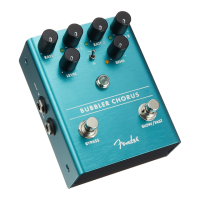
The Fender Bubbler Chorus is a classic-sounding bucket brigade-based chorus pedal designed to add depth and interesting textures to any guitar rig. It offers modern flexibility with the ability to switch between Slow and Fast speeds and dynamically control the modulation rate with playing dynamics.

Function Description

The Bubbler Chorus provides a modulation effect that can be controlled through various parameters. It features two distinct speed settings, "Slow" and "Fast," each with independent rate and depth controls. The pedal can dynamically adjust its modulation rate based on the player's instrument volume, offering expressive control over the chorus effect.

Important Technical Specifications

  • Impedances:
    • Input: 500kΩ
    • Output Load: >10kΩ
  • Power Supply: 9VDC regulated adapter, 5.5 x 2.1 mm barrel connector, center negative.
  • Power Requirements: 80mA @ 9VDC.
  • Dimensions: 3.75" x 4.9" x 2.5" (95.25mm x 124.5mm x 63.5mm).
  • Weight: 1.2lbs (.54kg).
  • Compliance: This device complies with Part 15 of FCC Rules.

Usage Features

The Bubbler Chorus offers a comprehensive set of controls and features for shaping the chorus effect:

Controls and Indicators:

  1. Bypass Footswitch: Engages or bypasses the effect.
  2. Right Output Jack: Low-impedance output for stereo signal chains or connecting to an amp/next effect pedal.
  3. Jewel Indicator: Illuminates when the chorus effect is active.
  4. Left/Mono Output Jack: Low-impedance output for mono signal chains or connecting to an amp/next effect pedal.
  5. Level: Adjusts the amount of chorused signal mixed with the instrument's dry signal.
  6. Rate 1: Adjusts the speed of modulation when "Slow" speed is selected.
  7. Rate 1 LED: Illuminates when "Slow" speed is engaged. Rate 1 and Rate 2 controls are active when this LED is on.
  8. Depth 1: Adjusts the intensity of the chorus when "Slow" speed is selected.
  9. Center LED: Blinks in time with the rate of the Bubbler.
  10. Rate 2: Adjusts the speed of modulation when "Fast" speed is selected.
  11. Rate 2 LED: Illuminates when "Fast" speed is engaged. Rate 1 and Rate 2 controls are active when this LED is on.
  12. Depth 2: Adjusts the intensity of the chorus when "Fast" speed is selected.
  13. Sensitivity: When "Slow" mode is engaged, this control adjusts the threshold for the Bubbler's dynamically controlled rate. Turning it clockwise allows the Bubbler to automatically switch from "Slow" to "Fast" settings based on instrument volume (softer playing maintains "Slow," louder playing ramps up to "Fast"). Turning it fully counter-clockwise disables this feature.
  14. Sensitivity LED: Illuminates when the instrument's signal passes the threshold set by the Sensitivity control, causing the Bubbler's chorusing speed to ramp from "Slow" to "Fast."
  15. Wave Type Switch: Toggles between sine and triangle shaped modulation.
  16. Input Jack: High-impedance input suitable for electric guitar, bass, acoustic guitars with pickup systems, keyboards, and other instruments.
  17. Slow/Fast Footswitch: Toggles between the "Slow" (Rate 1 and Depth 1) and "Fast" (Rate 2 and Depth 2) chorus speeds.
  18. LED Kill Switch: Extinguishes the LEDs that illuminate the knobs.
  19. DC Power Connector: Standard center-negative 9VDC jack for power.

Dynamic Control:

The Sensitivity feature allows for dynamic control over the chorus rate. When in "Slow" mode, the pedal can transition to "Fast" settings based on playing intensity. This means softer playing will maintain the slower chorus, while louder playing will cause the chorus to speed up, adding an expressive layer to the performance. This feature can be disabled by turning the Sensitivity control fully counter-clockwise.

Stereo Output:

The presence of both Left/Mono and Right Output Jacks allows for stereo operation, enabling wider and more immersive chorus effects when connected to a stereo amplifier setup or two separate amplifiers.

LED Indicators:

Multiple LEDs provide visual feedback on the pedal's status, including the active speed setting (Rate 1 LED for Slow, Rate 2 LED for Fast), the dynamic sensitivity activation (Sensitivity LED), and the overall effect engagement (Jewel Indicator). The Center LED blinks to visually represent the current modulation rate. The LED Kill Switch offers the option to turn off the knob illumination LEDs, which can be useful in certain stage or studio environments.

Maintenance Features

  • Cleaning: Unplug the AC power adapter before cleaning the unit exterior. Use only a damp cloth for cleaning and wait until the unit is completely dry before reconnecting to power.
  • Service: No user-serviceable parts inside. Refer servicing to qualified personnel only.
  • Power Adapter: Do not alter the AC plug of the connected power adapter.
  • Environmental Protection: To prevent damage, fire, or shock hazard, do not expose the unit or its AC power to rain or moisture. Do not drip or splash liquids on the unit.
  • Hearing Safety: Amplifiers and loudspeaker systems, and ear/headphones (if equipped) are capable of producing very high sound pressure levels which may cause temporary or permanent hearing damage. Use care when setting and adjusting volume levels during use.

The device is designed in California, U.S.A. and is a product of Fender Musical Instruments Corporation.

Fender Bubbler Chorus Specifications

General IconGeneral
BrandFender
ModelBubbler Chorus
CategoryMusic Pedal
LanguageEnglish

Related product manuals