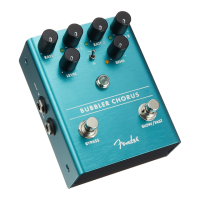
Sensitivity LED
This LED will illuminate when your instrument’s signal passes the
threshold set with the Sensitivity control to ramp the Bubbler’s chorusing
speed from the Slow settings to the Fast settings.
Jewel Indicator
The Jewel Indicator shows when the chorus effect is active.
Bypass Footswitch
This footswitch is used to bypass the effect.
Slow/Fast Footswitch
This footswitch is used to toggle between the Slow and Fast chorus
speeds. The Slow controls are Rate 1 and Depth 1; the Fast controls
are Rate 2 and Depth 2.
Input Jack
This is a high-impedance input suitable for electric guitar, bass, acoustic
guitars with pickup systems, keyboards and other instruments.
Left/Mono Output Jack
This is a low-impedance output jack that connects to the amp or to the
next effect pedal in a mono signal chain.
Right Output Jack
This is a low-impedance output jack that connects to the amp or to the
next effect pedal in a stereo signal chain.
DC Power Connector
This is a standard center-negative 9VDC jack for use with appropriate
power supplies.
LED Kill Switch
This switch extinguishes the LEDs that illuminate the knobs.





 To Next Page