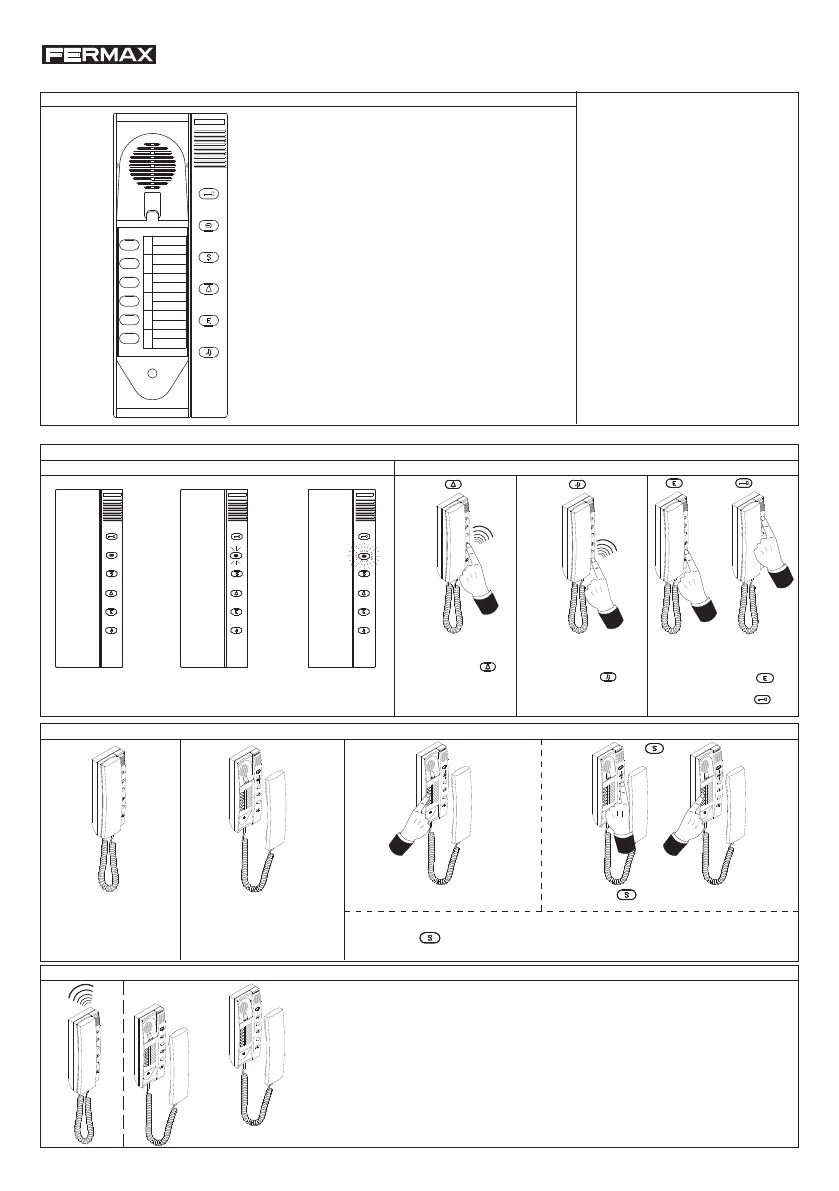
OPEN the DOOR without
hanging up the handset
Press the button
to
communicate with the outdoor pa-
nel and then the button
* When a telephone number is pressed the indicator led turns off.
* After pressing the indicator led blinks during 5 seconds, asking for slave telephone number.
* If the call is unattended, the system goes to the standby status in 40 seconds.
STANDBY OPERATION (The telephone must be hung up).
PUSHBUTTONS DESCRIPTION
S
E
1
2
3
4
5
6
E
S
1
2
3
4
5
6
E
S
The telephone called emits a calling sound. Both telephones can establish a private conversation. The indicator led
turns on in all the telephones except in the ones that are having communication.
* If the call is unattended, the system goes to a standby status in 40 seconds.
* The conversation time is limited to 4 minutes until one of the telephones has been hung up.
* If any of the telephones stay off the hook, the indicator led remains ON to warn it.
* If a telephone off the hook is called, no call sound is generated but audio is connected anyway.
* If an external call is made during an intercom conversation, a soft tone can be heard.
INDICATIONS FUNCTIONS
LED OFF
Intercom line free
LED ON
Intercom line busy
LED BLINKING
The telephone has
disabled the external call
(outdoor panel call).
CALL to
GUARD UNIT
Press the button
If there were a MDS Guard
Unit, a «bip» would sound
in the telephone.
S
E
bip
S
E
bip
TO ATTEND AN INTERCOM CALL
S
E
1
2
3
4
5
6
E
S
1
2
3
4
5
6
S
E
Check that the audio
channel is not busy (indicator
led is OFF).
Pick up the handset. The indicator
led turns ON.
press the «main» telephone number
directly.
1
2
3
4
5
6
S
E
1
2
3
4
5
6
S
E
TO MAKE AN INTERCOM CALL
Telephones must be programmed, as
explained in the next page:
«PROGRAMMING».
It is posibble to connect up to 12
extensions in each dwelling, 6 «main»
and 6 «secondary» ones.
It is possible to restrict the
communication between secondary
telephones. This is to say: disallow
calls between them.
Telephones are full privacy.
The call tones are different depending
on where the call is comming from:
intercom call or outdoor panel call.
Press + «secondary» telephone number.
2ºSecondary
telephone
number
1º
ENABLE / DISABLE
external call
alternately to enable/disable
the call.
Press the button
Cod.94838 V04_14
KIT CITY BUS MULTIWAY Ref. 9022
DOOR RELEASE PUSHBUTTON
INDICATOR LED
* OFF: standby.
* ON: line is busy.
* BLINKING: several indications.
CALL TO GUARD UNIT
CONNECT TO THE OUTDOOR PANEL
ENABLE / DISABLE
CALLS FROM THE OUTDOOR PANEL
1
2
3
4
5
6
INTERCOM CALL
PUSHBUTTONS
SECONDARY GROUP
TELEPHONE SELECTION
Telephone Ref. 8084 required in installations with intercom
and outdoor panel. It is used the Switcher Ref. 9017.














 To Next Page