-
S
+
+
SW7
SW14
-
PN
BAL
63412
-S-
C+ C-
--
-
-
++
+
+
-
S
+
+
SW7
SW14
-
1
Ref. 9017
220 VAC
AbAb
1326
EXT.
INT.
PRIM 220V SEC. 18 Vdc
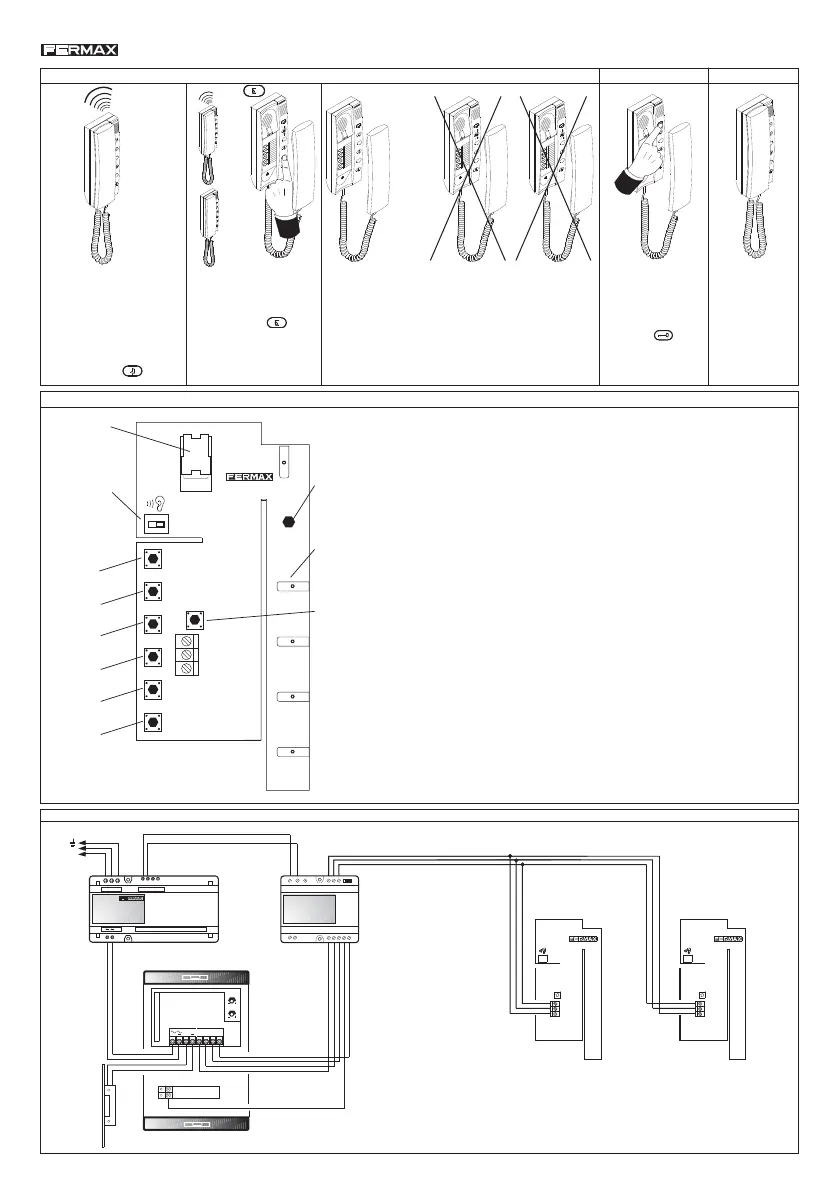
REMARK: Maximum Distance from switcher Ref. 9017 to the last telephone cannot
exceed 100 m (300 feet), with a cross section of 1 mm2 (17AWG).
A call from the outdoor panel will
generate a call tone that is
different than the internal call
tone.
It will be heard in the telephones
with the external call tone not
disabled. Button
TO ATTEND AN EXTERNAL CALL
S
E
E
1
2
3
4
5
6
S
E
1
2
3
4
5
6
S
E
1
2
3
4
5
6
S
When a telephone is connected to the outdoor panel the
line is busy. Other telephones can not hear the conversation.
1
2
3
4
5
6
E
S
S
E
The conversation
time is limited to
90 seconds or until
the telephone is on
hook.
S
E
S
E
E
1
2
3
4
5
6
S
PROGRAMMING
-
S
+
12202CI01A
+
SW7
SW14
-
SW4
SW5
SW6
SW1
SW2
SW3
SW11
S
SW9
CO
SW10
E
SW12
NM
SW8
1. Open the telephone cover, keep pressed the hook switch and
press the programming pushbutton once (SW7).
The handset has to be plugged into the telephone to hear the confirmation
sound when the telephone is programmed.
After this, the telephone can be programmed.
The indicator led starts to blink quickly. There are 10 seconds from now to
program the telephone.
2. If the telephone is going to be programmed as a:
* «mainl», press the corresponding pushbutton number.
* «secondary», press the metallic contact of the «S» pushbutton.
The led now blinks slowly.
And then press the corresponding pushbutton number.
In any case, the handset emits two confirmation «bips», the led turns OFF
and the telephone goes to the standby status.
3. Realese the hook switch and place the telephone cover.
Hook
Switch
Programming
Pushbutton
SW7
LED
indicator
Audio Volume
- : normal
+: extra
Metallic contact
corresponding to the
S pushbutton
Buttons
corresponding
to pushbutton:
1
2
3
4
5
6
WIRING DIAGRAM
This call can be attended
from any telephone. Just
hung up the telephone and
press the button
.
* The programmed number remains even if the telephone is disconnected or the power
supply is off.
* The telephone can be reprogrammed following the previous steps.
* To restrict the communications between secondary telephones it is necessary to replace
the spring of the «S» button by a blocking sleeve. It can be request to Fermax.
* It is possible to increase the audio level through switch SW14.
* There are 2 groups of telephones: MAIN and SECONDARY. Every group can
have up to 6 telephones.
* To call to the telephones of SECONDARY Group, it is necesary to press «S»
button, and then the required telephone number.
During the
conversation the door
release can be
activated pressing
the button
18 Vdc
12 Vac














 To Next Page