Pag 18
FINGERPRINTFINGERPRINT
FINGERPRINTFINGERPRINT
FINGERPRINT
FINGERPRINTFINGERPRINT
FINGERPRINTFINGERPRINT
FINGERPRINT
REMOTE UNIT
FOR ACCES CONTROL
+
321
7 8 9
0
x
-
654
E r A
1 bip
REMOTE UNIT
FOR ACCES CONTROL
+
321
7 8 9
0
x
-
654
A d d
REMOTE UNIT
FOR ACCES CONTROL
+
321
7 8 9
0
x
-
654
0 0 0 0
A L L
REMOTE UNIT
FOR ACCES CONTROL
+
321
7 8 9
0
x
-
654
E d i t
E r A
E r r
REMOTE UNIT
FOR ACCES CONTROL
+
321
7 8 9
0
x
-
654
REMOTE UNIT
FOR ACCES CONTROL
+
321
7 8 9
0
x
-
654
t. A b
REMOTE UNIT
FOR ACCES CONTROL
+
321
7 8 9
0
x
-
654
T e M
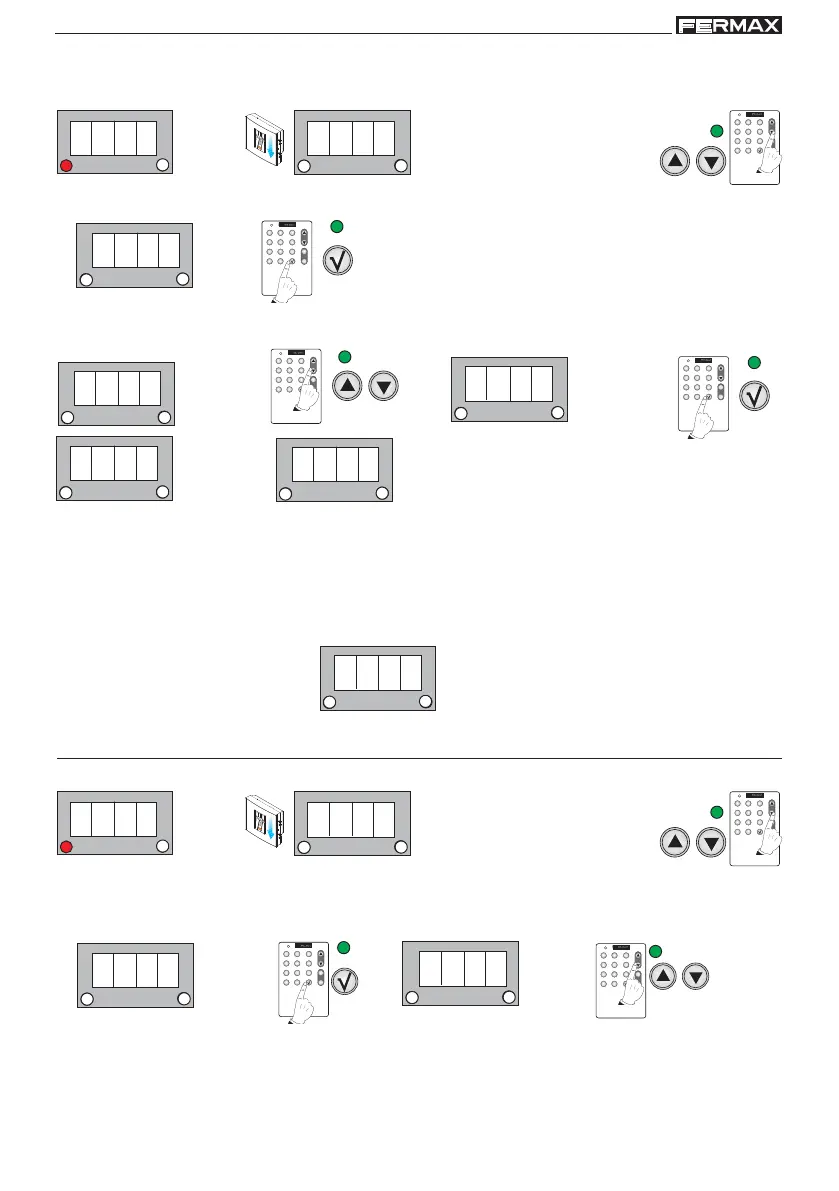
b) FULL User Reset
Standby Mode
2. Search using the menu’s scroll keys:
ErA
1. Enter the master fingerprint.
Enter Programming Mode
3. ErA is shown. Confirm with the OK key.
1 beep
4. 0000 is shown. Using the scroll keys the following sequence will appear: 0000, ALL, 0000.... Select the
following option: ALL and confirm with the OK key.
1 beep
1 beep
1 beep
NOTES on the DELETE option:
- Deleting a user or resetting all users are irreversible actions, such that once deleted the
information cannot be recovered.
- You can delete a code if you know its associated position, therefore we re-iterate the
importance of compiling a table with the users names and numbers.
- If the "user number" entered does not exist or the data is incorrect an error message will appear
on the display.
1 beep
Time Configuration (TeM)
Standby Mode
2. Search using the menu’s scroll keys:
tEM
1. Enter the master fingerprint
1 beep
Enter Programming Mode
3. tEM is shown. Confirm with the OK key. TeM is shown. Using the scroll keys the following sequence will
appear: t.Ab, t.ALM, t.SE, t.Ab.... Select the option you wish to configure.
NOTES on “Door Sensor Times” and “Alarm Activation Times” options:
- In options b and c the times are programmed but these functions have to be activated. See the
corresponding chapter on: "Auxiliary Output Time".
1 beep



 To Next Page