Pag 19
FINGERPRINTFINGERPRINT
FINGERPRINTFINGERPRINT
FINGERPRINT
FINGERPRINTFINGERPRINT
FINGERPRINTFINGERPRINT
FINGERPRINT
REMOTE UNIT
FOR ACCES CONTROL
+
321
7 8 9
0
x
-
654
REMOTE UNIT
FOR ACCES CONTROL
+
321
7 8 9
0
x
-
654
3
0
0 0 4. S
REMOTE UNIT
FOR ACCES CONTROL
+
321
7 8 9
0
x
-
654
0 0 3. S
0 y
t. A b
0
REMOTE UNIT
FOR ACCES CONTROL
+
321
7 8 9
0
x
-
654
REMOTE UNIT
FOR ACCES CONTROL
+
321
7 8 9
0
x
-
654
REMOTE UNIT
FOR ACCES CONTROL
+
321
7 8 9
0
x
-
654
0
8
REMOTE UNIT
FOR ACCES CONTROL
+
321
7 8 9
0
x
-
654
t. S E
0 0 0. S
0 0 8. S
0 y
t. S E
t. A L M
0 0 0. S
0
REMOTE UNIT
FOR ACCES CONTROL
+
321
7 8 9
0
x
-
654
REMOTE UNIT
FOR ACCES CONTROL
+
321
7 8 9
0
x
-
654
3
0
0 0 3. S
0 y
t. A L M
0
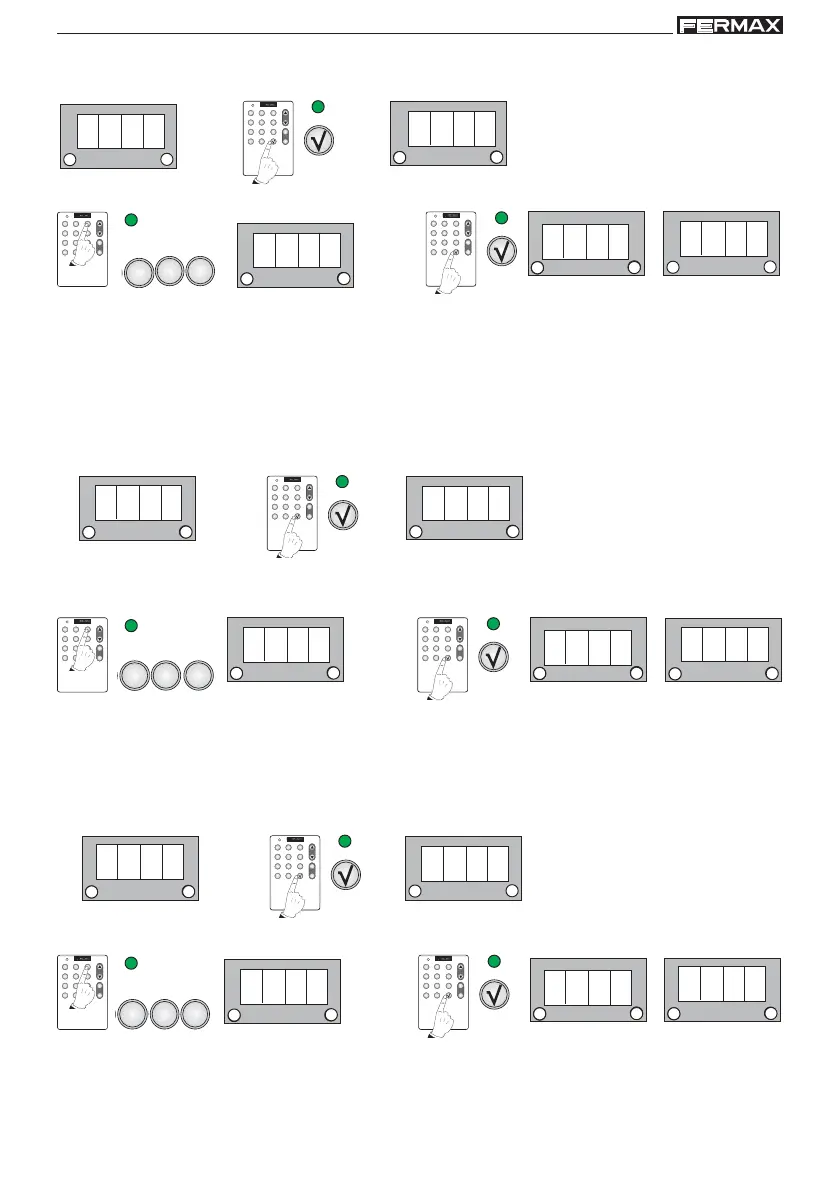
a) Lock-Release Timing
Time the door’s lock-release relay remains active.
1 beep
Default Value: 4 secs
1. Enter the required door opening time of between 01 and 99 seconds.
For example: 3 secs
1 beep
b) Door Sensor Timing
Maximum time the door can be open before an alarm goes off.
A magnetic door sensor is required. See diagram.
Initially these functions are disabled (000 value).
1 beep
For example: 8 secs
1. Enter a time of between 01 and 99 seconds after which, when the door is open an acoustic alarm integrated
into the reader will begin to sound.
1 beep
Default Value: 0 secs
c) Alarm Time (auxiliary output)
Time the alarm remains active. Initially these functions are disabled (000 value).
1 beep
Default Value: 0 secs
For example: 3 secs
1. Enter the time you wish the alarm to remain active for at between 01 and 99 seconds
1 beep
NOTE: the sensor time has to be greater than the lock-release time



 To Next Page