Pag 28
FINGERPRINTFINGERPRINT
FINGERPRINTFINGERPRINT
FINGERPRINT
FINGERPRINTFINGERPRINT
FINGERPRINTFINGERPRINT
FINGERPRINT
REMOTE UNIT
FOR ACCES CONTROL
+
321
7 8 9
0
x
-
654
REMOTE UNIT
FOR ACCES CONTROL
+
321
7 8 9
0
x
-
654
REMOTE UNIT
FOR ACCES CONTROL
+
321
7 8 9
0
x
-
654
A d d
C o d e
0 0 0 6
0 0 0 4
I n i
d 2. 2
0 y
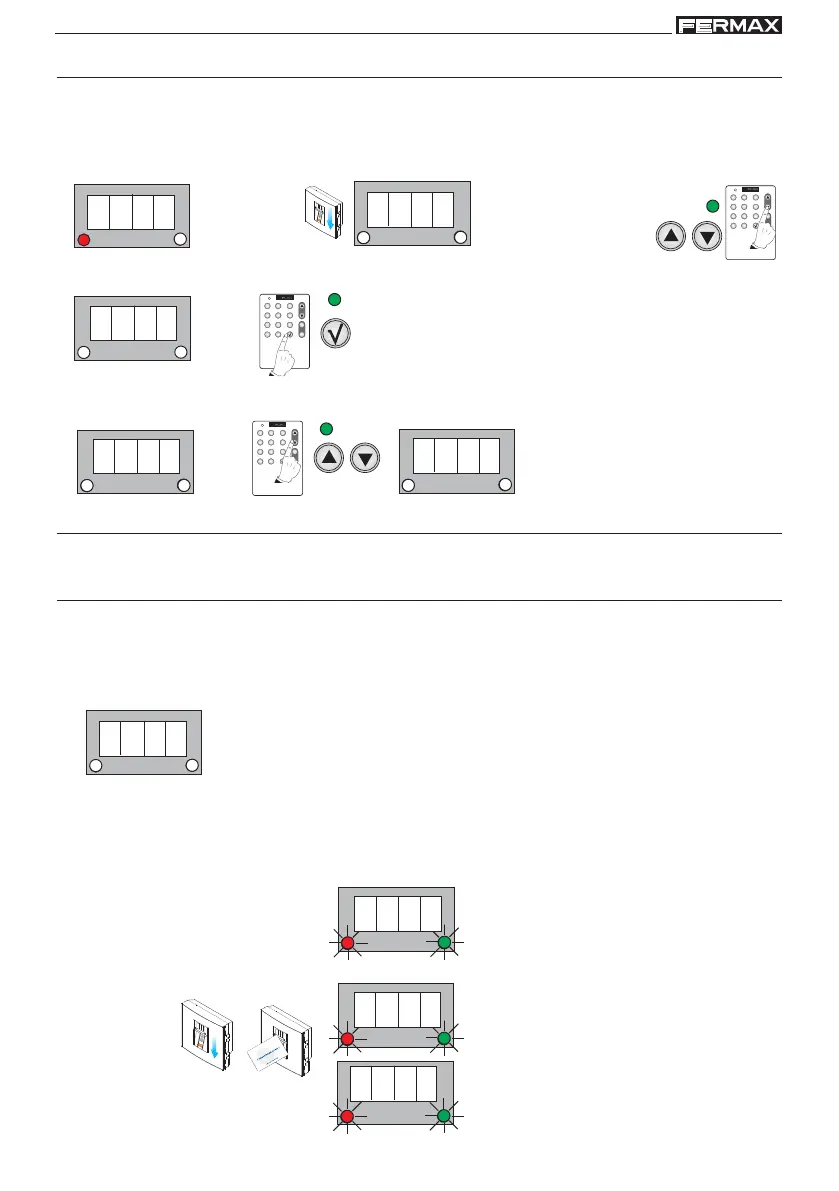
2. Code length - number of digits (Code)
Number of digits to use in the keyboard code. 4 or 6.
NOTES:
- See functioning (chapter “Add users - Add”):
Standby Mode
2. Search using the menu’s scroll keys:
Code
1. Enter the master fingerprint
Enter Programming Mode
3. Code is shown. Confirm with the OK key.
1 beep
1 beep
4. 0006 is shown. Using the scroll keys the following sequence will appear: 0006, 0004, 0006.... Select the
number of required digits: 4 or 6 and confirm with the OK key.
1 beep
Communications protocol in centralised system (Prot)
No autonomous function
1. Disconnect the system’s power supply.
Resetting the Master Code (where the previous code is forgotten)
This operation is carried out by electrically modifying the equipment, in the aim of ensuring
it is impossible for anyone without physical access to the equipment to modify it in any way.
Mode Not Set-Up
2. Short-circuit “Bs” and the system “-”.
If the system is equipped with an exit button, just press and hold it down.
3. Reconnect the system’s power supply and do not remove the short circuit.
1 beep
Once powered up Ini will appear
on the display
1 beep
Enter the master fingerprint or
present the master card
1 beep



 To Next Page