USER’S QUICK GUIDE: DUOX VEO MONITOR
1
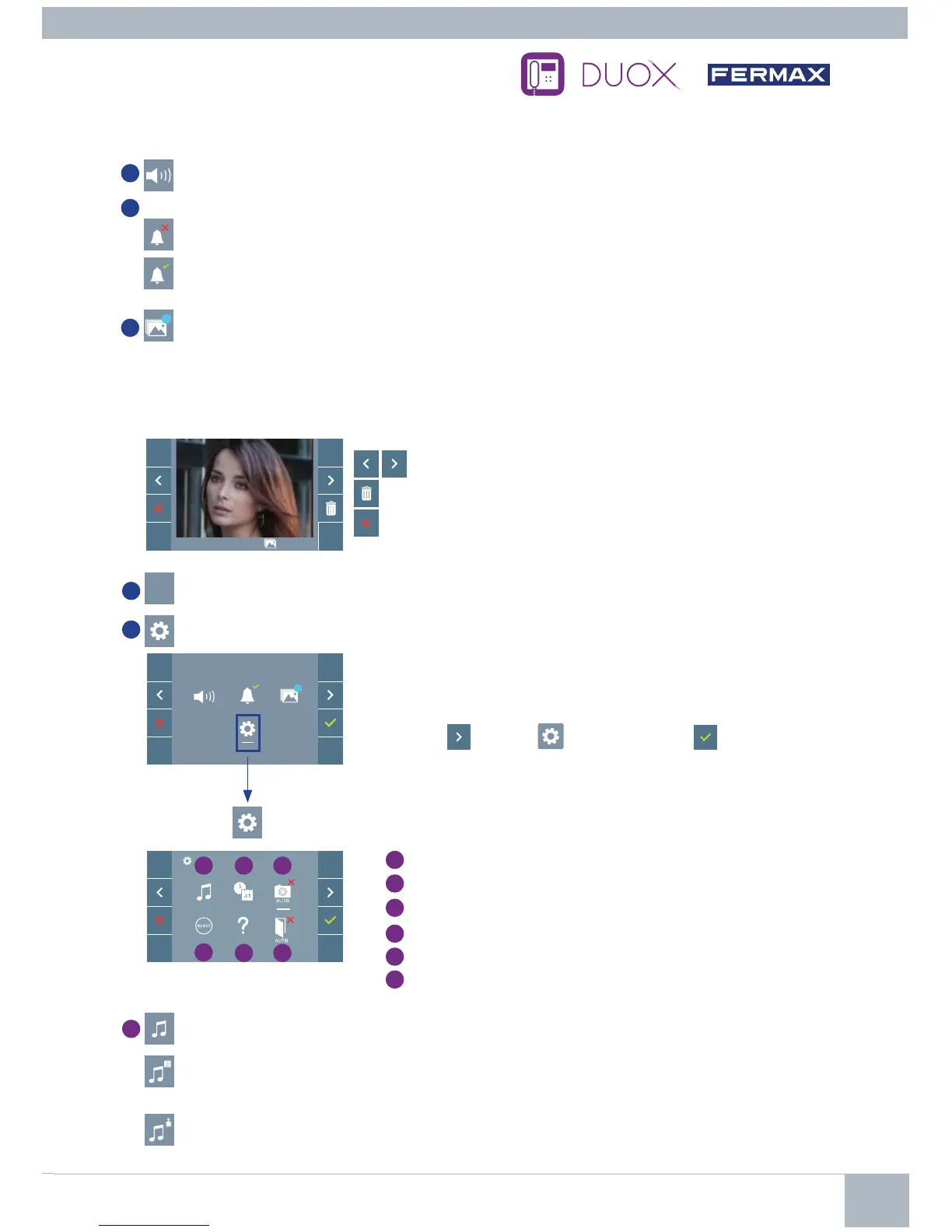
Monitor volume settings
2
Do Not Disturb function:
: The call is not heard.
: The call is heard, (by default normal operation is selected).
3
99
Display images:
To display the varios photos taken with the date, time and the photo number.
When a call is made from the outdoor panel, a photo is automatically taken 5 seconds later and stored
in the memory.
T
he image capture function must be pre-selected
, see screen «USER PARAMETER
SETTINGS»,
(option 3).
F2
99
Within the USER MENU, selecting the option «USER PARAMETER
SETTINGS»
will acces a new screen corresponding to the various
confi guration parameters.
Select with
the icon and confi rm with
.
4
F2
F2 Function (extra function, check with your installer).
5
User parameter settings
20/01/2018 12:37 130/149
: To clear images.
: To cancel and go to the previous screen.
: To select/view the photos stored.
1 2
4
5
3
6
1
Melody selection:
: Panel melody selection: It can be changed the melody that you hear on the monitor when a
call is made from outdoors.
: Concierge melody selection: It can be changed the melody that you hear on the monitor when
the concierge calls that monitor.
USER MENU
2
USER PARAMETER SETTINGS
1
Melody selection
2
Date and time settings
3
Enable/Disable image capture
4
User Reset
5
User help
6
Enable/Disable Doormatic














 To Next Page