USER’S QUICK GUIDE: DUOX VEO MONITOR
1. MONITOR SETTINGS
SETTINGS
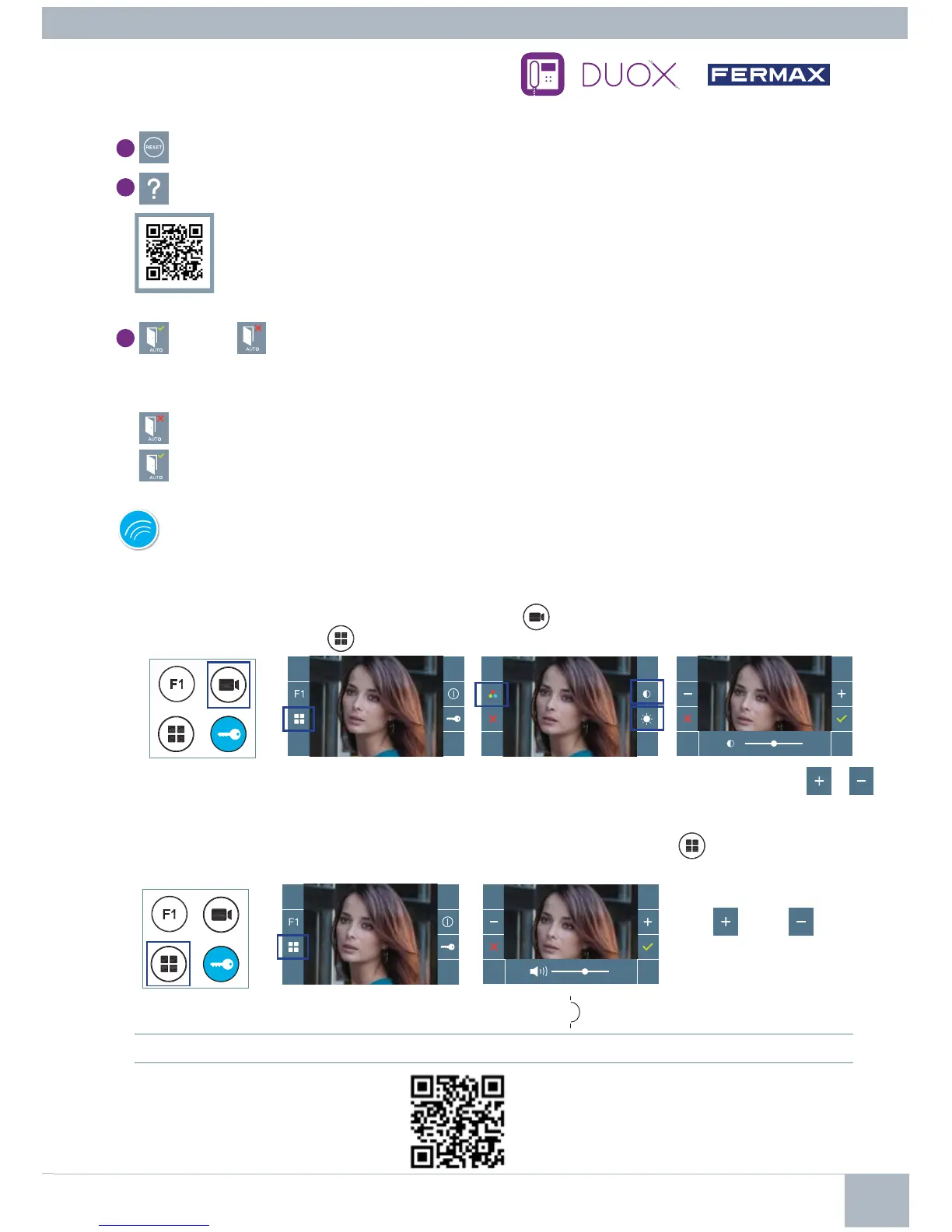
MANUAL FULL MONITOR
With an image on the monitor, by pressing the button
,
or upon receiving a call without establish
communication, press the
key to show the video settings.
VIDEO SETTINGS
AUDIO SETTINGS
While the audio channel is open, (established communication), press the
button and a menu
screen appears for this setting.
Seleccionar la opción del ajuste e ir aumentando o decrementando con
y
.
2
34
Increase or decrease
with
and
, until
obtaining the desired
regulation.
23
1
4
User Reset: Reset the user’s confi guration parameters.
5
User help
QR code that allows access to a promotional link that explains in detail the digital DUOX
system that Fermax has created.
6
Enable / Disable Doormatic
Option that allows automatic door opening when a call is made.
T
he function must be pre-selected
, check with your installer, (depending on confi guration).
: Doormatic
function
not selected, (by default).
: Doormatic
function
selected.
Notice: Maximum conversation time: 90 seconds.
1
4
Notice: The adjustment potentiometer can be used as well.














 To Previous Page