
 Need help?
Do you have a question about the Fermax FERMVISION and is the answer not in the manual?
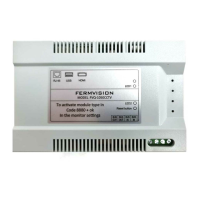
Overview of the FVQ-1050CCTV module for IP CCTV systems.
Details the RJ45, USB, and HDMI physical ports available on the module.
Explains the function of buttons, LEDs, and DIP switches for module operation.
Steps to log into the NVR and navigate to the user management section.
Setting up username, password, and specific access rights for a new user.
Confirmation step to ensure the new user has been successfully added to the NVR.
Describes the plug and play method for integrating the module with the NVR.
Illustrates wiring configurations when multiple door stations are connected to the system.
Instructions to activate the FVQ-1050CCTV module using a code on the monitor.
Steps to view active camera feeds on the monitor after module activation.
Launching the mobile viewer app and accessing device management features.
Discovering the NVR on the network and accessing its web interface.
Creating a new user account through the NVR's web interface on a mobile device.







 To Next Page
 General