Pag 28
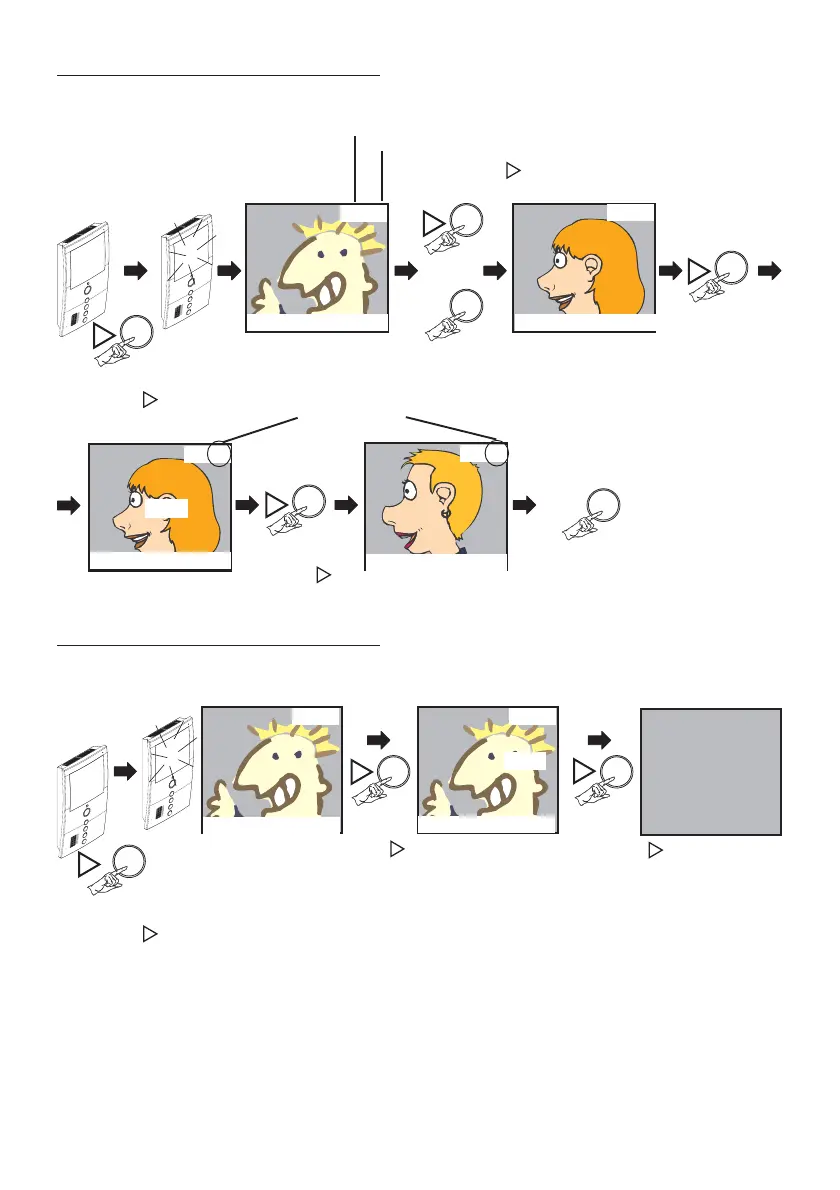
To delete a photo (image).
In Delete Mode, the monitor should be on and showing images.
Photo DELETE Mode
. . . .
REC
Auto-Start
OK?
REC
Shows the last
image saved.
43/43
LAST Photo saved
Total Photos Taken
24/09/2008 12:37
Pressing
REC
shows the next image
Pressing
shows the previous image
35/43
22/09/2008 10:11
Short press
35/43
22/09/2008 10:11
Short
press
34/42
21/09/2008 20:21
Press this button if
you want the
Monitor to return to
the STANDBY
mode (standby,
monitor screen off)
Photo deleted
To delete all the photos (images) saved.
In Delete Mode, the monitor should be on and showing images.
DELETE Mode Complete
OK?
Auto-Start
Shows the last
image saved.
Short press
Press
for longer than 2 seconds
Press and hold
for longer than 2
seconds until the screen
goes black
.
Delete All
43/43
24/09/2008 12:37
43/43
24/09/2008 12:37







 To Next Page