Pag 36
MENU
DISPLAY
TIME
EXIT 23.01.2008 12:37
BRIGHTNESS
CONTRAST
COLOR
70
50
50
MENU
DISPLAY
TIME
EXIT 23.01.2008 12:37
BRIGHTNESS
CONTRAST
COLOR
70
50
50
MENU
DISPLAY
TIME
EXIT 23.01.2008 12:37
BRIGHTNESS
CONTRAST
COLOR
50
50
50
MENU
DISPLAY
TIME
EXIT 23.01.2008 12:37
MENU
DISPLAY
TIME
EXIT 23.01.2008 12:37
BRIGHTNESS
CONTRAST
COLOR
70
50
50
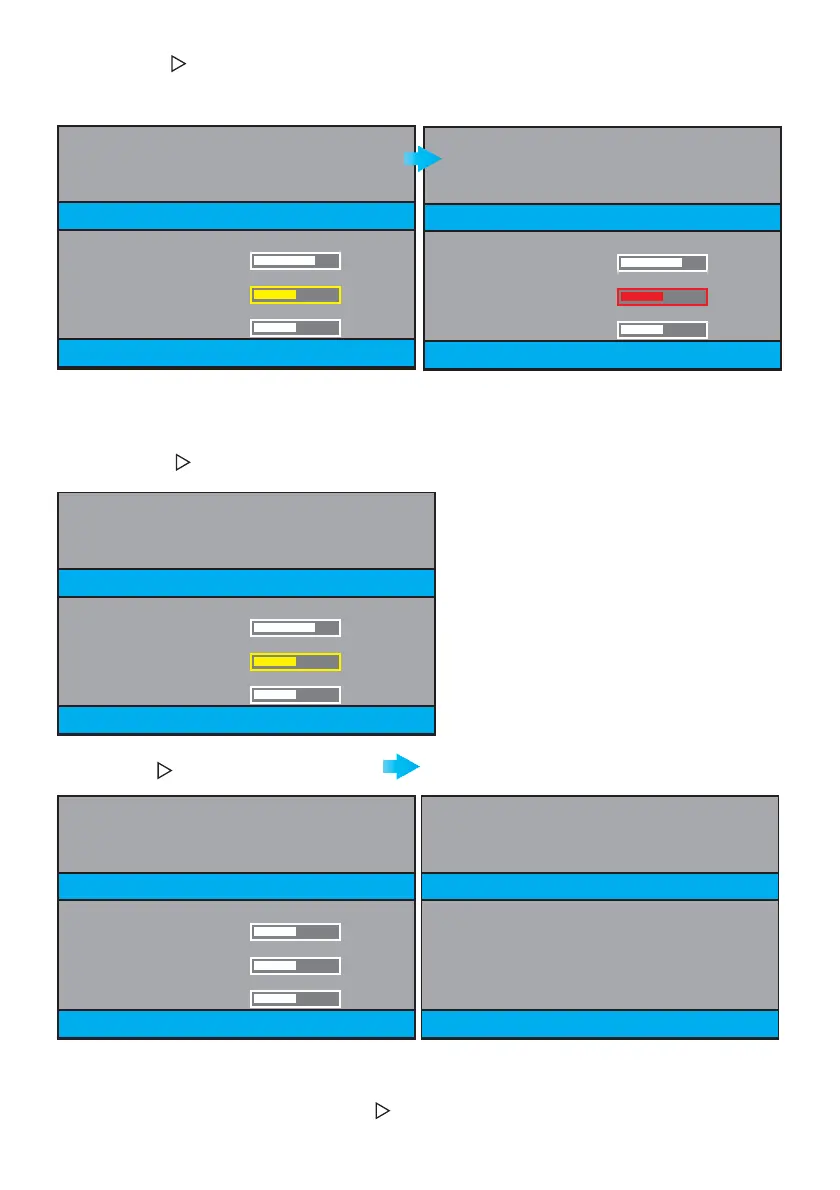
En appuyant sur , on se déplace parmi les options de manière séquentielle : BRIGHTNESS, CONTRAST,
COLOR, EXIT, BRIGHTNESS, CONTRAST, COLOR... (texte jaune).
Lorsqu’on est sur l’option (texte en jaune), en appuyant sur
REC
, on la sélectionne (texte rouge).
En appuyant sur ou
REC
plus de 2 secondes, on quitte l’option CONTRAST (CONTRASTE) ; le texte
redevient jaune.
Appuyer sur jusqu’à atteindre EXIT
(texte jaune).
En appuyant sur
REC
, l’on descend (frappe brève).
En appuyant sur
REC
, l’on monte (frappe brève).
Appuyer sur
REC
pour revenir à l’écran
précédent.
En appuyant de nouveau sur
REC
, on revient au mode ATTENTE (VEILLE).
Après 30 secondes sans avoir appuyé ni sur ni sur
REC
, on revient également au mode ATTENTE
(VEILLE).







 To Next Page