23
Note: To unlock, you should press an hold the Manual Mode keys for 3
seconds.
Note: If the alarm rings when the child key is enabled, you may silence the
alarm by pressing and releasing the Manual Mode keys. The lock will remain
enabled.
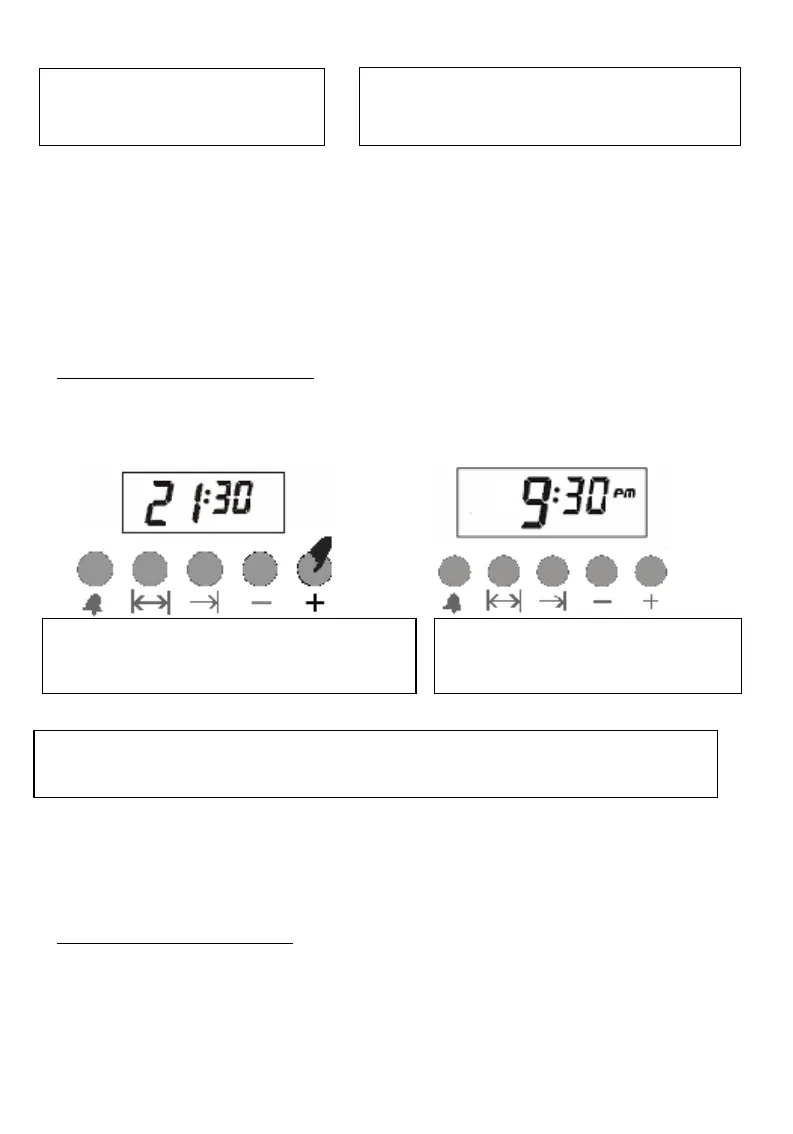
CLOCK MODE (12/24 HOUR)
Thanks to this feature, you may change appearance of your clock to 12- or
24-hour format.
Note: Default appearance of the clock is 24-hour format. In case power
failure occurs for a long time and the clock appearance was not changed, it
will return to the default setting.
ALARM VOLUME SETTING
Thank to this setting, you may change volume when the alarm rings.
1) You may hear the volume set by holding (-) key pressed.
2) You may release (-) key and press it again to hear and select the next
volume (3 levels)
1-Press and hold the manual
Mode for 3 seconds.
2- Key symbol will appear on the
display. (Now the child lock is engaged)
1-Now your clock is in 24-hour format.
Press (+) key and hold it for 3 seconds.
2-Now your clock is changed to
12-hour format.
To resume back 24-hour format, pres (+) key and hold it for 3 seconds
again.


 To Next Page