user’s manual
WANDLA by Ferrum
14
It glows blue to indicate it is playing an MQA Studio file, which has either been approved in the studio by the
artist/producer or has been verified by the copyright owner�
It glows magenta when WANDLA is receiving MQA signal which is unfolded by some upstream decoder or
software where the media source is initially handled�
You can find more info about MQA on this website: https://www�mqa�co�uk/customer/how-it-works
Note: For proper MQA decoding make sure your source can provide a bit perfect signal to the WANDLA� All
digital inputs will accept MQA signal�
MQA and the Sound Wave Device are registered trade marks of MQA Limited © 2016
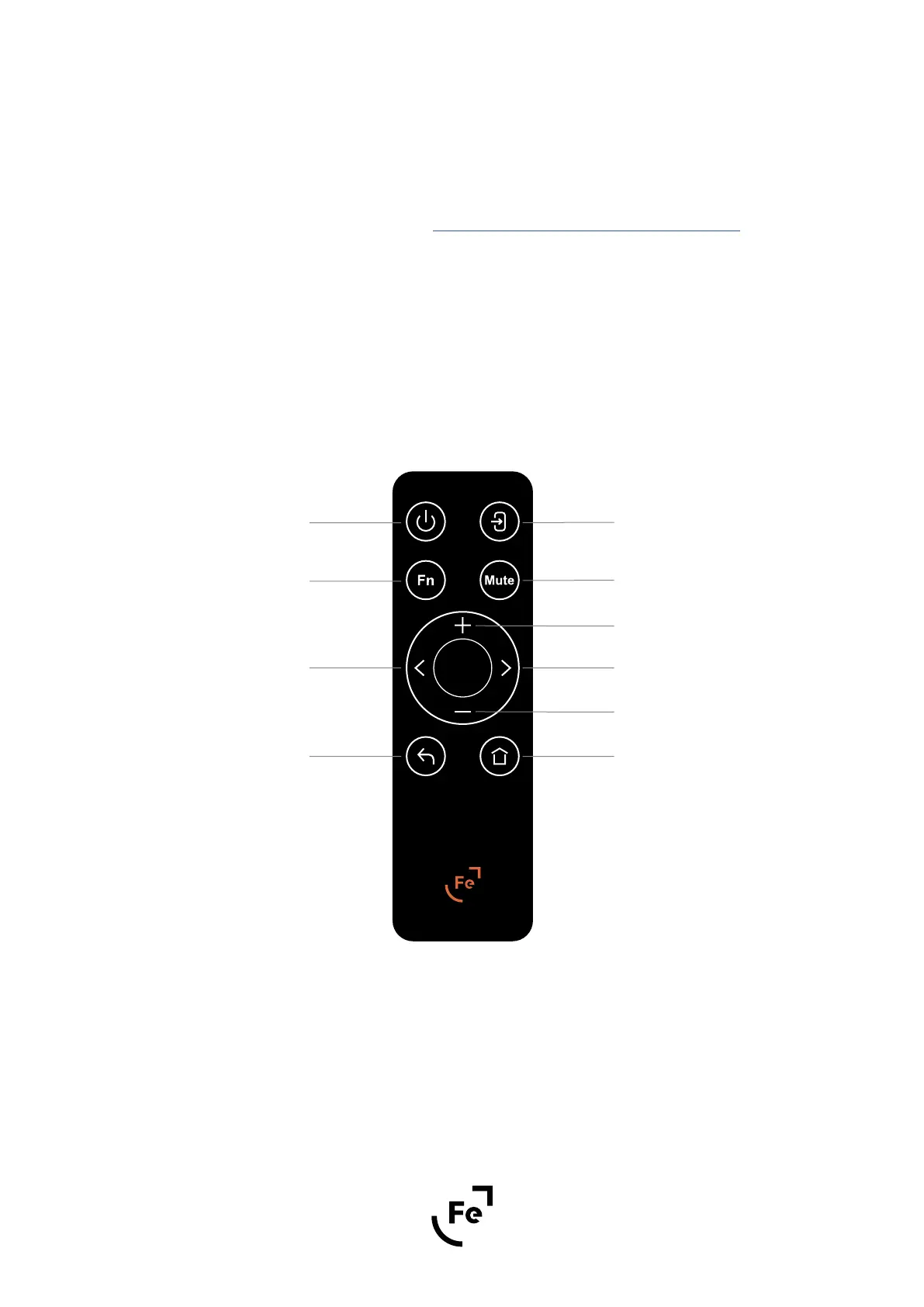
9� REMOTE CONTROL
Figure 6�
A� On/Standby button
B� Input selector button
C� Function button - not used now
D� Mute button
E� Left/right or change value buttons
F� Volume buttons
G� Back button
H� Home screen button
A
B
D
E
F
F
H
C
E
G


 To Next Page