11
Functional description
The pictures for the functional description are on a
fold-out page at the beginning of the instruction
manual. While reading the manual you can fold out
the page for comparison and quick reference.
Operation
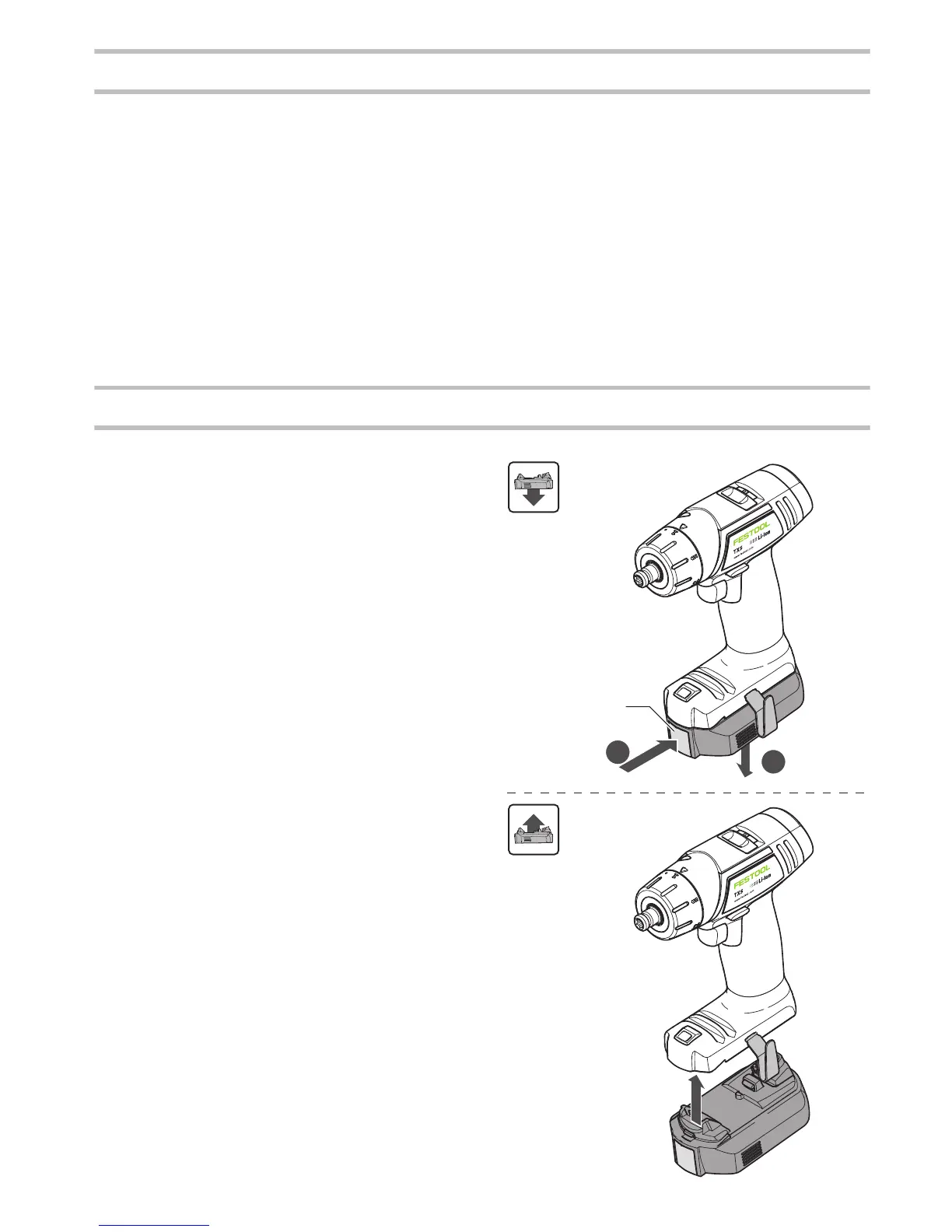
Changing the battery pack [2]
Battery pack is ready for use immediately upon
delivery and can be charged at any time.
Removing the battery pack
Press and hold the button
[2-1]
.
Slide the battery pack downwards to remove.
Inserting the battery pack
Slide the battery pack upwards into the machine
like shown in
[2]
until it engages.
[1-1]
Drilling symbol
[1-2]
Torque thumbwheel
[1-3]
Torque/drilling position marking
[1-4]
Gear switch
[1-5]
Right/left switch
[1-6]
On/Off switch
[1-7]
Belt clip
[1-8]
Insulated gripping surfaces (grey shaded
area)
[1-9]
Button for releasing the battery pack
[1-10]
LED lamp with capacity indicator
[1-11]
Bit store


 To Next Page