Go to fetco.com for the latest versions of all information Page 7 User Guide & Operator instructions P171 NEW MARCH 2018
PROGRAMMING MENU-Continued
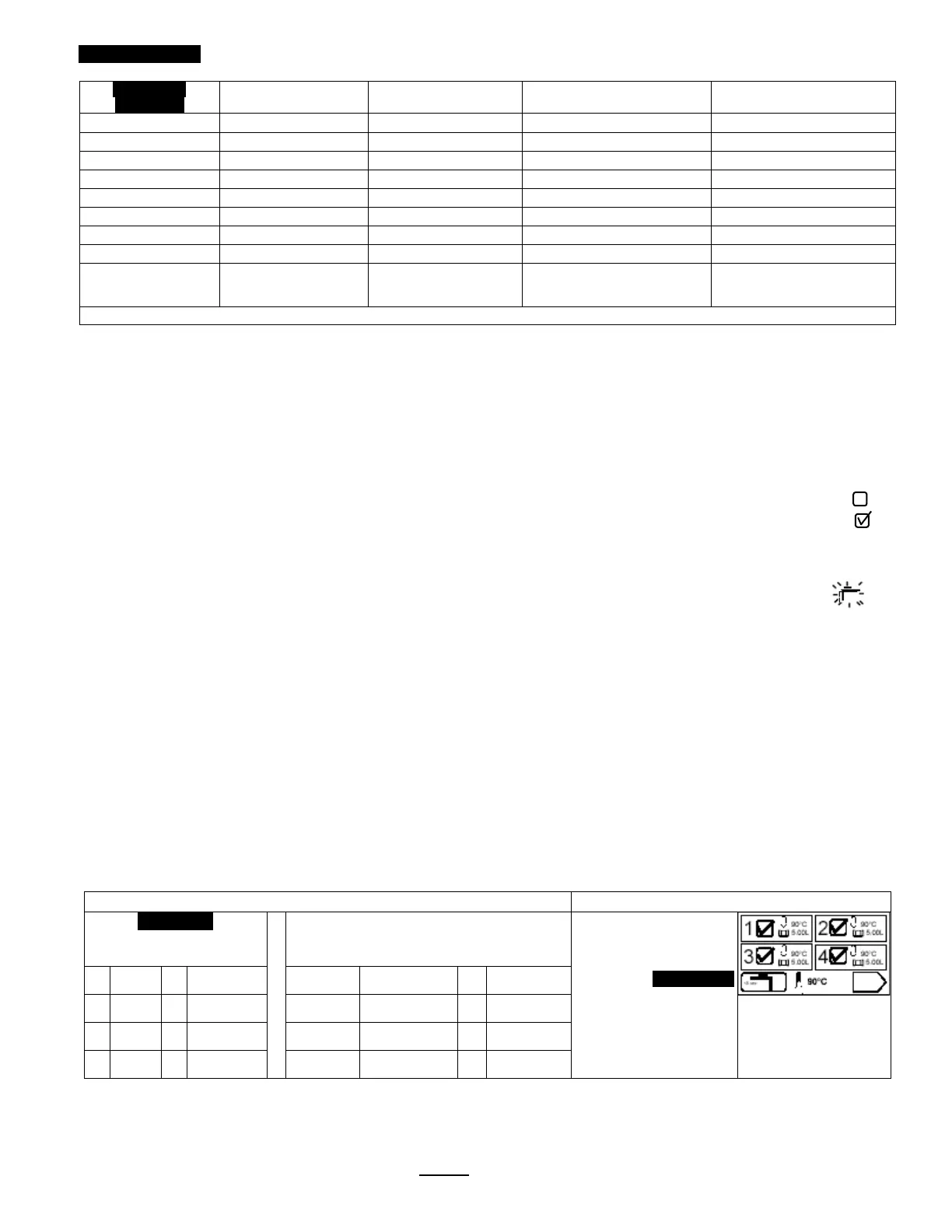
Factory set Default Programming Range Notes
Copy?
B1B2?
(example)
|_______________[]__|
*Batch 1& 5 are mandatory and cannot be disabled. Other batches can be disabled [“hidden”], and removed from display
Programming Batch Temperature
Individual temperature settings can be programmed for all eight recipes. This accommodates many different brew
temperature requirements of the coffee product used. The hot water tank temperature automatically sets to the lowest
programmed recipe setting. If a brew is started for a higher temperature setting, the brewer will pause and quickly
heat the hot water tank to the temperature setting of the recipe before starting the brew. This is rapid: taking only
minutes.
Tank temperature is too low for brew setup
1) If the tank temperature is LOWER than the temperature setting—the brewer will display the “Not Ready” icon:
The hot water tank will quickly reheat and the “Ready” icon will display when heated to the set temperature:
Tank temperature is too high for brew setup
2) If the tank temperature is HIGHER than the temperature setting—the brewer will flash the “PURGE” icon:
“PURGE” to cool feature
Purge is drawing a small amount of hot water from the hot water tank—the temperature of the tank is automatically
reduced by cool, fresh refill water from the mains. When the “PURGE” icon is activated for 5 seconds approximently
≈150ml/4 fl.oz hot water is relesed as bypass water and the tank temperature is reduced.
a) The hot water tank temperature can be quickly lowered by touching the “PURGE” icon for five seconds.
The single purge is adequate for most adjustments.
Note: the purged water increases the contents of the dispenser. The 150ml released is a negligible addition for most
brews—but should be noted for dispensers without headspace or for multiple purges
b)Water may be drawn from the hot water service faucet to lower hot water tank temperature.
The “PURGE” function is preferred as it offers better control.
c) Tank temperature override
The brew can be started at the high temperature by touching and holding the “START” icon to override the icon.
The brew may be exposed to some brewing water that is higher than temperature setpoint.
Recipe temperature setting table
Purge to lower brew water temperature
Factory Set
Temperature Summary as Set By User
Fill this in and save for future reference
Recipes show the temperature
setting. These can be set by
user from 80-97°.
PURGE Icon
Touch the purge icon for 5 sec.
This will lower hot water tank
temperature 3-4 degrees
1 90°C 5 90°C 1 5
2 90°C 6 90°C 2 6
3 90°C 7 90°C 3 7
4 90°C 8 90°C 4 8
.



 To Next Page