PRE-DEFINED VOICE TEXT REPLY RESPONSES
Ye s . Stuck in Traffic. See you later.
No. Start without me. I’ll be Late.
Okay. Where are you?
I will be <number> minutes
late.
Call me. Are you there yet?
I’ll call you later. I need directions.
See you in <number> of
minutes.
I’m on my way.
Can’t talk right now.
I’m lost. Thanks.
NOTE:
Voice texting reply and voice texting features require a compatible mobile device enabled
with Bluetooth Message Access Profile (MAP). iPhone and some other smartphones do
not currently support Bluetooth MAP. Visit UconnectPhone.com for system and device
compatibility.
Want to dictate a personal message? You must first register with Uconnect Access (U.S.
residents only) to take advantage of a new, cloud-based Voice Texting service, an enhance-
ment to Voice Text Reply.
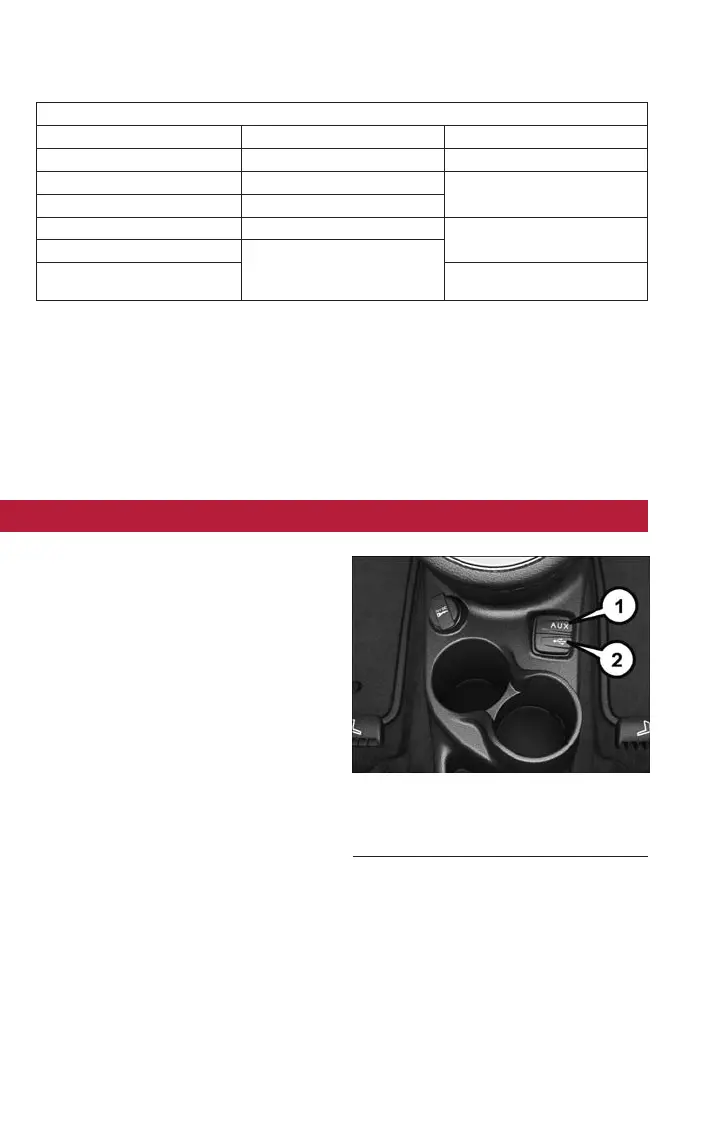
USB/AUX CONTROL
To select a specific audio source, push the
MEDIA button on the faceplate. To allow
music to play from your portable device
through the vehicle’s speakers, press the
“Source” button then select one of the
following modes:
USB/iPod
• USB/iPod Mode is entered by either in-
serting a USB Jump Drive or iPod cable
into the USB port or by pushing the
MEDIA button on the faceplate located
left of the display.
Audio Jack (AUX)
• The AUX allows a portable device, such
as an MP3 player or an iPod, to be
plugged into the radio and utilize the vehicle’s audio system, using a 3.5 mm audio
cable, to amplify the source and play through the vehicle speakers.
• The functions of the portable device are controlled using the device buttons, not the
buttons on t he radio. The volume may be controlled using the radio or portable
device.
USB/Aux Audio Jack
1 — AUX/Audio Jack
2 — USB Port
ELECTRONICS
54



 To Next Page