
 Need help?
Do you have a question about the Fiio K3 and is the answer not in the manual?
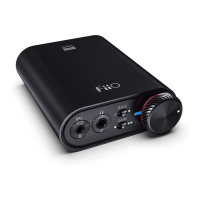
Details the key features and capabilities of the K3 device, including decoding modes and indicators.
Lists all accessories and components provided with the K3, ensuring users have everything needed.
Describes the 2.5mm balanced headphone jack and its function for improved output power.
Explains the 3.5mm single-ended headphone output jack for connecting standard headsets.
Details the function of the bass boost switch to enhance low-frequency audio.
Explains the gain switch for adjusting audio output power based on headphone impedance.
Describes the RGB indicator and its color-changing behavior based on audio sample rates.
Explains how to use the power and volume control knob for operation and volume adjustment.
Details the linear output port and its high-quality audio reproduction capabilities.
Explains the switch for selecting USB audio modes, such as USB Audio 1.0 or 2.0.
Describes the Type-C USB port for power and data input from a computer.
Explains the coaxial digital audio output port for connecting to amplifiers or decoders.
Details the optical digital audio output port for connecting to audio equipment.
Steps for connecting and using USB Audio 1.0 and 2.0 modes, including driver requirements.
Guide on how to set K3 as the default audio output device on a computer's operating system.
Illustrates connecting a headset via 2.5mm balanced or 3.5mm single-ended headphone ports.
Shows connecting to active speakers or an amplifier using a 3.5mm audio cable for output.
Details connecting to an amplifier using a coaxial input port for digital audio transmission.
Explains connecting to a device using an optical input port for digital audio transmission.
Instructions for playing music from a computer and setting the appropriate volume level.
Explains how the indicator light color changes based on the audio sample rate being played.
Describes the effect of the bass boost function when enabled for enhanced low-frequency response.
Guidance on safely adjusting the gain switch for optimal performance with different headphones.
Covers essential safety advice, including cable checks, volume levels, and avoiding potential ear damage.
Troubleshooting steps for diagnosing and resolving issues when there is no sound output from the device.
Solutions for issues causing low or diminished sound output, particularly with high-impedance earphones.
Details core specifications like name, size, weight, input/output ports, and recommended headphone impedance.
Lists detailed technical specifications including frequency range, amplitude, power output, and SNR ratio.
Guide on downloading the official USB driver from the FiiO website and initiating the installation process.
Detailed steps for the driver installation wizard, including choosing the install location and confirming.
Instructions on how to handle anti-virus software prompts to allow driver installation operations.
Steps for completing the driver installation process and closing the setup wizard successfully.
Tutorial on configuring the FB2000 media player to use the K3 as the audio output device.
Details on selecting the K3 device within the software's output device preferences menu.
Explains specific output options within the software for playing DSD audio files.
 General
| Frequency range | 20 - 80000 Hz |
|---|---|
| Output impedance | 1.04 Ω |
| Peak power per channel | - W |
| Signal-to-Noise Ratio (SNR) | 113 dB |
| Total Harmonic Distortion (THD) | 0.004 % |
| Line-out | Yes |
| Headphone connectivity | 3.5mm |
| USB 2.0 ports quantity | 1 |
| Power source | DC |
| Product color | Black |
 Weight and Dimensions
| Depth | 22 mm |
|---|---|
| Width | 58 mm |
| Height | 70 mm |
| Weight | 82 g |

 To Next Page