- 19 -
English
12 LCD Icon - Time until filter change (in days)
13 LCD Icon - Timer
14 Display board Reset key (R)
FILTER MANAGEMENT
The board manages the lter. The capacity can be set based on the quantity of water processed
and the time past (365 days).
When the lter runs out, the icon (9) will be ashing, the board can lock or not, based on the
conguration (see conguration section).
To reset, switch the machine off and on, keeping key R (14) pressed. The machine will respond
with three consecutive beeps.
Key R (14) is also used to display certain parameters of the equipment. In particular, if pressed
during the machine on status, the following will be displayed in sequence: lter ow rate, LCD
board rmware version, power board rmware version.
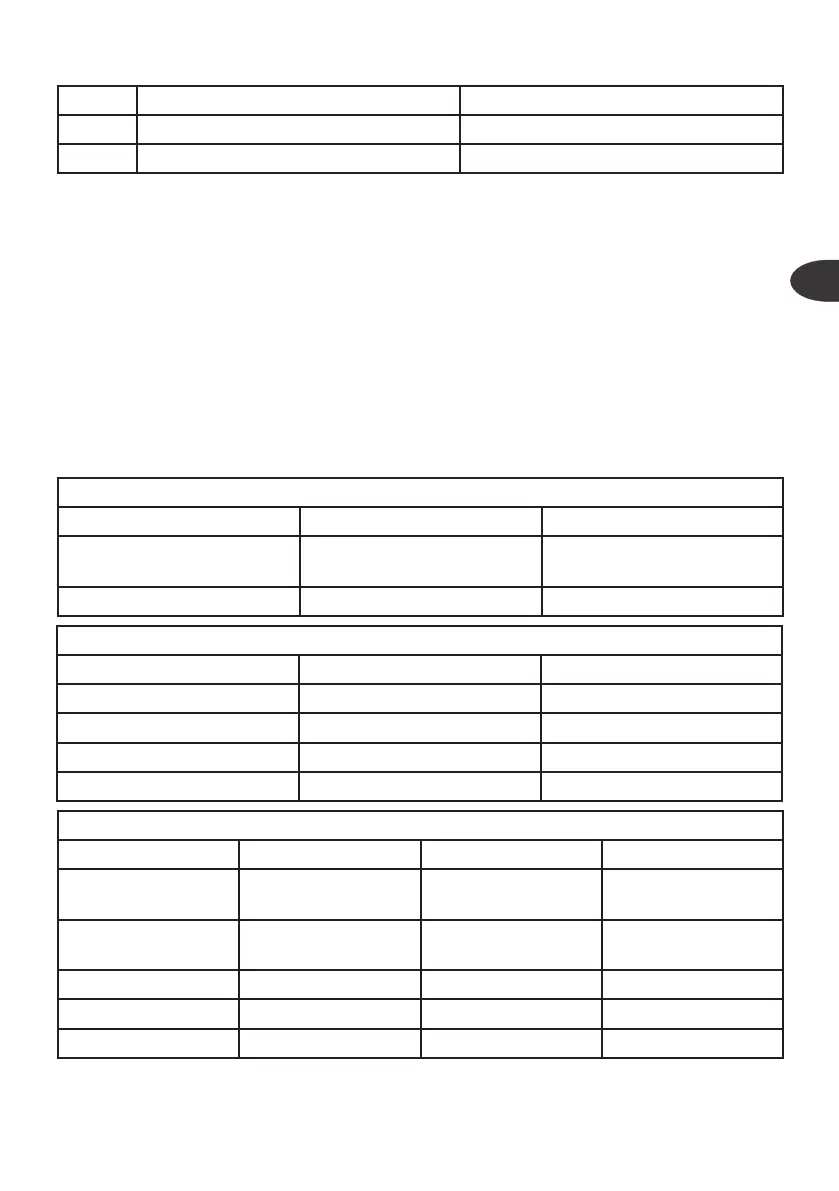
CONFIGURATION
(8) POWER BOARD
OFF ON
Dip switch 1 Cable (1) : button tap
Cable (1) : minimum pres-
sure switch
Dip switch 2 - -
(7) LCD BOARD
OFF ON
Dip switch 1 Not used Not used
Dip switch 2 2xFc130 FC500
Dip switch 3 NO Filter alarm lock Filter alarm lock
Dip switch 4 15 min lock NO 15 min lock
TABLE OF ALARMS
NAME LCD BACKLIGHT RESET
Litres lter alarm
Filter icon, L, zero
ashing
Red Reset procedure
Time lter alarm
Filter icon, Clock
zero ashing
Red Reset procedure
Flooding “Flood” displayed Red Restart
15 minutes lock 15 Red Restart
Low pressure L.P. Red Automatic


 To Next Page