- 6 -
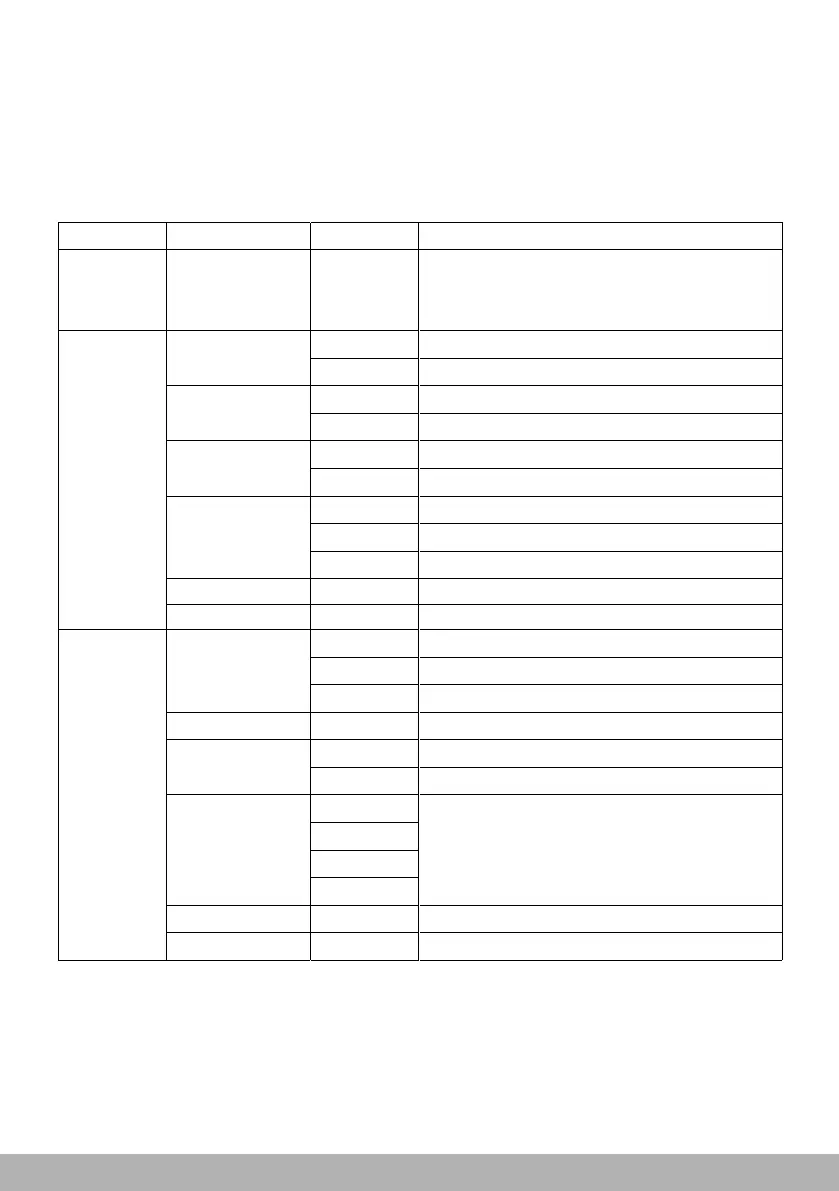
4/Operation chart for the display panel function
Menu Item Options Notes(Default settings in bold print)
Address
Setting
DMX
address
001-512
Specification
Setting
Pan Invert
Reverse DMX
pan control,R->L
Off Normal DMX pan control,L->R
Tilt
Invert
On
On
Reverse DMX
tilt control, D->U
Off
Normal DMX
tilt control,U->D
Pan/Tilt Swap
On
DMX
exchange pan&tilt controlling channel
Off
Normal pan&tilt controlling channel
DMX Mode
Standard
Standard controlling
mode
RGB
RGB controlling
mode
RGBW
SHAP
RGBW
SHAP
controlling
controlling
mode
mode
Exit
Return to the last menu
Pan/Tilt Speed
Fast
Optimize rotation speed
Normal
Medium rotation speed
Slow
Smoothest rotation speed
Pan/Tilt Smooth
000 ~ 007
Optimize pan&tilt rotation speed
Gobo/Color
Normal
Normal speed of gobo&color change
Fast
Optimize speed of gobo&color change
Dimmer Curve
Gm10
Choose different dimmer curve
GM15
Gm20
S
Dimmer Smooth
000 ~ 003
Optimize dimmer smooth
Exit Return to the last menu
Speed
Setting



 To Next Page