4
Part Number 18166, G, 01/11/2022
Installation
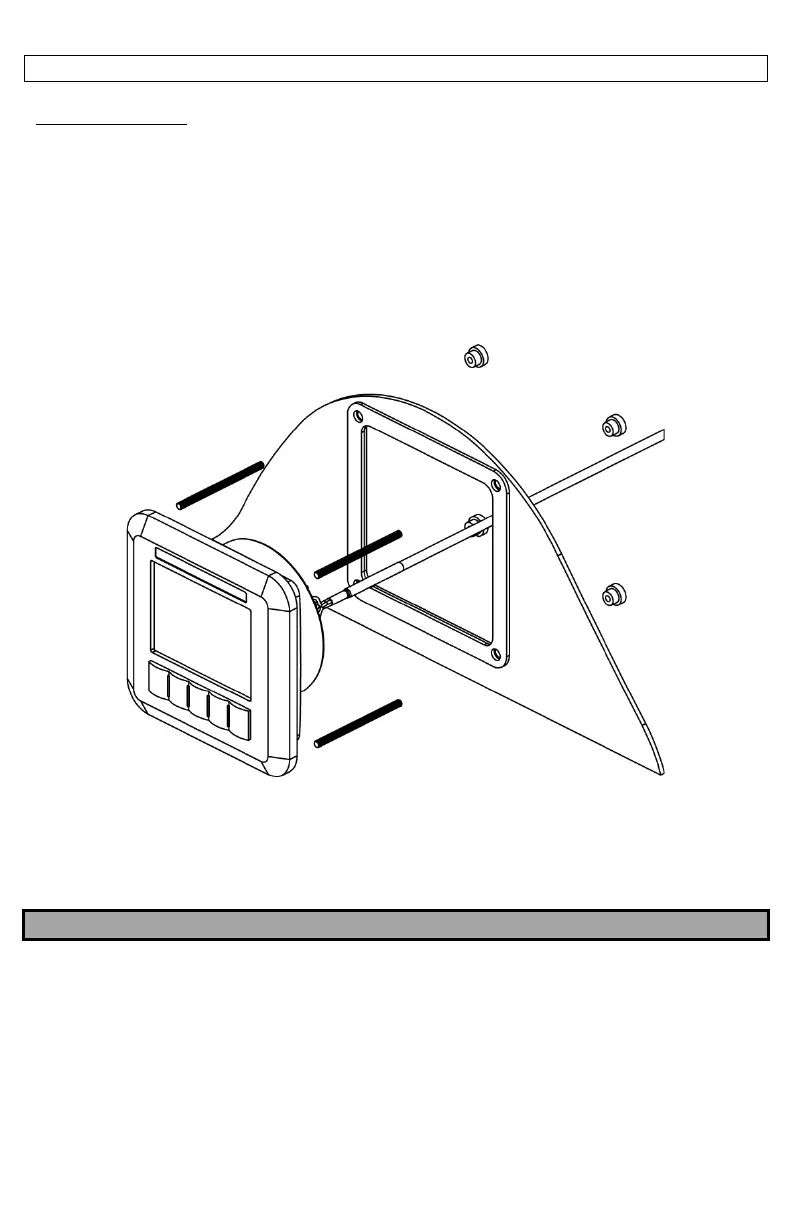
Installing the Display
Locate the Display so that it may be easily observed while the vessel is underway.
The Display may be mounted into a bulkhead, dash, or panel. Leave enough clearance behind the
Display for the cable connections. A paper template is provided with the Display to locate the
holes required to mount the Display. It is recommended to verify the measurements after
marking the locations. Drill out the mounting holes and cut out the area needed to insert the
Display. Thread the provided M4 studs into the rear of the Display. Install the Display and secure
with the provided nuts from the back side of the bulkhead, dash, or panel.
Locate the Control Module somewhere near the Display. It is not necessary to mount the Control
Module where it can be seen at all times, however, it must be protected from the elements. Use
the provided #8 Screws to secure the Control Module once the mounting holes are drilled.
NOTE
DO NOT MAKE ELECTRICAL CONNECTIONS AT THIS TIME. THEY WILL BE ADDRESSED IN A LATER
SECTION.



 To Next Page