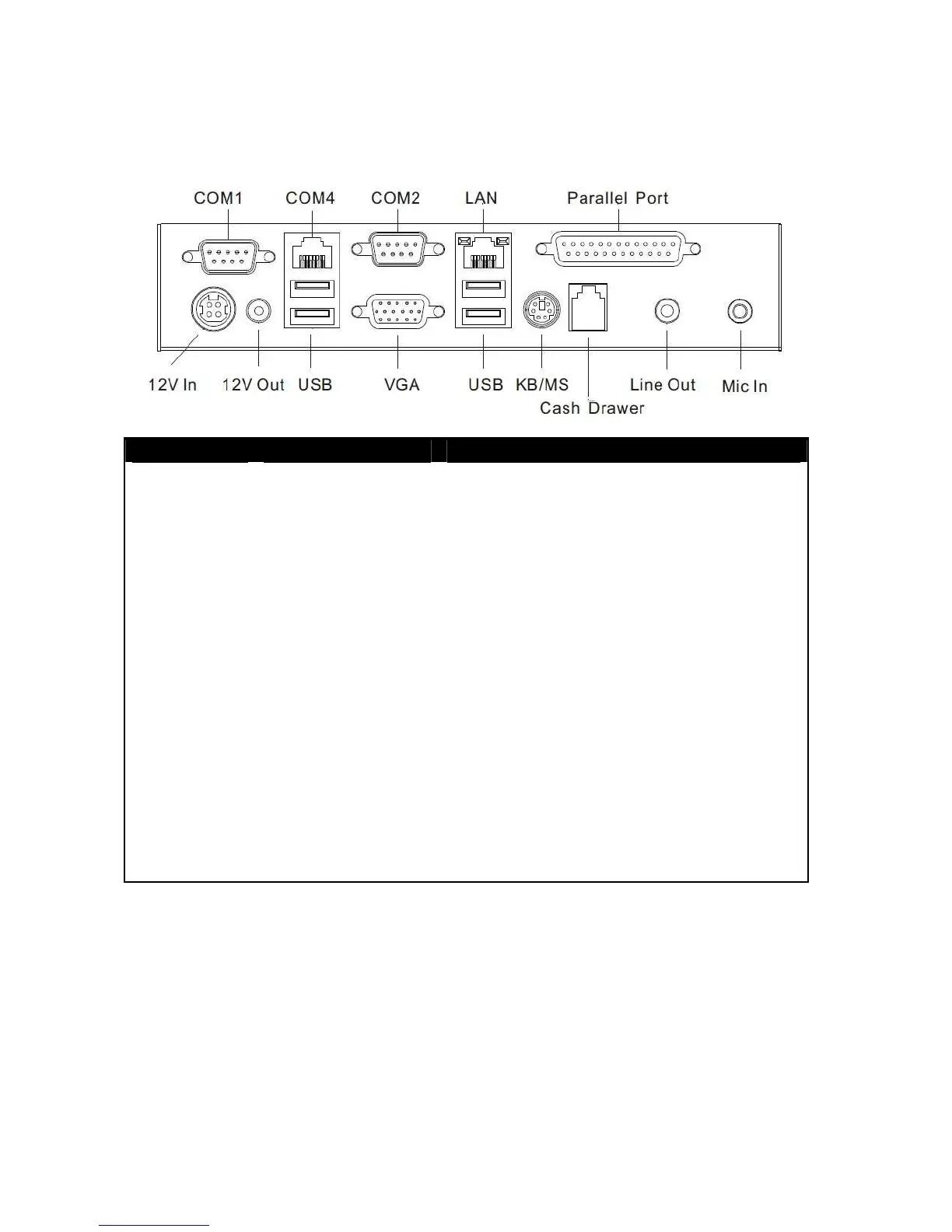
Rear I/O Panel
I/O Port Connector Type Description
Audio Jack
Earphone connector Connect the speakers to this port
USB
USB type A
connector
Standard USB connector for external device
DC IN
DC-in connector Connect the power adaptor to this port
+12V DC Out
12V DC-out
connector
This DC-out port can sustain the power of the
monitor or any other devices which need 12V
DC power input.
COM 4
VFD / RJ45
connector
COM4 This RJ45 port can be used to attach a
VFD customer display or serve as an additional
serial port (switching cable provided).
Cash Drawer
RJ11 connector Cash Drawer Connector, 12 V actuation support
KB / MS
PS2 connector Connect the keyboard or mouse to this port
COM 1
COM 2
D-SUB 9 connector
The serial ports COM1/COM2 can be used to
connect devices such as a printer or a
fax/modem.
LPT
Parallel 25-pin LPT
Connector
The standard LPT (D-SUB 25 pin) connector for
connecting POS printers or KeyPro solution
LAN
RJ45 connector Connect MP-3435 to the Ethernet
VGA
D-Sub 15 Pin
Connector
The VGA port is used for connecting LCD or
CRT monitors



 To Next Page