EasyManua.ls Logo

Fisher MT-730 - Turntable Adjustments

Fisher MT-730
20 pages
Print Icon
To Next Page IconTo Next Page
To Previous Page IconTo Previous Page
Loading...
TURNTABLE
ADJUSTMENTS
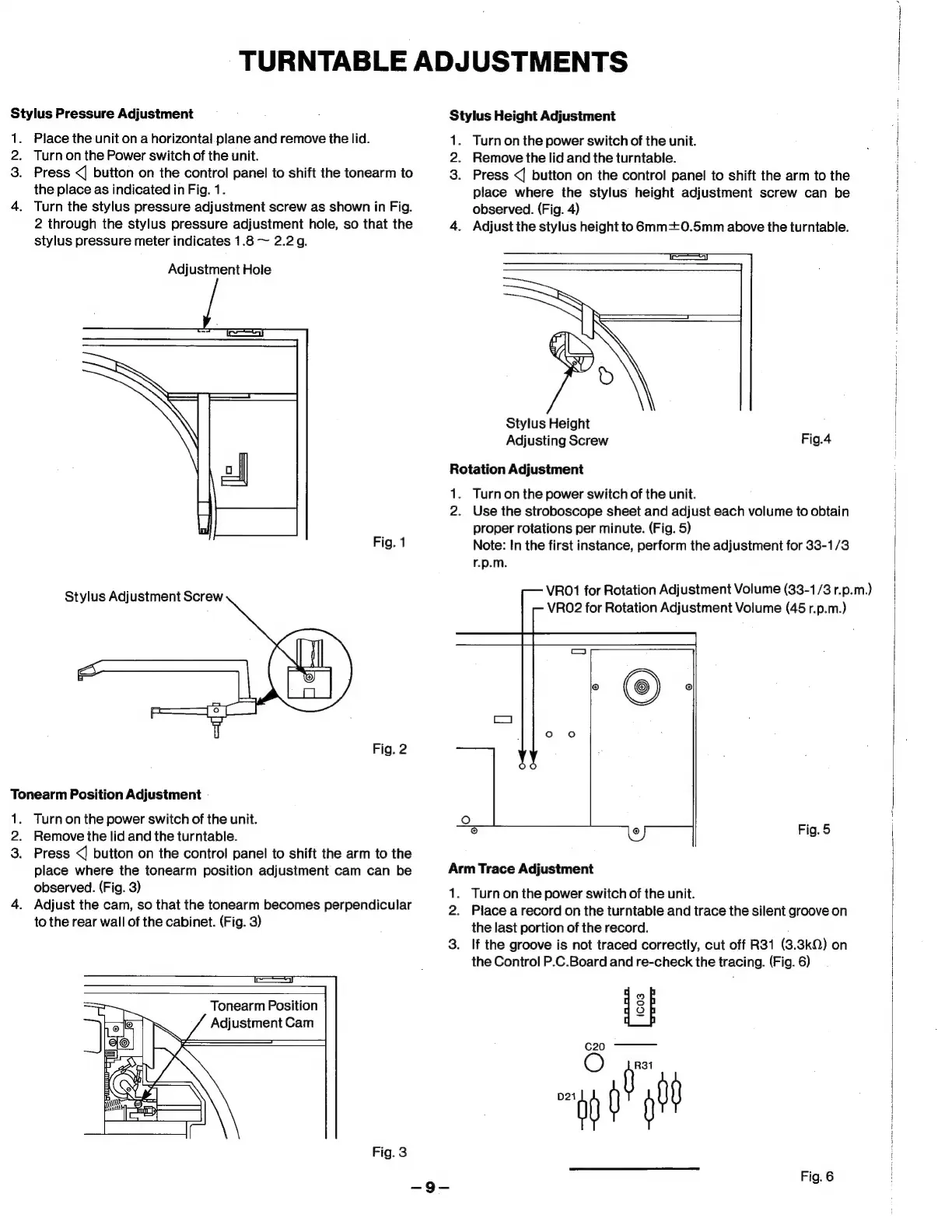
Stylus
Pressure
Adjustment
1.
2.
3.
Place
the
unit
on
a
horizontal.plane
and
remove
the
lid.
Turn
on the
Power
switch
of
the
unit.
Press
<|
button
on
the
control
panel
to
shift
the
tonearm
to
the
place
as
indicated
in
Fig.
1.
Turn
the
stylus
pressure
adjustment
screw
as
shown
in
Fig.
2
through
the
stylus
pressure
adjustment
hole,
so
that
the
stylus
pressure
meter
indicates
1.8
~
2.2g.
Adjustment
Hole
Fig.
1
Stylus
Adjustment
Screw
Fig.
2
Tonearm
Position
Adjustment
1.
2.
3.
Turn
on
the
power
switch
of
the
unit.
Remove
the
lid
and
the
turntable.
Press
<
button
on the
control
panel
to
shift
the
arm
to
the
place
where
the
tonearm
position
adjustment
cam
can
be
observed.
(Fig.
3)
Adjust
the
cam,
so
that
the
tonearm
becomes
perpendicular
to
the
rear
wall
of
the
cabinet.
(Fig.
3)
=I
Tonearm
Position
Adjustment
Cam
Fig.
3
Stylus
Height
Adjustment
1.
Turn
on
the
power
switch
of
the
unit.
2.
Remove
the
lid
and
the
turntable.
3.
Press
<j
button
on the
control
panel
to
shift
the
arm
to
the
place
where
the
stylus
height
adjustment
screw
can
be
observed.
(Fig.
4)
4.
Adjust
the
stylus
height
to
6mm=+0.5mm
above
the
turntable.
Stylus
Height
Adjusting
Screw
Fig.4
Rotation
Adjustment
1.
Turnon
the
power
switch
of
the
unit.
2.
Use
the
stroboscope
sheet
and
adjust
each
volume
to
obtain
proper
rotations
per
minute.
(Fig.
5)
Note:
In
the
first
instance,
perform
the
adjustment
for
33-1/3
r.p.m.
VRO1
for
Rotation
Adjustment
Volume
(33-1/3
r.p.m.)
VRO2
for
Rotation
Adjustment
Volume
(45
r.p.m.)
Fig.
5
Arm
Trace
Adjustment
1.
2.
3.
Turn
on
the
power
switch
of
the
unit.
Place
a
record
on
the
turntable
and
trace
the
silent
groove
on
the
last
portion
of
the
record.
;
If
the
groove
is
not
traced
correctly,
cut
off
R31
(3.3kQ)
on
the
Control
P.C.Board
and
re-check
the
tracing.
(Fig.
6)
Fig.
6
fal

Related product manuals