11
Tone Controls & Play/Edit Switch
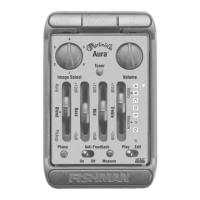
The Play/Edit switch lets you EQ the pickup and Image(s) independently.
Pickup EQ
Move the Play/Edit switch to Play and adjust the Bass, Mid and Treble controls.
Switch to Edit and the preamp retains the pickup EQ settings, disengages the
pickup tone controls and enables Image EQ. Return to Play and the preamp
holds the pickup EQ settings until the Bass, Mid or Treble controls are moved
(regardless of the current position of the controls).
Programmable Image EQ
To EQ an Image, move the Play/Edit switch to Edit. The “#” LED fl ashes to
indicate Edit mode. Move the Blend slider to Aura, select an Image and adjust
the tone controls. You can program EQ for each of the four Images: simply select
another Image and adjust the controls. Switch to Play and the preamp retains the
Image EQ settings, disengages the Image tone controls and enables pickup EQ.
Go back to Edit and the preamp holds the Image EQ settings until the Bass, Mid
or Treble controls are moved (regardless of the current position of the controls).






 To Next Page
