EasyManua.ls Logo

Fishman Aura - User Manual

Fishman Aura
36 pages
Print Icon
To Next Page IconTo Next Page
Loading...
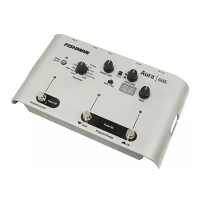
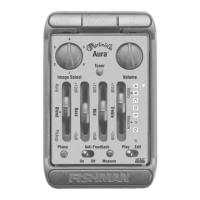
Aura
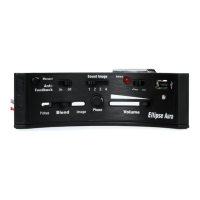
Acoustic Imaging Blender

Other manuals for Fishman Aura

Questions and Answers

  • D
    Danielle WilliamsAug 14, 2025
    Why is there no sound coming from my Fishman Aura or is it not loud enough?
    • S
      savannah79Aug 14, 2025
      Several factors could be at play. First, ensure that all connections to other devices are correctly made. Second, check if the input and output levels are set too low, and if so, raise them. Finally, verify whether the tuner is engaged; if it is, disengage it or step on the Down footswitch to un-mute the tuner.
  • G
    gary16Aug 17, 2025
    What to do if my Fishman Blender has distortion?
    • L
      Lisa MccoyAug 17, 2025
      If you're hearing distortion, the input level might be too high. Try turning down the input level until the red LED stops flickering.
  • J
    Jason SmithAug 20, 2025
    What to do if my Fishman Aura Blender's tuner will not engage?
    • S
      Sheri BowmanAug 20, 2025
      If the tuner isn't engaging, first, make sure the Aura is in Play mode by moving the Edit/Play switch to 'Play'. Also, check if the input level is too low and raise it if necessary.
  • G
    ghensonAug 25, 2025
    Why does my Fishman Blender sound thin or have weak bass?
    • J
      Jesse DukeAug 25, 2025
      A thin sound or weak bass could be due to a couple of reasons. First, the pickup and Sound Image signals might be out of phase. To correct this, switch to Edit mode, select the Phase parameter, and turn the Data knob clockwise then counterclockwise to choose the pickup phase that complements the Sound Image. Also, ensure that the Sound Image is turned on by pushing the Effect On/Off button so the LED above it lights up. If it's still not working, switch to Edit mode and choose the Select parameter. Select a Sound Image with the Data knob (the prompt “oF” in the display means that no Sound Image is currently in that program location).
  • R
    Robert DanielsAug 27, 2025
    What to do if my Fishman Blender is not turning on?
    • K
      Karen BeckerAug 27, 2025
      Ensure you are using the correct AC adapter. Only Fishman 910R or Roland PSA adapters should be used.
  • C
    cranerachaelAug 31, 2025
    Why does my Fishman Aura sound uneven or muddled?
    • J
      Johnny PierceAug 31, 2025
      An uneven or muddled response could be due to a mismatch between the Sound Image and your instrument's body style. Select a Sound Image that better matches your instrument. Also, verify if your pickup matches the sampled pickup in the Sound Image by checking the Stock Sound Image chart to find a Sound Image compatible with your pickup (either undersaddle or magnetic soundhole pickup). Finally, ensure you are using an undersaddle pickup or a magnetic soundhole pickup, as soundboard pickups or microphones are not suitable.
  • D
    David WestSep 2, 2025
    Why do I hear hiss from my Fishman Aura?
    • L
      Lisa WilcoxSep 3, 2025
      If you're hearing hiss, the input level might be too low. Raise the input level until the Green LED flashes regularly and the red LED does not flash at all.
  • R
    Rachel RodriguezSep 6, 2025
    Why do I hear hum through the speakers of my Fishman Aura?
    • A
      amanda15Sep 6, 2025
      If you hear hum through the speakers when using both the 1/4” and XLR outputs, move the Gnd/Lft switch to the “Lft” position.
  • C
    Christopher KnightSep 10, 2025
    Why do I hear only pickup and no Sound Image on my Fishman Aura?
    • C
      Christine MoranSep 10, 2025
      Make sure the Effect On/Off switch is engaged. Confirm that the Program you are in has a Sound Image placed in it. Check the Select Parameter in Edit mode.

Summary

Warnings and Safety Precautions

Important Safety Instructions

Instructions for safe operation of the apparatus and general precautions.

Quick Start Guide

Controls and Connections

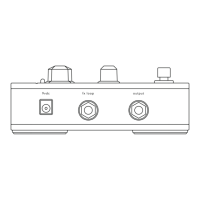
Rear Panel Overview

Description of all ports and connections on the rear of the unit.

Front Panel Controls

Explanation of all knobs, switches, and footswitches on the front panel.

Control Panel Operation

Five Basic Control Groups

Divides the control panel into five functional groups for clarity.

Inner Workings Explained

Setting Up Your Sound

Creating and Saving Mixes

Step-by-step guide to creating, adjusting, and saving custom sound mixes.

Appendices and Support

Technical Specifications

Detailed technical specifications of the Aura Acoustic Imaging Blender.

Troubleshooting Common Issues

Common problems encountered and their solutions.

Fishman Aura Specifications

General IconGeneral
BrandFishman
ModelAura
CategoryBlender
LanguageEnglish

Related product manuals