VOLUME
Set this as high as possible (without distorting your amp or mixer) for the clean-
est signal.
SMOOTH™ ACOUSTIC COMPRESSION
Takes the percussive edge off of your high end when you play hard.
To set the Smooth control:
1. Turn the Smooth knob fully counter-clockwise.
2. Adjust the Input Gain so that the Clip/Low Battery light faintly flashes when
you play your hardest.
3. Raise the Smooth knob (clockwise) just enough to take the percussive edge
off your string sound as you strum hard (set the dial at about 12:00). Be
aware that turning the Smooth knob up too high may kill the highs for lighter
picking styles.
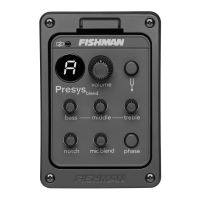
NOTCH AND PHASE
These controls work hand in hand to suppress two adjacent ranges of acoustic
feedback. When you set them properly, you can play your instrument as loud
as you like, feedback free. We use guitar as an example, but the notch filter
and phase switch are compatible with all acoustic instruments.
NOTCH
Tune the Notch filter to scoop out the lowest range of feedback when you play
bass notes between the open low E string and (up to and including) the fourth
fret G# on the same string. This "cavity resonance" feedback can usually be
squelched by setting the Notch control between 1:00 and 2:00 on the dial.
Note that for instruments that do not suffer from low frequency feedback, the
notch can be defeated by moving the dial to the 7:00 position.
6
6
Pro-EQ Platinum
Pro-EQ Platinum


 To Next Page
