OPERATIONAL TIPS
..................................................................................................................................................................................................................................
OPERATIONAL TIPS
A
B
C
D
E F G H
I
J
K
L
M
N
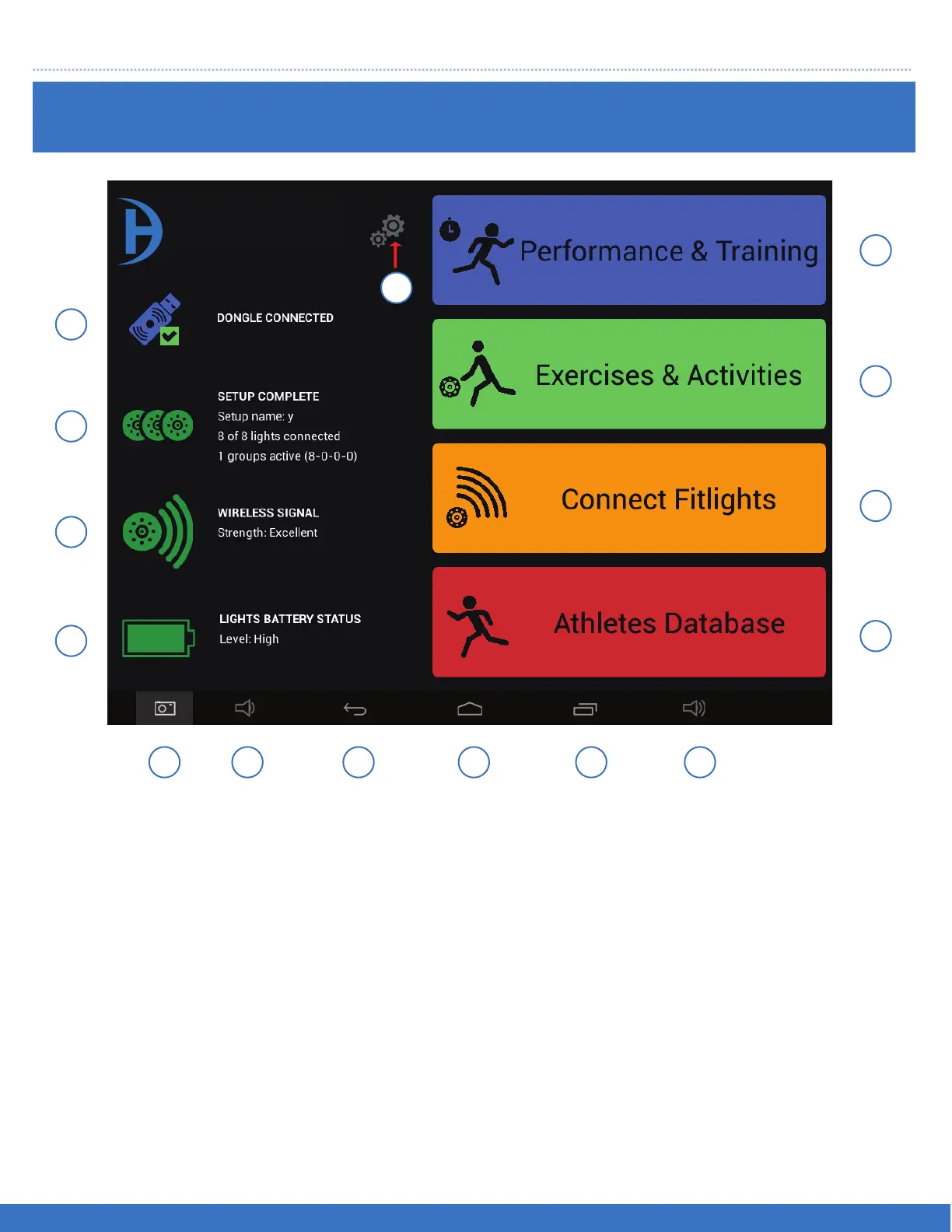
A. Indicates the status of the dongle
B. Indicates the status of the Light set up
C. Indicates the status of the wireless connection
D. Indicates the status of the Light battery charge
E. Captures a picture of the screen ( Screenshot )
F. Volume control of the tablet ( decreases the volume )
G. Previous Screen
H. Home Screen
I. Multiple Screens of the tablet
J. Volume control of the tablet ( increases the volume )
K. Menu for recording Data
L. Menu for Wireless connection of the Lights
M. Menu for FITLIGHT™ Games
N. Menu for Training Programs
O. Settings menu
QUICK GUIDE: MAIN MENU
15
FITLIGHT Trainer™
O


 To Next Page