SYSTEM OPERATION HAND/EYE COORDINATION
..................................................................................................................................................................................................................................
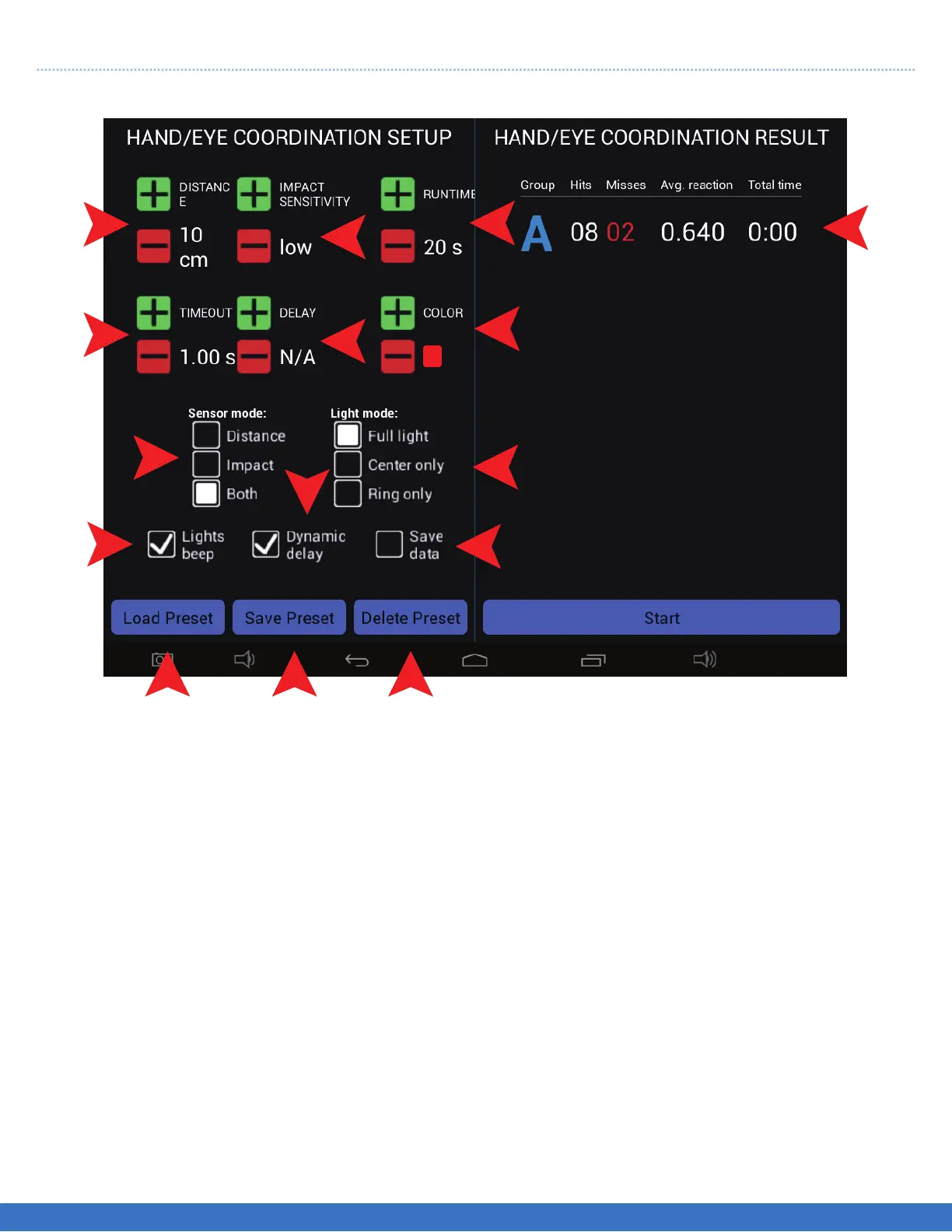
Select the routine parameters before selecting “Start”. All parameters are similar to previous setting modes.
1. The deactivation distance can be set from 10 cms to 80 cms.
2. The time out can be set from 0.10 seconds to 10 seconds.
3. There are 3 deactivation modes to select from. Distance only, Impact only or both, which means the
Light can be deactivated by motion or Impact.
4. Select if sound (Beep) is required.
5. Select the sensitivity of “Impact” as required, “soft hit or a firm hit”.
6. Select the “Delay” interval between lights coming on in succession.
7. Indicates the duration of the routine.
8. This gives a choice of 6 different colours.
9. There are 3 choices, Full light, Perimeter light or just the Centre of the Light that illuminates.
10. Select “Save Data” if you require the results of the routine to be saved for future analysis.
11. Select “Load Preset” if the set up has been saved before.
12. Select this to save the current set up.
13. If the set up has been saved before, select “Delete preset” to remove it.
14. This enables the system to follow the users hit rate, as the user speeds up so does the triggering of the
Lights. The Lights are paced to the rate at which they are being hit.
15. This displays the results of the run.
PLEASE NOTE: Depending on the Tablet Controller that you have, you may have to scroll up/down
within the “Sequence Step Setup” to view all of the options.
The object of the test is to hit as many Lights in the selected time.
1
2
3
4
11
12
13
10
9
8
7
5
6
15
14
SYSTEM OPERATION - HAND/EYE COORDINATION
40


 To Next Page