~230V/50Hz/3200W
T15AL 250V
~230V/50Hz/3200W
T15AL 250V
~230V/50Hz/3200W
T15AL 250V
CH1 IN CH1 LINK
CH1 IN CH1 LINK
CH1 IN CH1 LINK
CH2 IN CH2 LINK
9
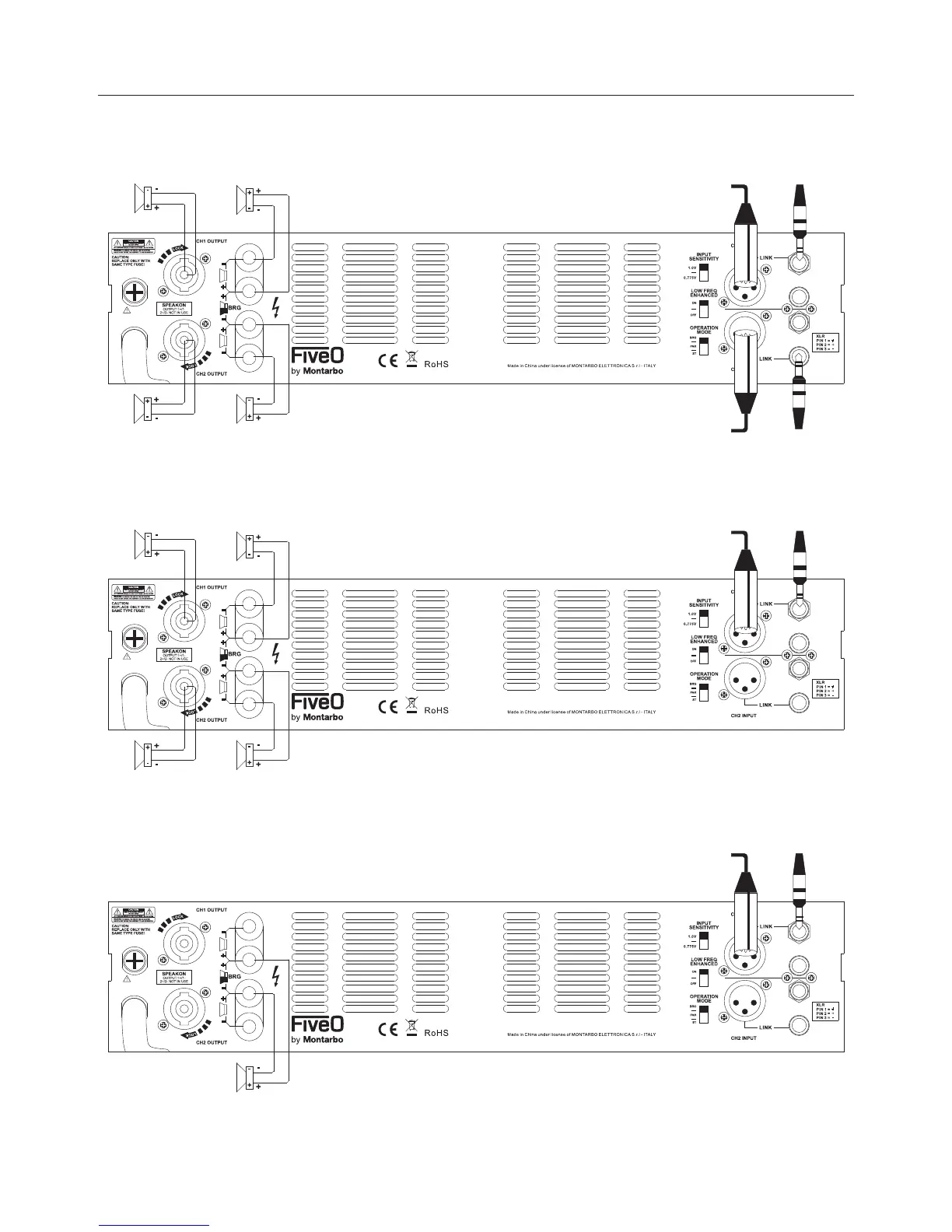
stereo mode
parallel mode
In this mode, after connecting two SPEAKON cables to the speakers, connect the sound source(such
as mixer,CD)output to the two amplifier channels input.Finally set the mode at “STEREO”,and adjust
both channels volume knobs to a suitable position.
bridge mode
In this mode,after connecting two SPEAKON cables to the speakers,connect the sound source (such
as mixer,CD)output to the two amplifier channels input.Finally set the mode at “PARALLEL”,and
adjust both channels volume knobs to a suitable position.
In this mode, after connecting one cable from binding posts to the speakers, connect the sound source
(such as mixer,CD)output to amplifier CH1 input.Finally set the mode at “BRIDGE”,and adjust CH1
volume knob to a suitable position.
Professional Audio Equipment
Stereo mode/parallel mode/ bridge mode


 To Next Page