47FläktGroup DC_9355GB 20180119_R0 We reserve the right to make changes without prior notice
ReCooler HP
Hand terminal ReCooler HP
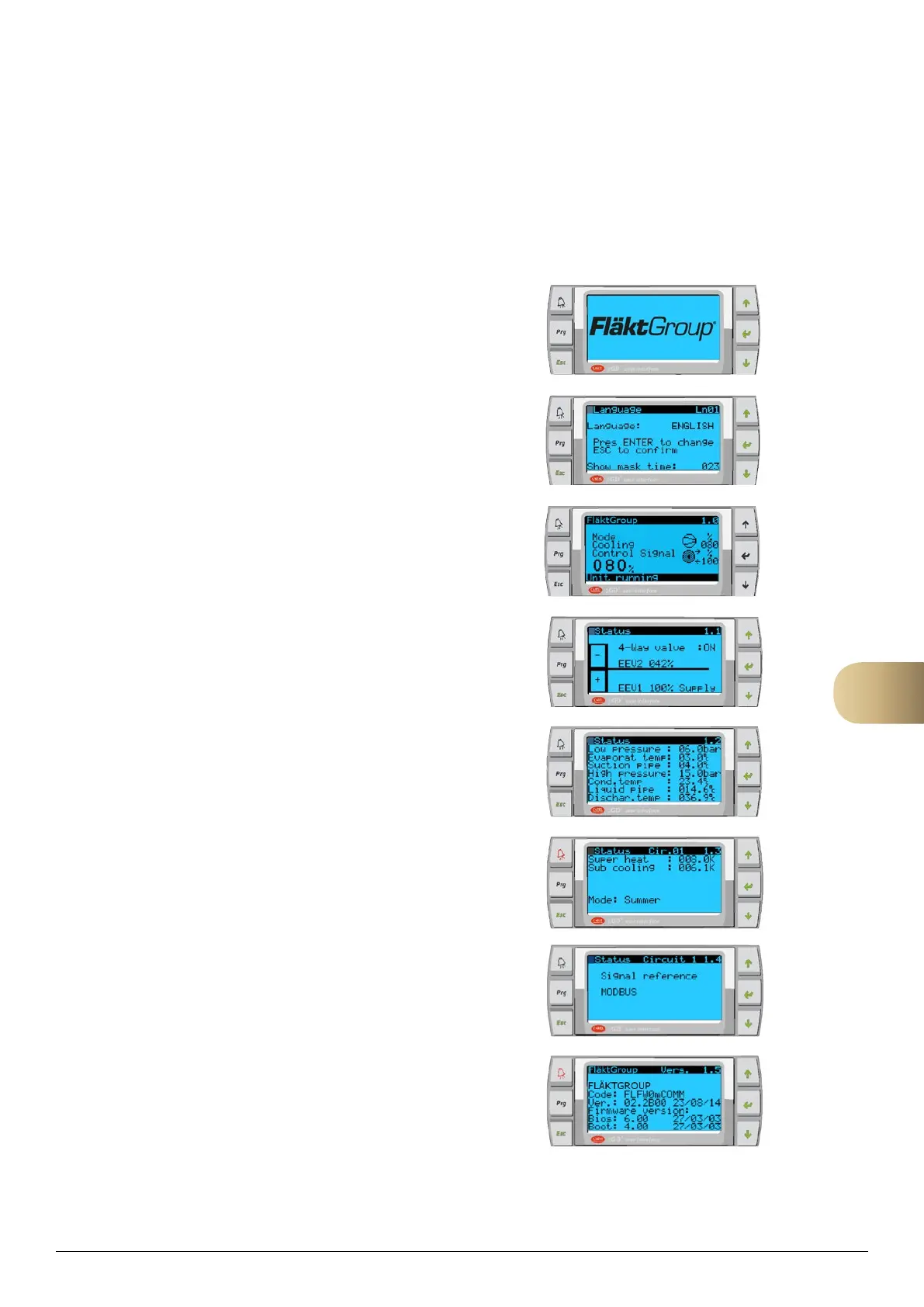
The ReCooler HP is equipped with an own display. This display is used for detail information of
the Re-Cooler HP system.
When the unit is powered up the following screen is displayed.
The user is presented with the option to select a desired language.
The ENTER button is used to change through the list of available
languages and the ESC button selects the highlighted language.
The home screen displays information related to the current status of the
unit.
This screen displays information related to the current status
(operation mode) of the coils (condensing/evaporating) and whether the
AHU is configured with supply air in the upper or lower level.
Displays information related to the temperature and pressure of the
system.
Displays information regarding the status of the unit.
Select signal reference for controlling the ReCooler.
Analog signals or Modbus for controlling from BMS. eQ air
handling unit with control uses Modbus.
Software information of the system.
Reset alarms can be restarted 5 times in 24 hours.
If more alarms are generated then manual reset will be necessary. To restart the unit in this case press 5 sec
on the Alarm button on the handheld terminal for the ReCooler HP.
10



 To Next Page