50FläktGroup DC_9355GB 20180119_R0 We reserve the right to make changes without prior notice
Modem/sms
The eQ PRIME can be supplied with a factory installed
modem for alarm monitoring via sms. Most of the settings
are configured at the factory, but some need to be
configured on site.
SIM card
1. Make sure that the supply voltage to the unit is
switched off before starting work.
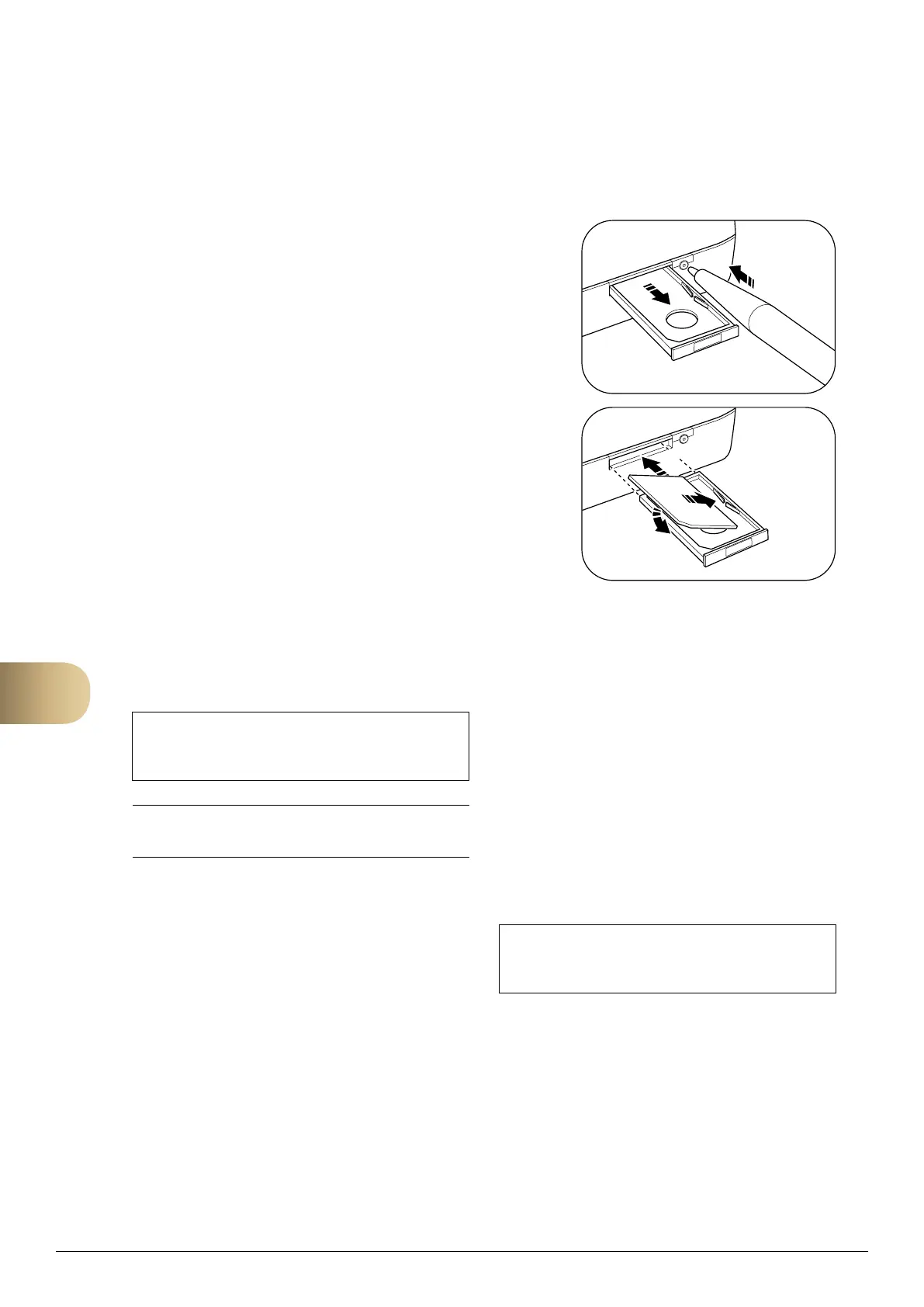
2. Press the small button on the modem to eject
the SIM card holder.
3. Insert the SIM card in the holder.
4. Insert the SIM card holder back into the modem.
5. Switch on the power.
PIN code and coverage
The next step is to insert the PIN code and adjust the
antenna to obtain optimum coverage. Go to the following
menu:
MAIN INDEX
Ú
SYSTEM OVERVIEW
Ú
COMMUNICATION
Ú
SMS
Ú
SETTINGS MODEM
Do not hesitate to contact FläktGroup support for advice and
assistance. Tel. +46 36 193003.
1.
1.
2.
2.
3.
1. Go to the parameter PIN and enter the correct PIN
code. If PIN code verification is not activated, this
step is not necessary.
2. Check that OK is displaced in the Status row. If
not, check all the connections.
3. Check Signal strength GSM. If necessary, adjust
the antenna position.
If it is difficult to find a good position, the
included antenna can be replaced with a different
model. Connect the modem via a 50 FME
(male) coaxial outlet.
Language and telephone number
These settings are also in the above menu.
• Set the language for the sms alarm with the
parameter SMS Language.
• The control unit can handle up to four
telephone numbers Phone nbr 1, Phone nbr 2,
Phone nbr 3 and Phone nbr 4.
Enter the telephone numbers without spaces
Finish with #.
Separate schedulers determine which telephone
number the alarm will be linked to, see below.
Schedulers for sms alarm
Finally, set the schedulers for the sms alarm.
Go to the following menu:
MAIN INDEX
Ú
SYSTEM OVERVIEW
Ú
COMMUNICATION
Ú
SMS
Ú
SMS ACT NUMBER
These schedulers are set in exactly the same way as the
control unit's normal schedulers for handling operation, see
page 22. The only difference is that with the sms alarm,
the schedulers handle the telephone numbers Phone nbr 1,
Phone nbr 2, Phone nbr 3 and Phone nbr 4.
12



 To Next Page