PowerFLARM Core Manual v.150 International
Pin 5 transmits NMEA-0183 Version 2.0 data at a configured data
rate (default is 19.2kBaud). Further FLARM-specific data is availa-
ble for periphery devices (e.g. remote display).
Do not connect more than one external application to the port.
Maximum current on pin 3: 200mA @ 3VDC.
D-Sub DE9: Power, Data and Audio Connections
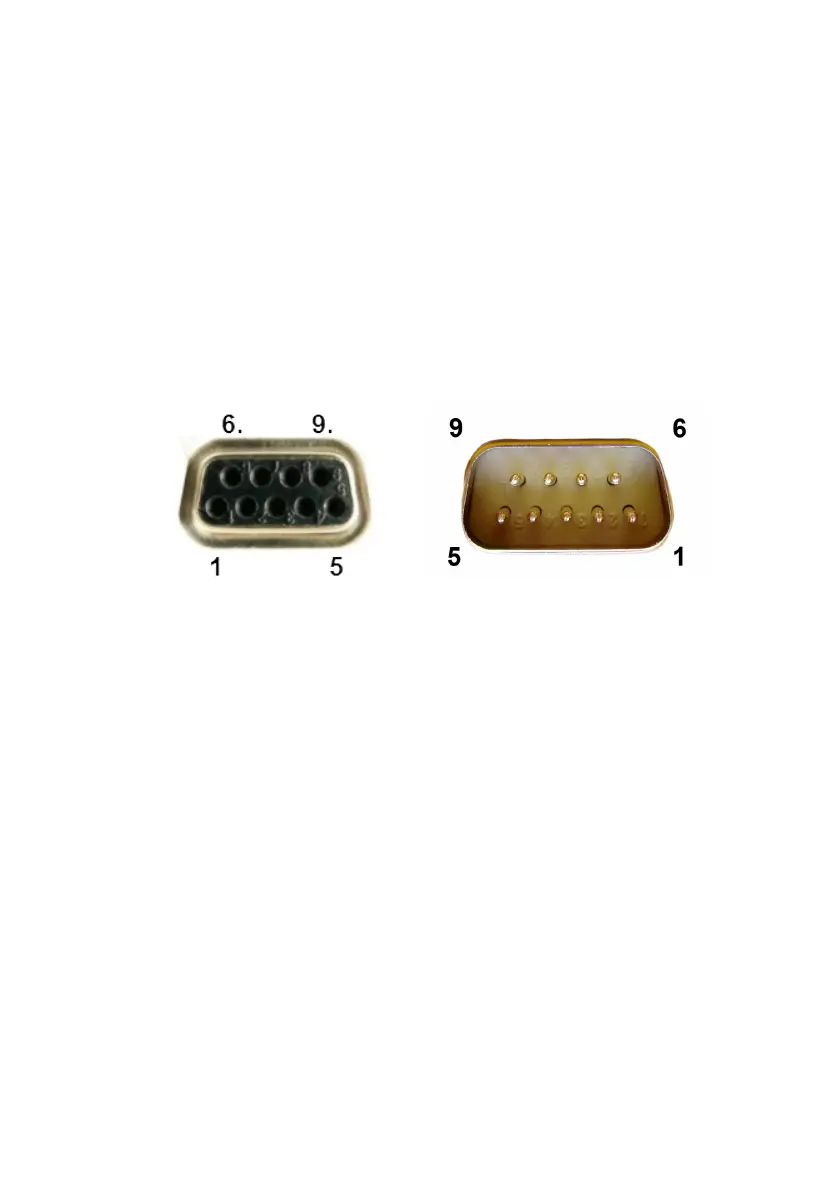
The 9 pin DE9 connector is shown below. On the left side the female
socket on the PowerFLARM is shown. On the right side the male
plug (on the cable) is shown.
1: Audio OUT (referenced to GND; H/W versions >= 1.1 only)
2: TX, Core sends (RS232)
3: RX, Core receives (RS232)
4: Do not connect
5: GND
6: Do not connect
7: +12 to +28VDC power supply
8: Core supplies +5VDC for PDA
9: Core supplies +3VDC for display
Pin 2 transmits NMEA-0183 Version 2.0 data at a configured data
rate (default is 19.2kBaud). Further FLARM-specific data is availa-
ble for periphery devices (e.g. remote displays).
Do not connect more than one external application to the RS232
port.
Maximum current on pin 9: 200mA @ 3VDC; independent of pin 3
of the RJ45 connector.



 To Next Page