uidelines
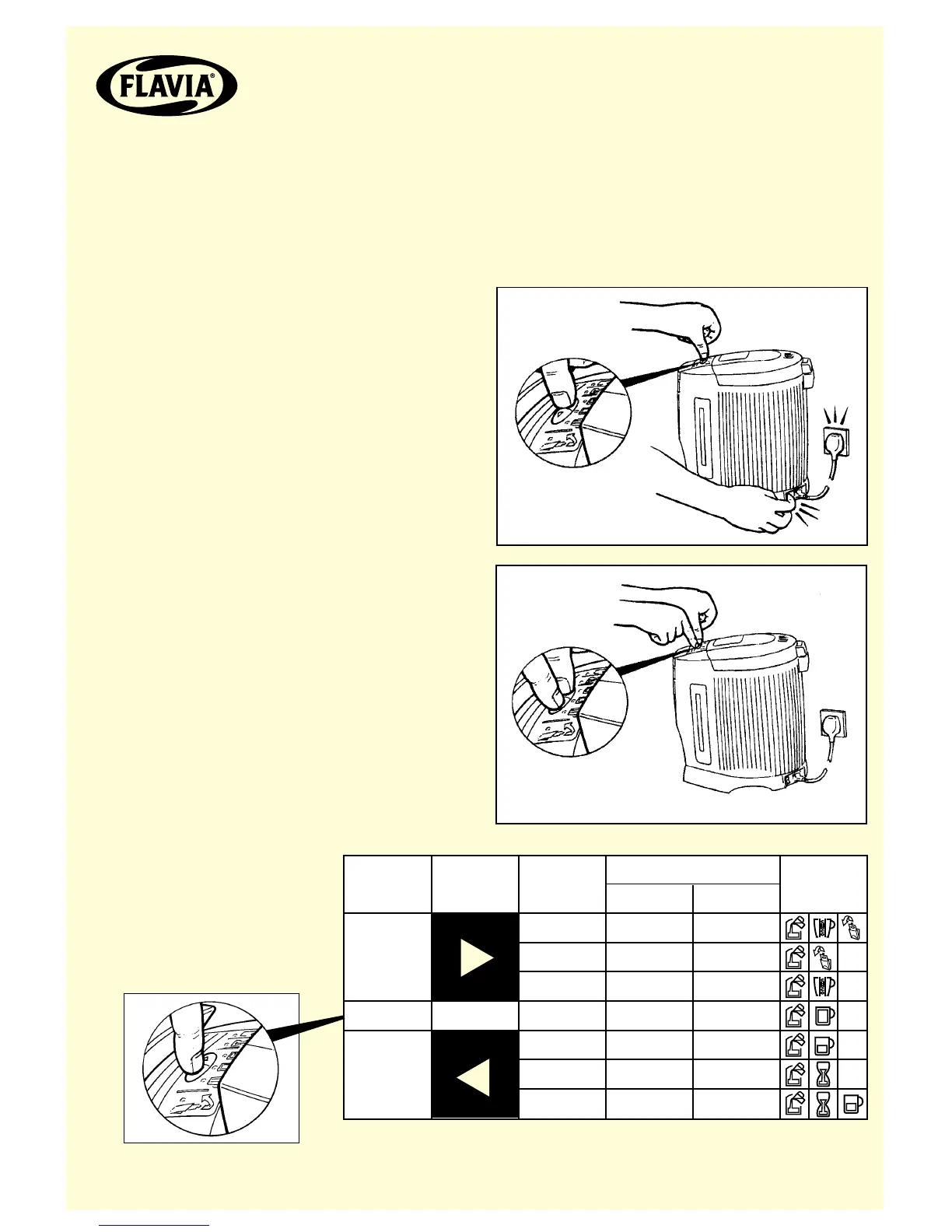
1. Ensure there is no filterpack in the brewer, the filterpack holder is closed and the
start button is in the down position.
2. Switch off the brewer and leave for approximately 10 seconds.
Required
Adjustment
INCREASE
NONE
DECREASE
Button
Number of
presses
x3
x2
x1
0
x1
x2
x3
+24
+16
+8
0
-8
-16
-24
+0.81
+0.54
+0.27
0
-0.27
-0.54
-0.81
Approx. drink adjustment
Flashing
Indicators
cc/ml US fl oz
3. Press and hold left arrow
button and switch on the brewer.
4. Whilst holding left arrow button,
press right arrow button. Release
both buttons.
5. Use the left arrow
button to decrease the
drink volume and the
right arrow button to
increase the drink volume
(see table)
6. Switch off the brewer, leave for approximately 10 seconds and then switch on.


 To Next Page