10
ECONORDIC W4
4. Use
4.1. General
The Flexit GO app enables you to control your Flexit
EcoNordic product.
There are two methods of connecting to the product:
via your local network or by registering your product for
cloud computing; then you only need to have internet
access in order to connect.
The language of the app will automatically be the same
as the one you selected on your mobile device: English
(default), Norwegian, Swedish, Finnish or Danish. If you
have another language, the language of the app will
be English.
With the aid of the app you can, for example, see if
there are any alarms or maintenance messages, set
the desired temperature, select ventilation mode etc.
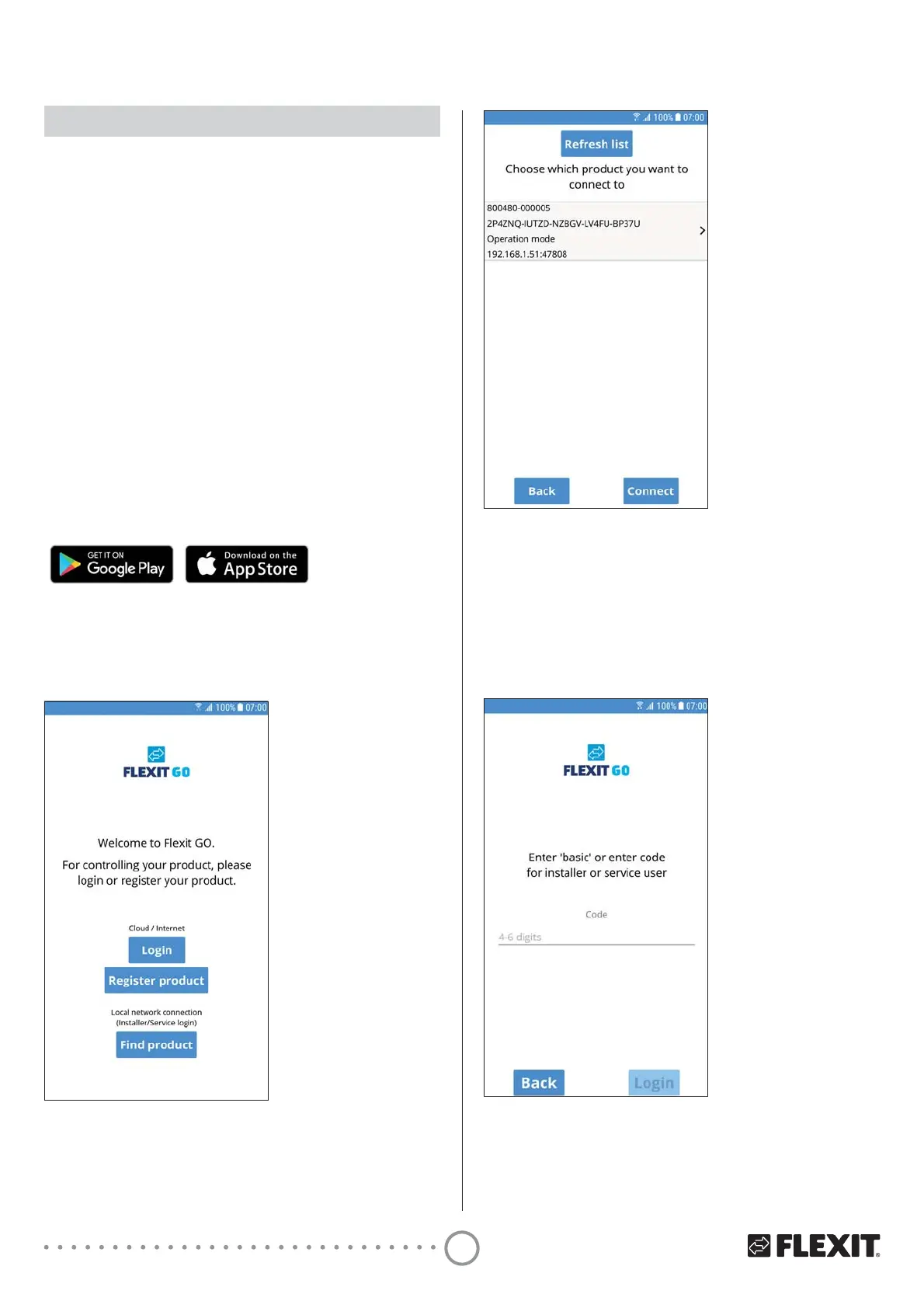
You can download the Flexit GO app from:
4.2. Logging in via local network
To connect your product to your local network, both
your product and your mobile device must be connected
to the same local network.
1 Press ’Find product’.
2 Press the unit in the list that you want to connect to.
3 Press ’Connect’.
4 Enter the code basic.
5 Press ’Login’.


 To Next Page