11
ECONORDIC W4
Serial no.
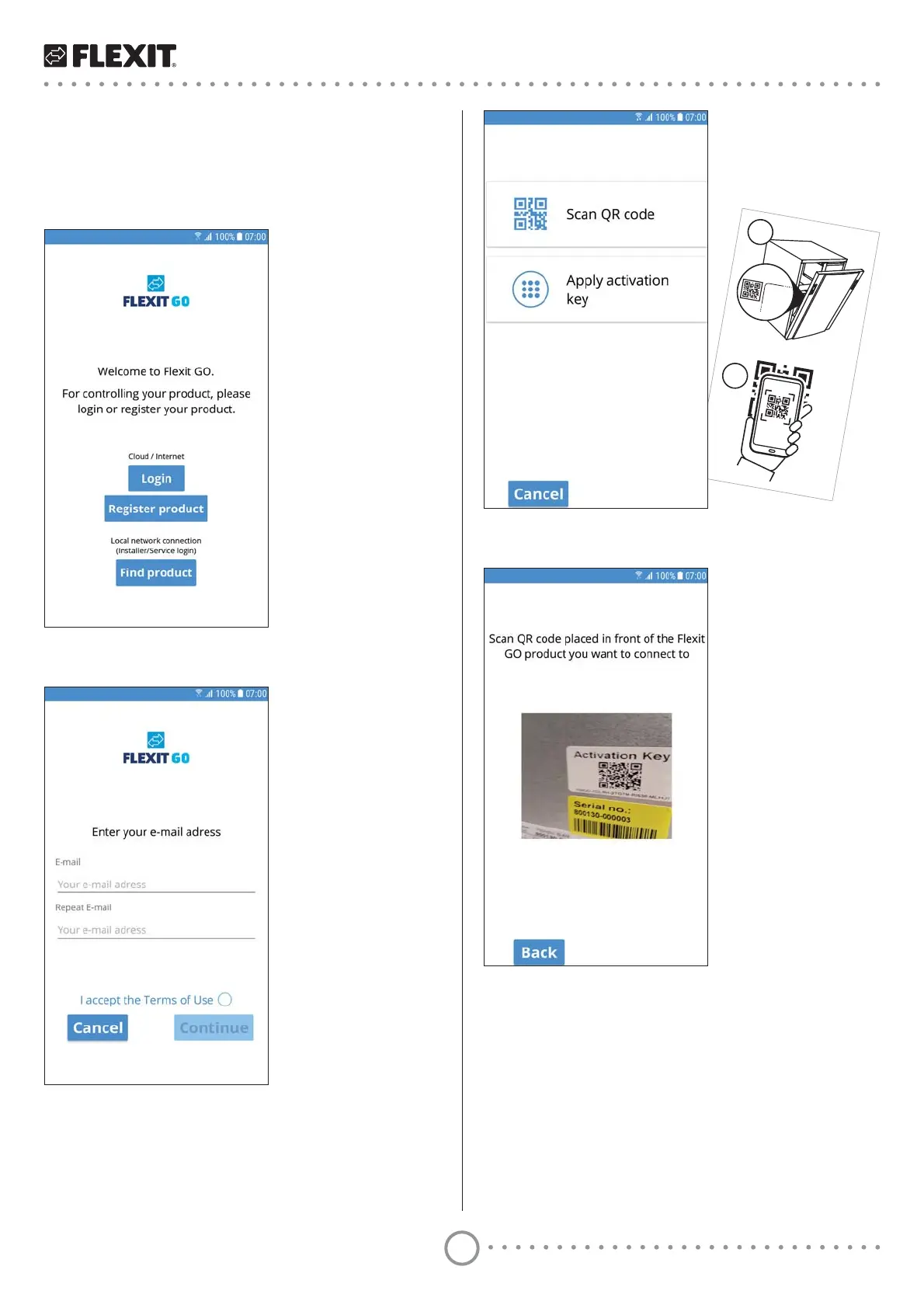
5 Press ’Scan QR code’.
6 6FDQLQWKHDFWLYDWLRQNH\E\ȴOPLQJWKH45FRGH
with the camera window shown.
When the camera has successfully read the
activation key, you will be taken directly to the next
VFUHHQZLWKWKHDFWLYDWLRQNH\ȴOOHGLQ
4.3. Registering product for cloud
computing
To register your product for cloud computing, both your
product and your mobile device must be connected to
the internet.
1 Press ’Register product’.
2 Enter the email address where you want to create
an account.
It must be an email address you access in
FRQMXQFWLRQZLWKWKHUHJLVWUDWLRQȵRZ
3 Repeat your email address to ensure you
have entered it correctly.
4 Press ’Continue’.


 To Next Page