15
CI600 User Manual
If you select a function that has numerical values, the
current value is displayed with a light blue cursor. The value
is changed with buttons 1 and 3 and is then confirmed by
pressing button 4.
TIME AND DATE
13 : 45 04.07.09
TIME DAY MONTH YEAR
OK?
If several values can be changed, the cursor jumps to
the right when a selection is confirmed with button 4. The
procedure is repeated until all values have been changed to
the desired values.
If you want to cancel a function or return to the previous
menu screen, use button 2.
Button 5 activates a help text that briefly describes the
current menu screen.
7.4 Start menu
When the system is started, a start menu is opened.
START MENU
LANGUAGE
TIME AND DATE
MAIN MENU
OK?
>
>
The basic language and date settings are set in this menu.
When this activity has been carried out, you choose to go to
the main menu.
7.5 Operating status
In normal operation without problems, the green LED 7
lights up to confirm that everything is working normally. How
any problems affect the system is described in subsequent
sections.
7 CI600 in use
7.1 General
The control unit consists of a colour display, a touch panel
and indicators (LEDs). The unit communicates with the
ventilation unit via a low-voltage cable.
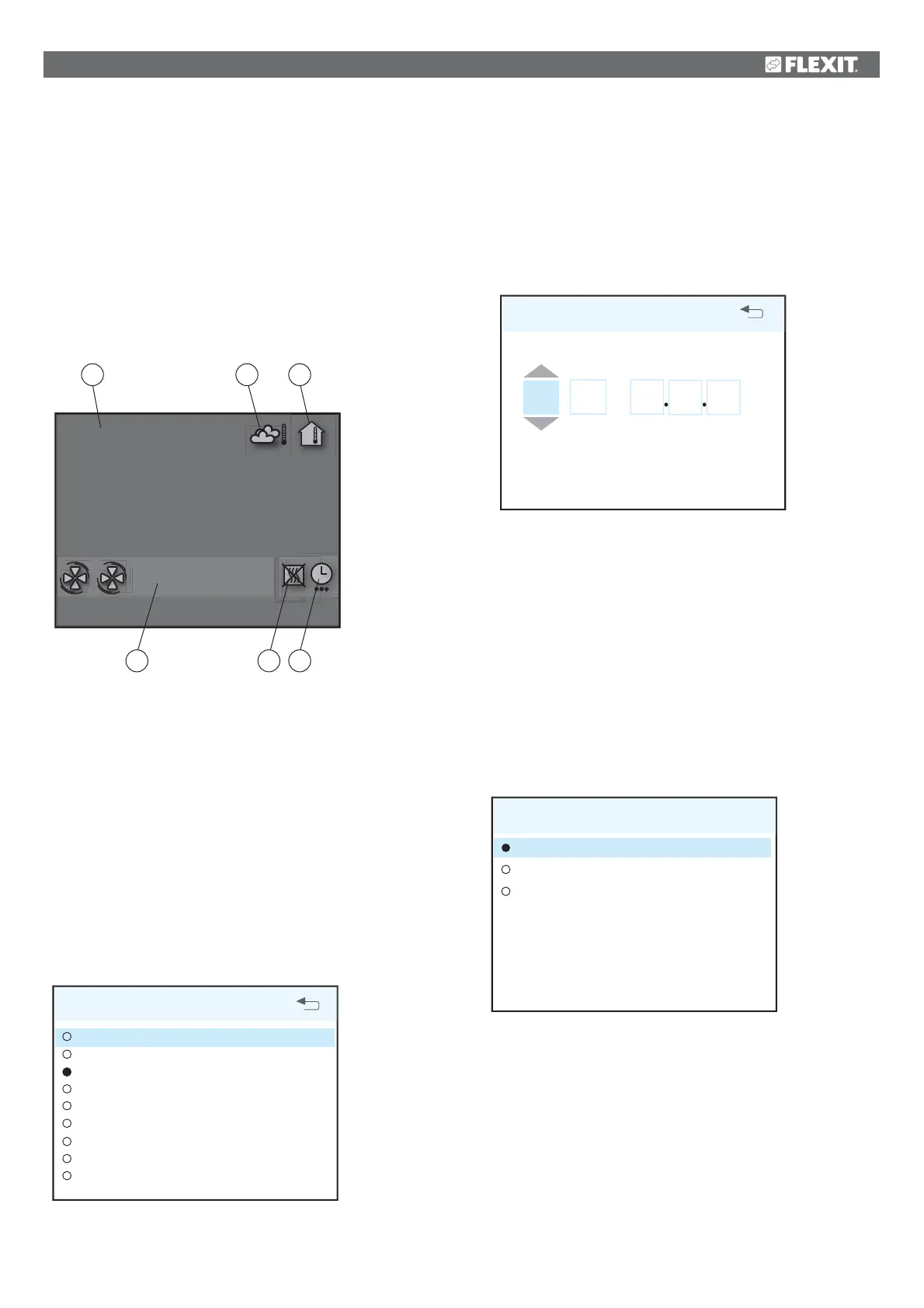
7.2 Idle mode
If the touch panel is not used, the control unit will, after a
certain period of time, enter idle mode, in which operating
information will be displayed.
13.08.2009
16:43
18°C 22°C
- NORMAL
A. Time and date
B. Outdoor air temperature
C. Room temperature
D. Current speed
E. Additional heating activated/deactivated
F. Daily/weekly timer active
7.3 Menu navigation
Buttons 1 and 3 are used to navigate through the menu lines.
The cursor is illustrated by the line being light blue. If it is
possible to make a selection on the current menu line, this
is displayed with OK? to the right of the line. A selection is
confirmed by pressing button 4.
If a menu line contains submenus, this is illustrated with a ‘>’
sign at the end of the line.
SETTINGS
TEMPERATURE
TIMER
DAY/WEEK SETTINGS
TIME AND DATE
LANGUAGE
FILTER
ALARM
ADVANCED USER
OPERATING INFORMATION
>
>
OK?
>
>
>
>
>
>
A
B C
D E F


 To Next Page