5
UNI 3 User Manual
2 Operation of Handheld Terminal
2.1 Horizontally Wall-Mounted Unit
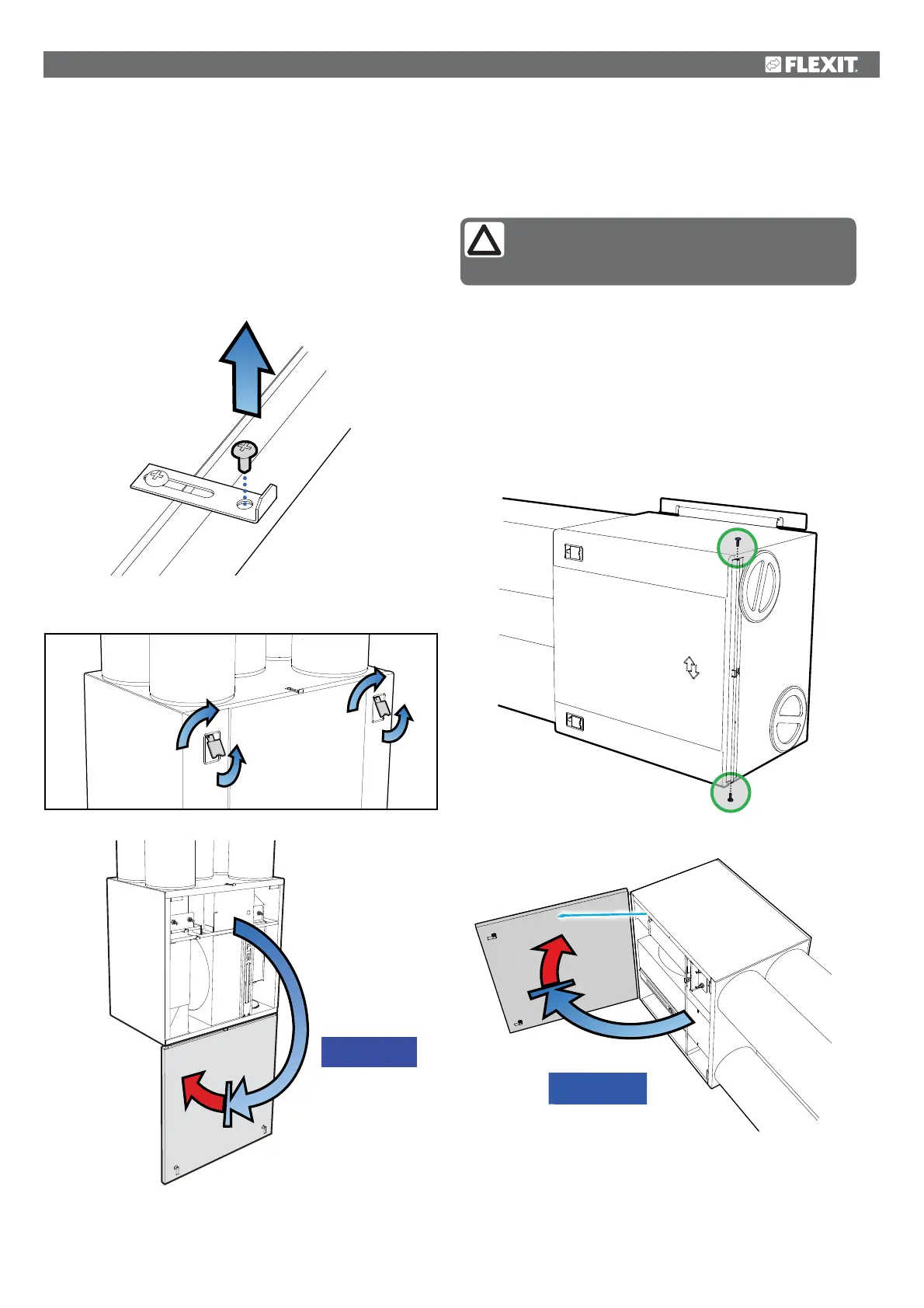
1. 1he unit is opened by first unscrewing the screw in the top
(see Fig. 3).
2. Pull the handles out, and rotate to the side (see Fig. 4).
3. The door can now be opened to hang open at 180º (see
Fig. 5), or be hooked off (see point 2.4).
MAX 105°
2.2 Sideways Wall-Mounted Unit
NB! A sideways mounted unit must have a strap
and end studs installed, so that the door does
not become damaged or fall off when opened.
1. Ensure that the end studs and strap are installed (Fig. 6
and Fig. 7).
2. Unscrew the top screw (see Fig. 3).
3. Pull the handles out, and rotate to the side (see Fig. 4).
4. The door can now be opened, but will have a maximum
swing of 105º (se Fig. 7).
Fig. 3
Fig. 4
Fig. 5
Fig. 6
Fig. 7
MAX 180°


 To Next Page