17
CI600 User Manual
8.6 Daily/weekly timer
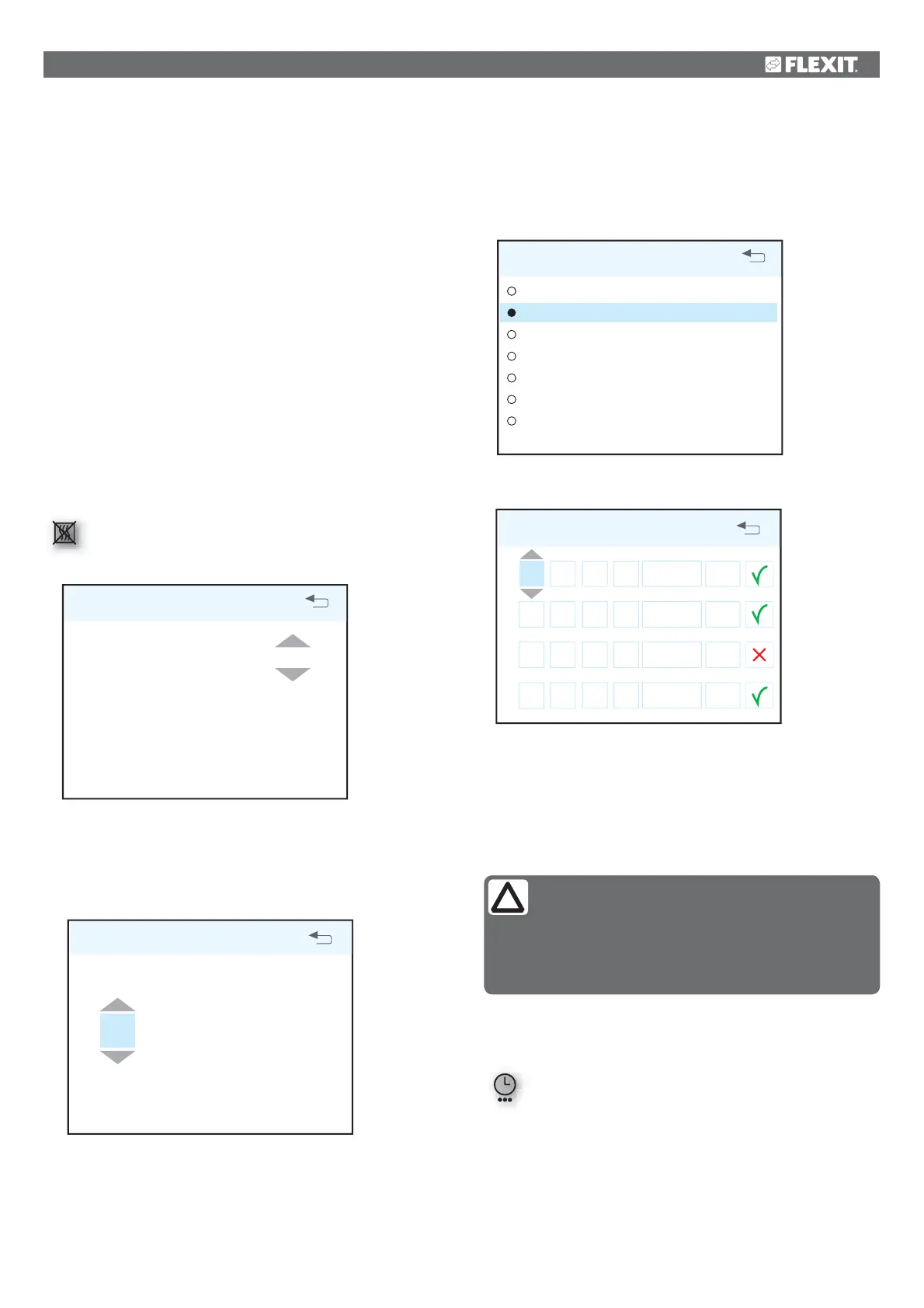
The programming of the timer begins by selecting the day.
DAY / WEEK SETTINGS
MONDAY
TUESDAY
WEDNESDAY
THURSDAY
FRIDAY
SATURDAY
SUNDAY
OK?
A new menu screen appears under each day.
TUESDAY
1 08
:
00
16
:
00
-
MIN
16°
2 16
:
00
18
:
00
-
NORMAL
18°
3 18
:
00
19
:
00
-
MAX
16°
4 19
:
00
24
:
00
-
NORMAL
18°
Each day can be programmed with four different time
intervals. Adjust the start and stop times for each interval
and then adjust the desired speed and temperature. To
activate the interval, select a green tick. A red cross means
that the interval is not activated. If necessary, then select
another interval and repeat the procedure.
After you have finished programming a day, repeat the
procedure for other days.
When the timer is active, this symbol is displayed
when the display enters idle mode.
If there is no new time interval registered after the finished
period, the speed and temperature return to the setting that
was previously active.
We recommend adjusting the temperature to max 18° so
that the air is mixed optimally with the air already in the
building.
In the HEATING ELEMENT OFF/ON menu item, the additional
heating in the ventilation unit can be switched off. In such
case, only the rotating heat exchanger is used as a source of
heat.
If necessary, the ventilation unit’s heating can also be turned
off. In this case only the rotating heat exchanger is used as
a source of heat. It is best to leave it ON, as the unit will then
respond automatically when there is a need for additional
heating.
NB! This is not possible if the unit is installed with a water
battery.
If the heating element is switched off, this symbol is
displayed when the display enters idle mode.
HEATING ELEMENT ON/OFF
HEATING ELEMENT ON
OK?
8.5 Timer
Here you set the time you want for the MAX TIMER function.
This is used when the function is activated from the main
menu.
TIMER
60
min
OK?
To adjust the time interval for MAX TIMER, see chapter 9.4
under “Timer”.
NB!
The following rules apply to the programming:
• An interval can never commence before a
previous one has been finished.
• The stop time can never appear before the
start time.


 To Next Page