FAA-27, Technical Manual, Rev. 1.1, June 2014
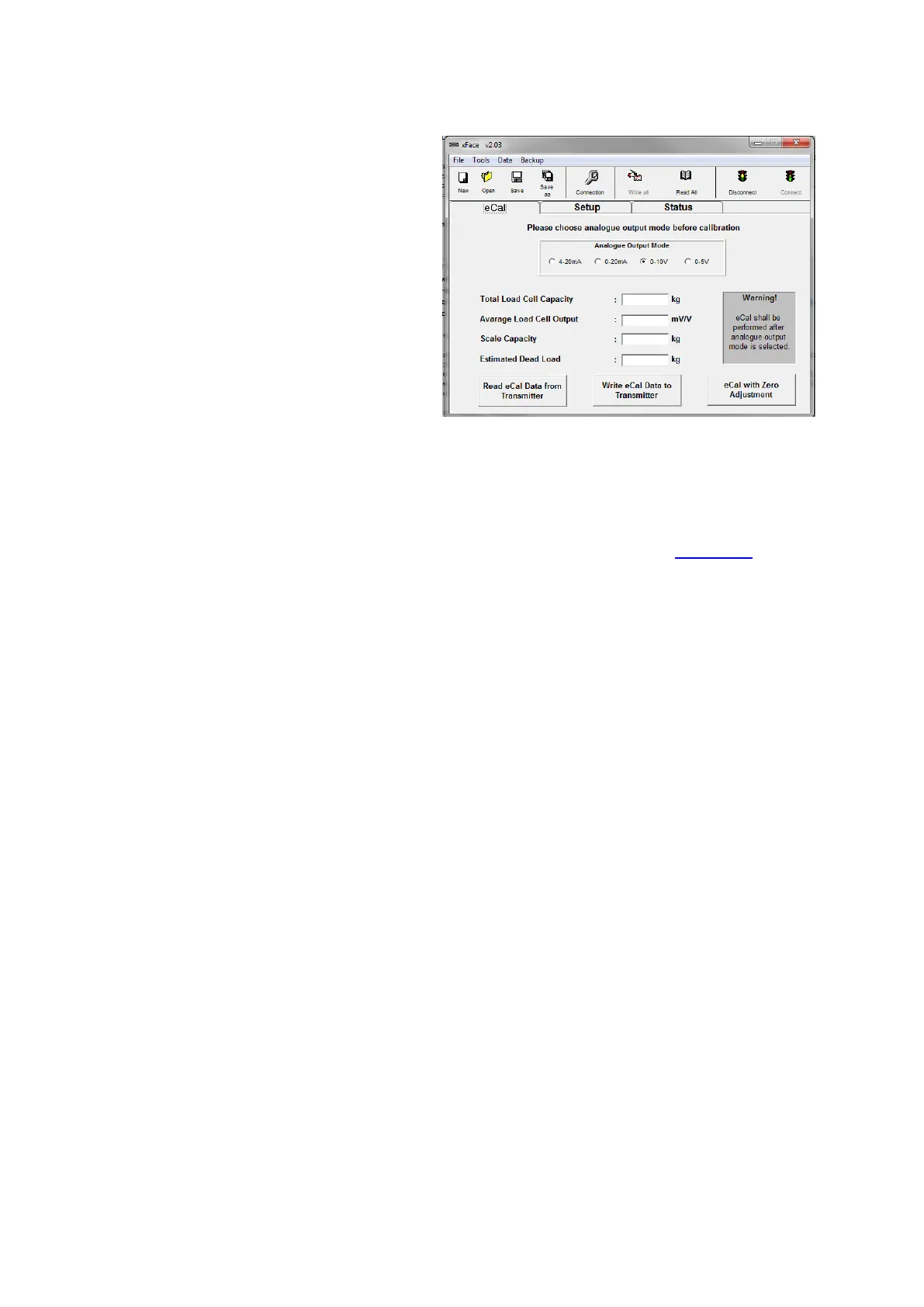
4. Select the analog output type.
5. Enter Total Load Cell capacity,
Average Load Cell Output,
Scale Capacity and
Estimated Dead Load.
6. Press “Write eCal Data to
Transmitter” button on the
monitor to perform eCal.
7. Unload the scale and Press
“eCal with Zero Adjustment“
button on the monitor.
8. Adjust filter value and setpoints in section “Setup”.
9. In section “Status” instrument information are available.
10. Power off the instrument before disconnecting from PC. Bring the
programming switch to the analog output type position and apply the
connection between TxD and RxD pins which is described in chapter 7 to set
the analog output type.
11. Turn the adjustment switch position to “0“ - position.
12. Power on the instrument for operation.
After performing eCal as described in the software, check the performance of your
system.
You may adjust to instrument to factory default by xFace, if it is changed before.


 To Next Page